

Introduction: The “Hidden Link” That Kills Accounts
Have you ever bought EURUSD and sold USDCHF at the same time, thinking you were diversifying? In reality, you just placed the exact same trade twice.
Because these pairs are Negatively Correlated (they move in opposite directions), buying one and selling the other doubles your exposure to the US Dollar. If the Dollar gets strong, you lose on both trades instantly.
The Currency Pairs Correlation Indicator for MetaTrader 4 solves this by visualizing the mathematical relationship between any two assets directly on your chart. Instead of checking complex tables on a website, this tool shows you in real-time, if two pairs are moving together (Positive Correlation) or fighting each other (Negative Correlation).
If you want to trade like a Hedge Fund manager and master Risk Management, this is a mandatory tool.
Table of Contents
What is the Currency Pairs Correlation Indicator?
This Currency Pairs Correlation indicator sits in a separate window below your main chart. It allows you to overlay the price behavior of a second currency pair onto your current chart to see how they interact.
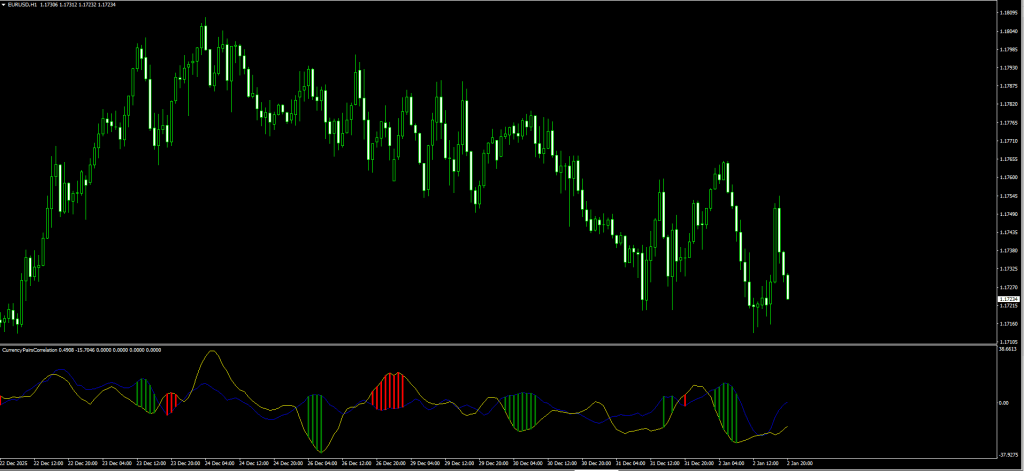
How to Read Your Screenshot:
As seen in the image you will download, the indicator displays:
- The Lines (Yellow & Blue):
- These represent the smoothed price movement of the two pairs you are comparing (e.g., EURUSD vs. USDCHF).
- When they crisscross or move apart, the correlation is shifting.
- The Histogram (Green & Red):
- Green Bars: Often indicate a phase where the pairs are moving in their expected correlation (e.g., trending together or inversely as expected).
- Red Bars: Indicate a “Flip” or volatility spike in the relationship.
- Note: Unlike trend indicators, this histogram measures the Strength of the Relationship, not just price direction.
The Logic:
- Positive Correlation: Pairs move same direction (e.g., AUDUSD and Gold).
- Negative Correlation: Pairs move opposite direction (e.g., EURUSD and USDCHF).
- Zero Correlation: Pairs move randomly (e.g., EURUSD and EURGBP sometimes).
Review: Pros and Cons
Is this Currency Pairs Correlation indicator worth the screen space? Here is our verdict for 2026.
✅ PROS (The Good)
- Prevents Over-Exposure: It stops you from accidentally taking 5 trades that all depend on the US Dollar moving one way.
- Real-Time Data: Correlation changes over time. A static website table is often outdated; this indicator updates live.
- Visualizes Divergence: You can spot when a correlation “breaks” (e.g., Gold goes up, but AUDUSD fails to follow), which is a huge warning signal.
- Versatile: You can compare anything, Bitcoin vs. S&P500, Oil vs. CAD, etc.
❌ CONS (The Bad)
- Complex for Beginners: Understanding correlation math (Coefficient +1 to -1) takes some study.
- Not a “Signal” Tool: It does not give Buy/Sell arrows. It is a filter/confirmation tool only.
- Repaint Risk (Calculated): Correlation is a lagging statistic. It calculates based on past candles.





Download a Collection of Indicators, Courses, and EA for FREE
The Strategy: The “Correlation Divergence” System
Using this Currency Pairs Correlation indicator blindly is useless. The power comes from spotting Broken Correlations.
We will use the Currency Pairs Correlation Indicator to find “Fakeouts” by comparing EURUSD with USDCHF (which usually mirrors it).
Setup & Settings
- Currency Pairs Correlation Indicator:
- Symbol 1: EURUSD
- Symbol 2: USDCHF
- Timeframe: H1 or H4.
- 50 EMA: Applied to Close (Main Chart Trend Filter).
1. The “Broken Mirror” Reversal Setup
Usually, if EURUSD goes UP, USDCHF goes DOWN. When this rule breaks, a reversal is coming.
- The Setup: Price of EURUSD is making a Higher High (Bullish Breakout).
- The Filter: Price is far away from the 50 EMA (Overextended).
- The Trigger: Look at the Correlation Window.
- Ideally, USDCHF should be making a Lower Low.
- The Signal: If USDCHF fails to make a Lower Low (i.e., it stays flat or goes up slightly) while EURUSD pushes up, the Correlation is Broken.
- The Logic: The Dollar is not weak enough to push the Swiss Franc down. Therefore, the EURUSD move is likely a fakeout.
- Entry: Enter a SELL on EURUSD when price falls back below the recent breakout candle.
- Stop Loss: Above the swing high.
- Take Profit: Back towards the 50 EMA.
2. The “Twin Turbo” Trend Setup
We use Positive Correlation (e.g., AUDUSD vs NZDUSD) to confirm a strong trend.
- The Setup: AUDUSD breaks above resistance.
- The Trigger: Look at the Correlation Indicator (set to compare with NZDUSD).
- The Confirmation: You want to see the indicator lines for both pairs moving up in sync, with strong Histogram bars.
- The Logic: If both “Kiwi” and “Aussie” are pumping, the move is driven by real institutional buying, not just noise.
- Entry: Buy AUDUSD confidently.
Pro Tip: Never trade a breakout on a pair like GBP/JPY without checking GBP/USD and USD/JPY. If both component pairs aren’t supporting the move, the “Beast” (GBPJPY) will likely trap you.
Indicator Settings: How to Configure
This Currency Pairs Correlation indicator requires you to type in the exact symbol names from your broker’s “Market Watch” window.
- Symbol_1 (Default: EURUSD):
- Type the name of the main pair you are trading.
- Note: If your broker uses suffixes (e.g.,
EURUSD.pro), you must typeEURUSD.pro.
- Symbol_2 (Default: USDCHF):
- Type the name of the comparison pair.
- Good Comparisons:
- EURUSD vs DXY (Dollar Index)
- AUDUSD vs Gold (XAUUSD)
- BTCUSD vs ETHUSD
- Correlation_Period (Default: 20):
- How many candles to look back.
- Tweak: Set to 50 or 100 for a smoother, long-term correlation view.
How to Install (MT4)
- Download the
.ex4file from the link below. - Open MetaTrader 4.
- Go to File > Open Data Folder > MQL4 > Indicators.
- Paste the file.
- Restart MT4 or Right-Click “Navigator” and hit Refresh.
- Drag the indicator onto your chart.
- IMPORTANT: You must ensure both pairs you are comparing are listed in your “Market Watch” window, or the indicator will show a blank window.
FAQ: Frequently Asked Questions
Why is the window blank/empty?
This happens if the indicator cannot find the data for “Symbol 2.” Go to View > Market Watch, right-click, and select “Show All” to ensure your MT4 has loaded the data for the other pair.
What is the best timeframe?
Correlation is unstable on low timeframes (M1/M5). We recommend using H1, H4, or Daily charts for reliable data.
Can I use this to trade Binary Options?
Yes. If two highly correlated pairs (like EURUSD and GBPUSD) are moving in opposite directions for a moment, one of them is usually “wrong” and will snap back quickly. This is a classic 5-minute expiry strategy.
Final Verdict: Is it Worth Using?
Score: 4.5/5 Stars ⭐⭐⭐⭐🌗
The Currency Pairs Correlation Indicator is not a “Buy/Sell” arrow tool, but it is an essential piece of professional trading software.
It forces you to look at the Big Picture. By stopping you from taking conflicting trades (like buying EURUSD and buying USDCHF), it saves you money before you even enter the market.


