
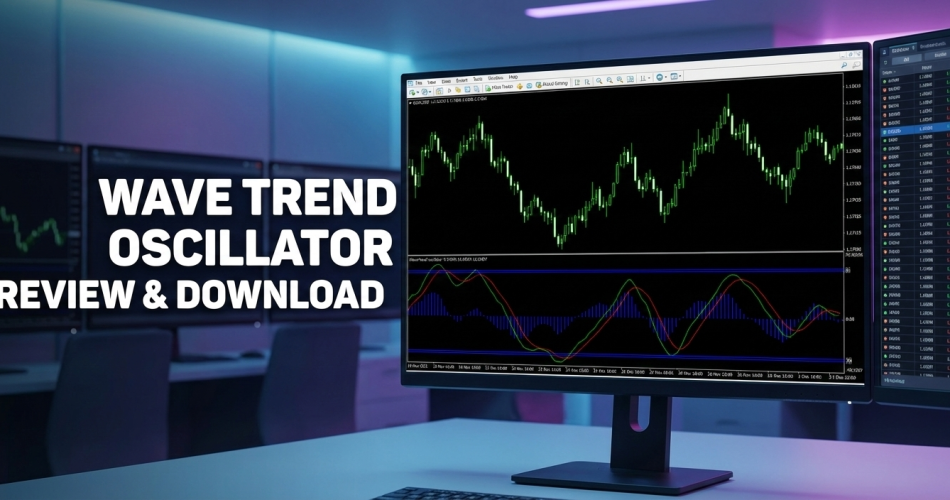

Introduction: The “Smoother” Way to Trade Reversals
If you have ever used the standard RSI or Stochastic, you know the pain: they are “jittery.” They spike up and down with every tiny price movement, giving you false signals constantly.
The Wave Trend Oscillator (often famous on TradingView and ported to MetaTrader 4) solves this by adding a sophisticated smoothing algorithm to the momentum calculation.
Instead of jagged lines, you get smooth, flowing waves that clearly visualize the market’s “breathing” pattern. It helps you identify exactly when a trend is exhausted and ready to turn, without the noise of standard tools.
If you are a swing trader looking to catch bottoms and tops with precision, this tool is your upgrade.
This indicator was featured in our Top 10 Best Free MT4 Indicators for 2026 — read the full comparison with expert reviews and trading strategies.
Table of Contents
What is the Wave Trend Oscillator?
The Wave Trend Oscillator is a technical indicator that sits in a separate window below your main chart. It tracks the momentum of price swings relative to a “Channel” and an “Average.”
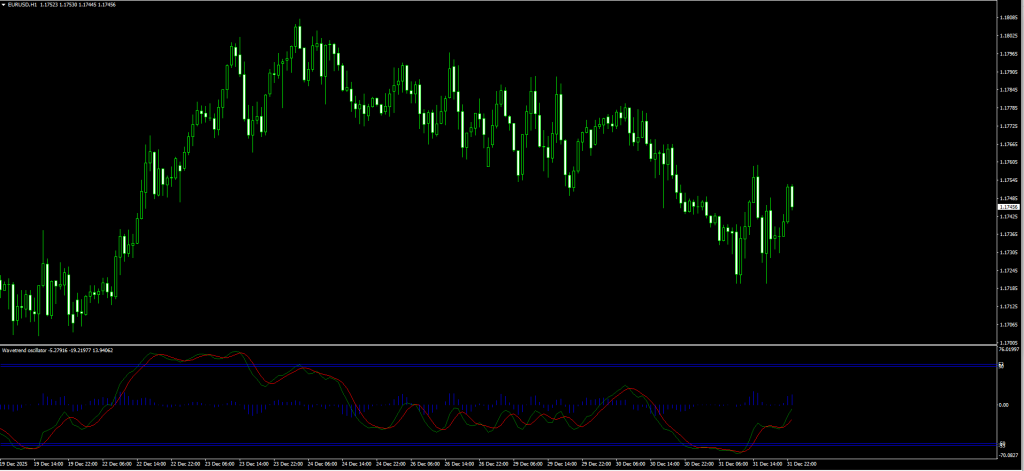
How to Read Your Screenshot:
As seen in the images you will download, the Wave Trend Oscillator is composed of three visual parts:
- The Oscillator Lines:
- Green Line (Fast): Represents current price momentum.
- Red Dotted Line (Signal): A slower, smoothed version of the Green line.
- The Signal: When Green crosses Red, momentum is shifting.
- The Histogram:
- Blue Bars: These represent the strength of the trend. When bars shrink towards the zero line, the trend is weakening.
- The Zones (Horizontal Lines):
- Top Levels (+53 / +60): The Overbought Zone. Price is expensive here; look for Sells.
- Bottom Levels (-53 / -60): The Oversold Zone. Price is cheap here; look for Buys.
The Logic: Markets move in waves. This indicator ignores the small ripples and shows you the big “Tidal Waves” of buying and selling pressure.
Review: Pros and Cons
Is this popular Wave Trend Oscillator worth the hype in 2026? Here is our honest testing verdict.
✅ PROS (The Good)
- Visual Clarity: The crossover of the Green and Red lines is incredibly easy to spot, no guesswork required.
- Less Noise: Because of its smoothing calculation, it generates fewer false signals than a standard Stochastic.
- Divergence Hunter: It is one of the best tools for spotting Divergence (where price makes a new high, but the oscillator makes a lower high).
- Dual Purpose: Works for both Scalping (M5) and Swing Trading (H4/D1).
❌ CONS (The Bad)
- Lag: Because it is “smoothed,” the entry signal often comes 1-2 candles after the absolute top or bottom.
- The “Glue” Effect: In a super-strong trend, the lines can get “glued” to the top or bottom level for a long time. Selling just because it’s at the top can destroy your account (see Strategy below).
The Strategy: The “Wave Rider” System
The sample post suggests entering on every crossover. Do not do this. In a strong trend, you will get killed trying to pick tops.
To rank this strategy among the best, we add a “Trend Filter” to ensure we only trade with the flow.





Download a Collection of Indicators, Courses, and EA for FREE
Setup & Settings
- Wave Trend Oscillator: Default Settings.
- 200 EMA: Applied to Close (Main Chart).
- Timeframe: H1 or H4 (Highest accuracy).
1. The “Deep Value” Buy Setup
We want to buy the dip, but only if the long-term trend is UP.
- The Filter: Price must be ABOVE the 200 EMA.
- The Setup: Wait for the Wave Trend lines to drop into the Oversold Zone (Below -50).
- The Trigger: Wait for the Green Line to cross ABOVE the Red Signal Line.
- The Confirmation: Wait for the candle to close. Ideally, look for a bullish candlestick pattern (like a Pin Bar or Engulfing) on the main chart.
- Entry: Buy at the open of the next candle.
- Stop Loss: Below the recent swing low.
- Take Profit: Target the Zero Line or the Upper Overbought Level.
2. The “Peak Reversal” Sell Setup
We want to sell the rally, but only if the long-term trend is DOWN.
- The Filter: Price must be BELOW the 200 EMA.
- The Setup: Wait for the Wave Trend lines to rise into the Overbought Zone (Above +50).
- The Trigger: Wait for the Green Line to cross BELOW the Red Signal Line.
- The Confirmation: Wait for the candle to close.
- Entry: Sell at the open of the next candle.
- Stop Loss: Above the recent swing high.
- Take Profit: Target the Zero Line or the Lower Oversold Level.
Pro Tip: If you see “Divergence” (e.g., Price makes a lower low, but the Wave Trend makes a higher low) while at the 200 EMA, this is a “Grade A+” setup.
Indicator Settings: Customizing for Volatility
When you install the Wave Trend Oscillator, you can tweak the inputs to match your trading style.
- Channel_Length (Default: 10):
- Controls the sensitivity of the channel.
- Tweak: Increase to 14 or 20 to reduce noise for Swing Trading.
- Average_Length (Default: 21):
- Controls the smoothing of the momentum.
- Tweak: Decrease to 10 for Scalping (faster signals), but beware of more fakeouts.
- Overbought/Oversold Levels:
- Usually set to 60 and 53. You can push these to 70 and -70 if you only want to trade extreme reversals.
How to Install (MT4)
- Download the
.ex4file from the link below. - Open MetaTrader 4.
- Go to File > Open Data Folder > MQL4 > Indicators.
- Paste the file.
- Restart MT4 or Right-Click “Navigator” and hit Refresh.
- Drag the Wave Trend Oscillator onto your chart.
FAQ: Frequently Asked Questions
Does the Wave Trend Oscillator repaint?
No. Once the candle closes, the position of the Green and Red lines is fixed. However, while the candle is still forming, the lines will move up and down. Always wait for the candle close.
Is this the same as the one on TradingView?
Yes, this is the MT4 port of the famous “WaveTrend [LazyBear]” script found on TradingView. It uses the exact same math.
Can I use it on Crypto?
Absolutely. The Wave Trend is extremely popular for trading Bitcoin and Ethereum momentum on the H4 timeframe.
Final Verdict: Is it Worth Using?
Score: 5/5 Stars ⭐⭐⭐⭐⭐
The Wave Trend Oscillator is widely considered superior to the standard RSI because of its smoothing. It gives you a much clearer picture of market cycles.
If you combine it with our 200 EMA Filter, you have a robust system that keeps you on the right side of the trend while helping you enter at “discount” prices.


