

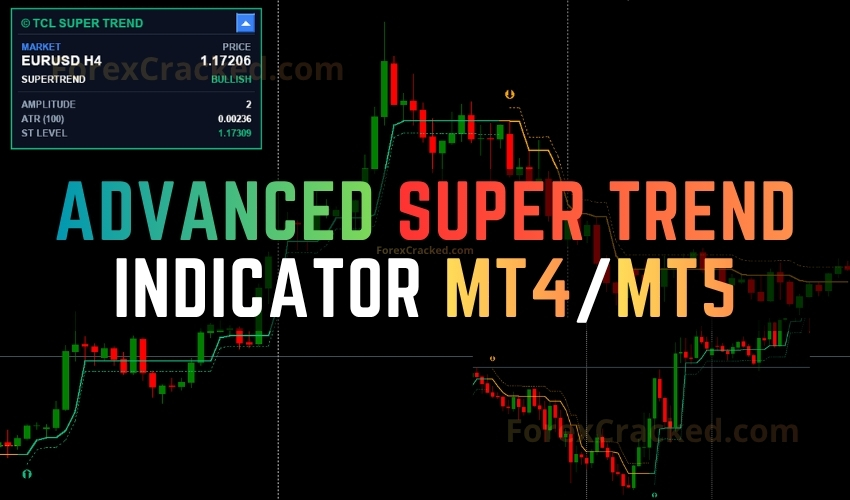
The TCL Super Trend is a free trend-following indicator developed by Trade Code Labs for MetaTrader 4 (MT4) and MetaTrader 5 (MT5). Unlike the standard SuperTrend, which offsets a single ATR multiplier above or below price, the TCL version uses a dual-logic state machine that tracks both the highest lows and lowest highs over a configurable lookback window, and only confirms a reversal when a smoothed extreme (SMA or EMA) crosses the tracked boundary and the close breaks the prior bar’s high or low. The two-condition confirmation produces a SuperTrend line that is naturally resistant to whipsaws.
Most SuperTrend variants with adaptive bands, dashboards, and multi channel alerts are sold as premium MT4/MT5 indicators in the $30-$150 range or even more. The TCL Super Trend bundles the same feature set and ships as a free download with ongoing version updates.
How It Works: The Algorithm Behind TCL Super Trend
- Dual-Logic State Machine – The engine tracks the highest of the recent lows and the lowest of the recent highs over the user defined Amplitude lookback. A bullish flip requires the smoothed Low MA to break above the tracked minimum-high and the close to break the prior bar’s high. A bearish flip requires the inverse. The same two factor structure shift logic appears in the SuperTrend Oscillator, here applied directly to the on-chart trend line.
- ATR-Adaptive Volatility Bands – Around the SuperTrend line, the indicator plots ATR-scaled bands. In an uptrend (green), the upper band sits at the SuperTrend level and the lower band at
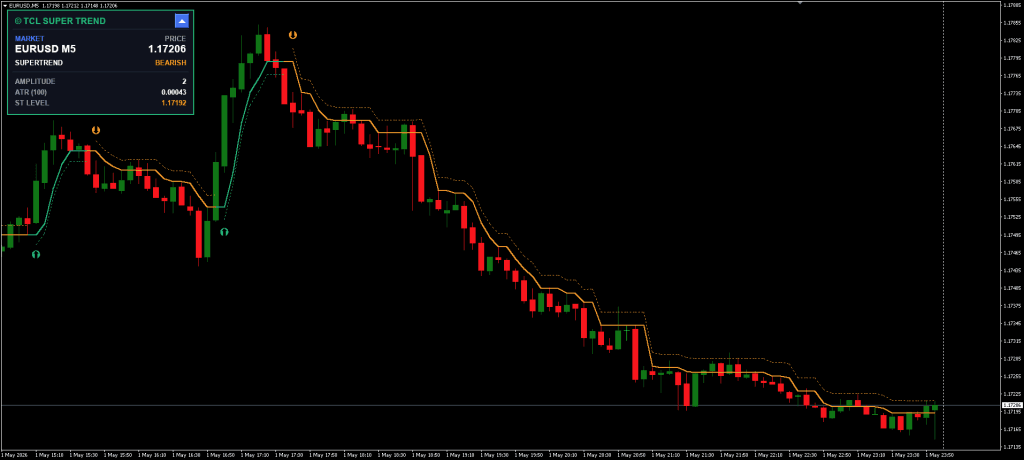
SuperTrend − (ATR × Multiplier)– a built-in trailing stop zone. In a downtrend (orange), the relationship inverts to form an overhead resistance corridor. The ATR sizing approach is comparable to the Mod ATR Trailing Stop Indicator, but coupled to trend state rather than running standalone. - Non-Repainting Trend Change Arrows – On a confirmed reversal, a green (bullish) or orange (bearish) arrow is plotted at an ATR-scaled offset from the SuperTrend level, keeping arrows visible across all volatility regimes, unlike the fixed pixel offsets in the older Non-Repainting SuperTrend Indicator. Arrows are calculated on the closed bar and never removed.
Core Features
- Dual-Logic SuperTrend Engine – Two condition reversal confirmation (MA crossover + close break) for genuine whipsaw resistance.
- SMA / EMA Engine Selection – Switch the smoothing algorithm to match scalping (SMA) or swing (EMA) styles without changing the codebase.
- ATR-Adaptive Volatility Bands – Dotted bands that double as a dynamic trailing-stop envelope, color-coded by trend direction (green/orange).
- Non-Repainting Trend Arrows – ATR scaled offset keeps arrows visible on any volatility regime; calculated on closed bars and never removed.
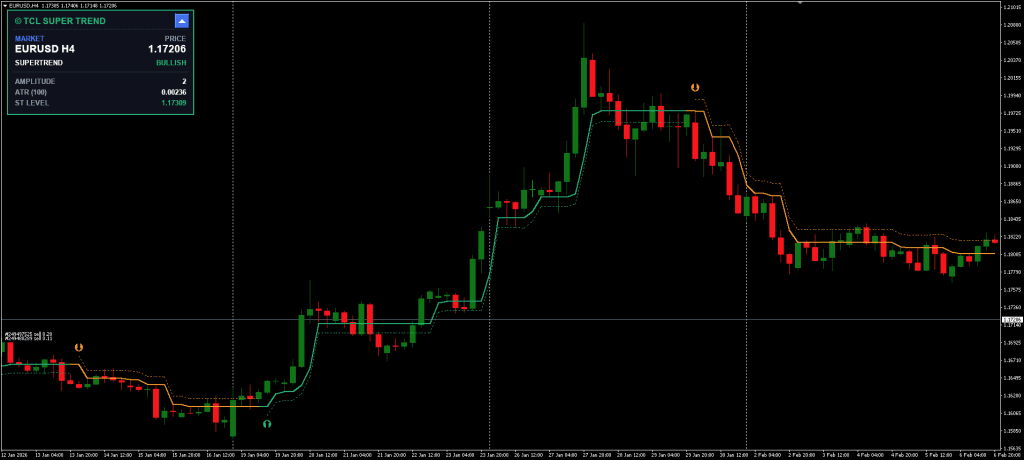
- Interactive Dashboard – Collapsible panel displaying market, price, SUPERTREND state, AMPLITUDE, ATR, and ST LEVEL. Click the minimize button to switch between the full panel and a compact title bar; placement is configurable to any of the four chart corners.
- Persistent Dashboard State – Minimized/maximized state is saved per chart via MT4 Global Variables, so layout survives timeframe switches.
- Multi-Channel Alerts – Popup, sound, email, and mobile push notifications, each with an independent toggle. Alert messages include the symbol, timeframe, direction, and price.
- TCL Branding & Free Updates – Built-in update notifier ensures users get notified of new versions automatically. No license keys, no time-limited unlocks.
Settings and Customization
The TCL Super Trend exposes a focused parameter set, organized into three logical groups: visual settings, the SuperTrend engine, and alert routing.
SuperTrend Engine (the parameters that matter most):
- MA Calculation Method (default: SMA) – Choose between SMA (Simple Moving Average) and EMA (Exponential Moving Average) for the smoothed extremes. SMA produces faster trend flips and works well for scalping; EMA provides smoother, lagged detection ideal for swing trading.
- Amplitude (Lookback Period) (default: 2) – Defines how far back the state machine scans for the highest low and lowest high. Lower values (2-3) flip quickly and suit M1-M15 timeframes. Higher values (5-7) produce slower, more confirmed flips and suit H4-D1.
- ATR Period (default: 100) – Controls the smoothness of the ATR used for band width. The default of 100 is unusually long, which intentionally produces stable, less reactive bands.
- ATR Band Multiplier (default: 0.5) – Scales the band width relative to the smoothed ATR. Tight bands hug the SuperTrend line; wider multipliers create a generous trailing-stop envelope.
- Arrow ATR Factor (default: 2.0) – Distance offset for trend change arrows in ATR multiples. This ensures arrows remain visually clear even on very volatile assets.
Recommended Settings by Timeframe:
| Timeframe | Amplitude | ATR Period | ATR Multiplier | Strategy |
|---|---|---|---|---|
| M1–M5 | 2 | 50 | 0.5 | Scalping – tight trailing stop, fast flips |
| M15–M30 | 3 | 100 | 0.7 | Intraday – balanced signal frequency |
| H1 | 3 | 100 | 1.0 | Day trading – wider bands reduce noise |
| H4 | 5 | 100 | 1.5 | Swing trading – catches major moves |
| D1 | 7 | 100 | 2.0 | Position trading – weekly trend direction |
The relationship between Amplitude and ATR Band Multiplier is the most important pair to tune. A low Amplitude with a wide multiplier produces fast trend flips with a forgiving trailing stop zone, useful for scalping volatile pairs. A high Amplitude with a tight multiplier produces rare, high-conviction flips with a precise trailing reference, useful for swing entries on majors and indices.
How to Use the TCL Super Trend
The indicator is designed primarily for trend-following entries with a built-in trailing stop reference. The basic strategy uses the arrow signals as the entry trigger and the SuperTrend line itself as the dynamic stop loss.
- Step 1: Check the Dashboard – Before evaluating any signal, glance at the on-chart dashboard. The SUPERTREND row shows the current direction (BULLISH in green / BEARISH in orange), and the ST LEVEL row shows the exact price of the active trend line, your reference stop loss.
- Step 2: Wait for the Trend Change Arrow – Do not anticipate the flip. The dual-logic state machine requires both the smoothed MA crossover and a close break of the prior bar’s high or low. Once both conditions are satisfied, a non-repainting arrow is plotted at bar close. Trade only after the candle closes, the arrow location is final.
- Step 3: Confirm with Confluence – As a standalone indicator, its effectiveness often depends on how it’s combined with other tools or strategies. Cross-reference the signal direction with higher timeframe trend data from the TCL Trend Radar, or layer volatility context from the TCL Adaptive Super Bands to confirm you are not entering at a band squeeze where the SuperTrend flip is more likely to be a fakeout.
- Step 4: Manage Risk Using the Lower Band – Place your initial Stop Loss at or just beyond the lower band (in uptrends) or upper band (in downtrends). As the trend extends, the SuperTrend line ratchets in your favor, never backtracking, so it serves as a built-in trailing stop. Use a Lot Size Calculator to size each position as a fixed percentage of account equity.
- Step 5: Take Profit on the Opposite Flip – The simplest exit rule is to close on the next opposing arrow. Traders who want partial profit logic can take 50% off at a 1R or 2R distance and trail the rest with the Super Trend line.
Scalping Variation: On M1–M5, set MA type to SMA and Amplitude to 2. The SuperTrend will flip rapidly, producing 5-15 signals per session on liquid pairs. Combine with the Supply and Demand Oscillator so that you only trade flips that align with active demand zones (longs) or supply zones (shorts).
Swing Variation: On H4–D1, set MA type to EMA and Amplitude to 5-7. Flips become rare but high-conviction. Confirm against weekly market structure using a tool like the Bollinger Bands Trader Indicator to check whether the flip occurs at a meaningful volatility extreme.
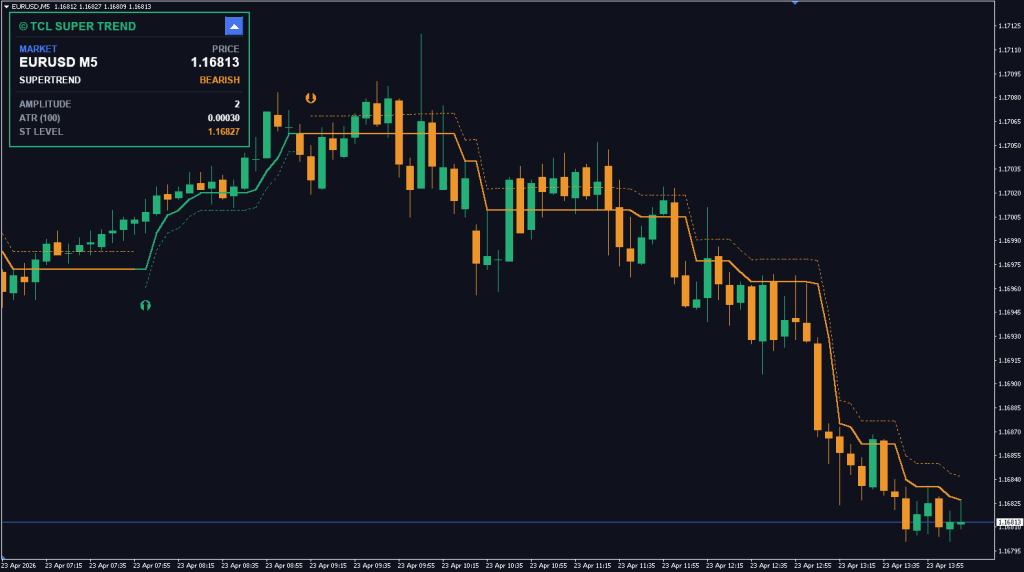
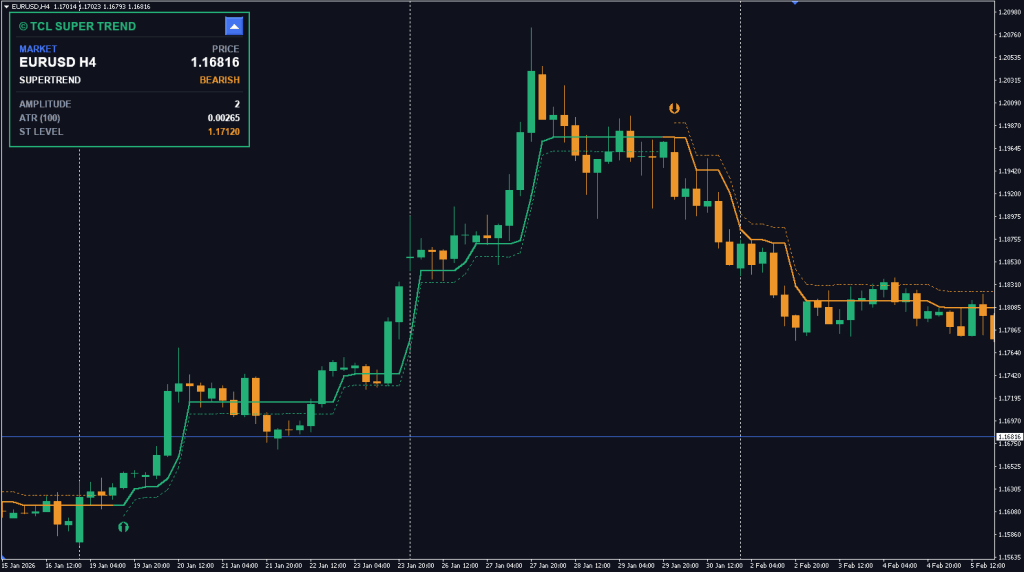
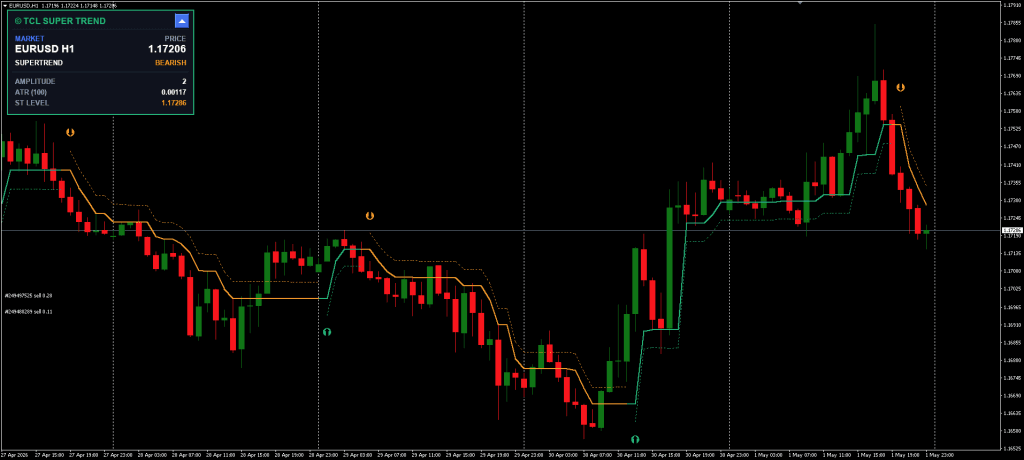
TCL Super Trend vs Standard Super Trend
| Feature | Standard SuperTrend | TCL Super Trend |
|---|---|---|
| Trend detection | Simple ATR + close comparison | Dual logic state machine (Amplitude + MA crossover + close break) |
| Whipsaw resistance | Low – flips on minor retracements | High – requires both MA and close confirmation |
| Volatility bands | None | ATR adaptive upper/lower bands |
| MA type selection | None | SMA or EMA |
| Dashboard | None | Collapsible 4 corner panel |
| Arrow placement | Fixed offset | ATR scaled offset (visible on any volatility) |
| Alert routing | Basic / single channel | Popup, Sound, Email, Push, per channel toggle |
| Price | Often $30-$150 (premium variants) | Free with updates |
Super Trend
A free MT4 & MT5 SuperTrend indicator with a dual-logic state machine, ATR-adaptive volatility bands, non-repainting trend arrows, and an interactive on-chart dashboard.
Pros
- Dual-logic state machine resists whipsaws far better than the standard SuperTrend
- ATR-adaptive bands act as a built-in trailing-stop reference
- Strictly non-repainting arrow signals confirmed at bar close
- SMA or EMA selectable for the trend engine, adaptable to scalping and swing modes
- Multi-channel alerts: popup, sound, email, push notifications (per-channel toggle)
Cons
- Trend-following bias means counter-trend setups need an external confirmation tool
Summary
TCL Super Trend delivers a meaningful upgrade over the classic SuperTrend by combining a two condition state machine for confirmed reversals, ATR scaled volatility bands that double as a trailing stop envelope, and a collapsible dashboard that surfaces trend, ATR, and SuperTrend level in real time. The strict non-repainting arrow logic and per channel alert toggles (popup, sound, email, push) make it usable as both a standalone trend tool and a confirmation layer for other systems, and it ships free with active version updates.
No premium unlock or subscription is required, create a free Trade Code Labs account, download the indicator files, and install them on your MetaTrader terminal. The included update module will notify you when a new version is published, so you do not need to re-check the page manually.
If you find the TCL Super Trend useful, consider visiting the indicator’s page on Trade Code Labs to leave a review and vote on feature requests for future updates.
FAQ: Frequently Asked Questions
.ex4 (MT4) and .ex5 (MT5) formats. The dual logic algorithm and dashboard behave identically on both platforms.Conclusion
The TCL Super Trend offers a technically rigorous alternative to the classic SuperTrend by replacing the single multiplier ATR rule with a dual logic state machine and adding ATR adaptive volatility bands that double as a trailing stop envelope. The interactive dashboard surfaces the data points a discretionary trader actually needs in real time, current direction, ATR, and the live SuperTrend level, while the multi channel alert system keeps you informed without requiring you to stare at the charts. Most indicators with this combination of features are sold as premium products; the TCL Super Trend ships free with ongoing version updates. As with any trend tool, combining it with higher timeframe context or a volatility filter is recommended for more consistent results.


Discussion no comments yet
Is this still working?
Nothing here yet
No one has asked anything about Advanced Super Trend Indicator for MT4/MT5 yet. First question gets answered.