

When it comes to forex trading, we all want high-probability trades—the kind that stacks the odds in our favor. That’s where the Probability Meter Indicator for MT4 steps in. Unlike other complex indicators, this tool provides a straightforward, no-nonsense way to determine trade probabilities without cluttering your chart with excessive lines or confusing signals.
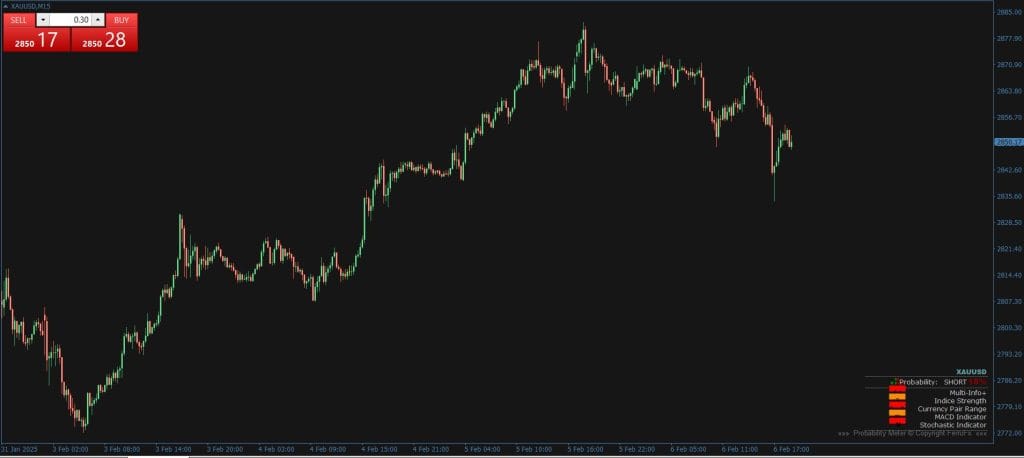
The Probability Meter pulls data from 13 indicators across seven timeframes to calculate a global probability score. This percentage tells you whether the forex market is more likely to move up or down, making it the best indicator for short-term and intraday traders. The best part? It’s easy to read, meaning you spend less time analyzing and more time executing profitable trades.
How the Probability Meter Indicator Works
Instead of juggling multiple indicators, the Probability Meter simplifies the process by combining:
✅ Trend Strength – Measures how strong the trend is in either direction.
✅ Momentum – Assesses the speed of price changes.
✅ Multi-timeframe Analysis – Pulls data from seven timeframes for a complete market view.
✅ Customization – Allows you to add two extra indicators for even better accuracy.
The result? A simple probability percentage that tells you whether to go long or short.
🔵 A reading above 75% (Green) – Strong Buy Signal 📈
🔴 A reading below 25% (Red) – Strong Sell Signal 📉
No need to overcomplicate things—just check the values and trade accordingly.
How to Trade with the Probability Meter Indicator
Buy Entry Strategy
- Check the probability percentage: If it’s above 75% and green, that signals a strong uptrend.
- Confirm with Multi Info+: The trade setup is even stronger if this value is also above 75.
- Enter a buy trade as soon as these conditions align.
- Stop-Loss: Place it below the most recent swing low for risk management.
- Take-Profit: Aim for the next resistance level or set a 1:2 risk-reward ratio.
Sell Entry Strategy
- Check the probability percentage: If it’s below 25% and red, that signals a strong downtrend.
- Confirm with Multi Info+: If this value is also below 25, selling becomes even more favorable.
- Enter a sell trade when both conditions align.
- Stop-Loss: Place it above the most recent swing high for protection.
- Take-Profit: Aim for the next support level or set a 1:2 risk-reward ratio.
Why You Need the Probability Meter Indicator
✔ Eliminates Confusion – No need to interpret complex charts, just read the probability value.
✔ Multi-Timeframe Analysis – Helps you avoid weak trades by confirming trends across different timeframes.
✔ Perfect for Scalping & Intraday Trading – Ideal for quick decision-making with precise entry points.
✔ Customizable – Add your favorite Forex indicators to make it even more powerful.
✔ Beginner-Friendly – Very simple to use —check the percentage and confidently open trades.
Free Download Probability Meter Indicator MT4
Probability Meter Indicator
An MT4 indicator that combines 13 indicators across seven timeframes into one probability percentage, with readings above 75 or below 25 marking buy or sell bias.

 Built by ForexCrackedWe tested 1,200+ indicators. Then we built our own.Six years of reviewing EAs and indicators went into FXC Fusion: two engines, the seven-panel cockpit, MT4 and MT5, from the team behind this site.
Read More Market Profile Trendlines MT4 Forex Indicator Free Download
Conclusion
The Forex Probability Meter Indicator MT4 makes Forex trading easy by giving a clear probability percentage for trade entries. Whether Forex scalping, day trading, or swing trading, this Forex indicator helps boost accuracy and reduce uncertainty.
With this Forex indicator, You can stop over-analyzing MT4 charts. It gives you simple buy and sell signals to trade confidently. Want to maximize your forex gains while keeping things simple? Give the Probability Meter Indicator a try!


Discussion no comments yet
Is this still working?
Nothing here yet
No one has asked anything about The Probability Meter Indicator for Smarter Forex Trades yet. First question gets answered.