FXC Fusion · MetaTrader 4 & 5 Drop 2 · ongoing release · 50 licences

Not another arrow indicator.

A seven-panel cockpit and one scored trade a day, for MetaTrader 4 & 5.

Watch how it works · 90-second intro
EURUSD · M5 · FXC Fusion cockpit + Auto EA
Public opens Tue, Jul 21 · 05:00
Waitlisters get in Mon, Jul 20 · 05:00
--Days
--Hrs
--Min
--Sec
Waitlist access opens in soon, joining is free
50 licences · first come, first served when the drop opens

Free · no card · one email when it opens · unsubscribe in 1 click

You're on the Drop 2 waitlist. Watch your inbox the day before launch, that's when the 24h head-start unlocks for you.
Built by ForexCracked

Real traders helping traders since 2019. After 6+ years testing other tools, we built our first own indicator.

1,200+ EAs & indicators tested by us
2M+ free downloads delivered
100K+ traders use us each month

Behind it: traders with 10+ years experience each. Everything we learned from testing what works and what doesn't went into Fusion. More about us →

01 The cockpit

The whole market, one panel

A breakout engine and a seven-panel cockpit, fused. Switch a tab, the dashboard and the read-out beside it both change.

↓  click a tab to explore
FXC FUSION
04:21
TradeUSDCHF
CLOSED · WIN
0.78280
Spread 0.1p
Spot · M5
TP30.78680HIT+40.0 p
TP20.78520HIT+24.0 p
TP10.78400HIT+12.0 p
ENTRY0.78280
SL0.78080−20.0 p
FXC EA CONNECTED
AUTO OFF
NEW SIGNAL 16s ago
BUY · USDCHF · 0.78280
LOT SIZE0.01
RISK$5.08
TP1+12p TP2+24p TP3+40p
QUALITY
S&R Zones · current chart
EURJPY
184.514 · M5
3Resist
2Support
Zones OFF
RESISTANCE
185.161 – 185.2307 pip wide
+65 pips
PROVEN
RESISTANCE
184.873 – 184.9679 pip wide
+36 pips
PROVEN
RESISTANCE
184.651 – 184.76511 pip wide
+14 pips
VERIFIED
184.514Price now
SUPPORT
184.378 – 184.4517 pip wide
−6 pips
UNTESTED
SUPPORT
184.177 – 184.35718 pip wide
−16 pips
VERIFIED
Overall bias
▼ BEARISH
1 UP  ·  4 DOWN  ·  4 RANGE
4of 9
Currency strength · today
00:00
Server
000306091215182124
Sydney·
Tokyo·
London·
New York·
Volume typically , right now ,
Swing Structure
▲ BULLISH
last BOS @ 184.720
Internal Structure
▼ BEARISH
last CHoCH @ 184.390
Premium / Discount · Dealing range EQUILIBRIUM · 51%
Discount184.177 Equilibrium184.703 Premium185.230
Key zones · nearest unmitigated
Bull OB−13p
184.312 - 184.381
unmitigated · 12 bars
Bull FVGIN
184.487 - 184.529
open · 4 bars
Liquidity EQL−34p
184.177
3 equal lows
Bear OB+39p
184.902 - 184.968
unmitigated · 31 bars
Bear FVG-
-
no active zone
Liquidity EQH+72p
185.230
2 equal highs
Chart layers
Swing Struct Int. Struct Order Blocks FVG EQH / EQL Prem / Disc Levels Swing Pts
/
All

Scaled to fit your screen. For the full, interactive cockpit, open this page on a desktop.

02 The problem

More arrows won't make you profitable

Most MT4 / MT5 indicators add noise. What's missing is structure, and the discipline to wait for it.

Arrows that repaint

The signal looks perfect, then quietly moves after the candle. The backtest cheats; the live account doesn't.

No plan, just a guess

An arrow gives a direction and nothing else. No stop, no target, no risk. You improvise it live.

Signal spam

A dozen alerts a day trains you to overtrade. By the ninth, you've forgotten what good looks like.

03 Who it's for

Built for the trader who's done guessing

Fusion isn't for everyone. It's sharp if this sounds like you.

You know MT4 / MT5

You trade a live or funded account and want a tool, not training wheels.

You're done with spam

Repainting arrows and a dozen alerts a day have cost you enough.

You want a reason to wait

Structure and patience beat activity. You'd rather sit on your hands than force it.

One good trade > ten

You'd take a single graded setup over ten mediocre ones, every week.

Not for you if you want a hands-off robot or a promise of guaranteed wins, Fusion is a decision tool. You still place the trade.

04 At a glance

Everything FXC Fusion puts on your chart

One indicator. One licence. The seven-panel cockpit, the full trade plan drawn for you, multi-pair scanning, and an optional Auto EA for one-click or full-auto execution.

Done for you The whole trade, drawn for you

Entry, stop and three targets drawn on the chart the moment a signal qualifies. You only decide whether to take it. See it live in the cockpit →

Auto EA · optional add-on One-click, semi-auto, or full-auto

Same indicator's signals, with execution automated to your filters. Bundle in this drop for +$50, or add anytime later for $87. See the Auto EA →

Multi-pair scanner & alerts Watch every pair, trade more than one

Click any pair, the chart loads instantly. Alerts fire across every watched pair so you can run multiple setups at once, not just one chart at a time.

The cockpit Seven live panels, one chart

Trade · S&R · Trend · Currency strength · Session · SMC · Multi-pair, in one draggable panel. Open the cockpit →

Smart Money ConceptsNew Smart money, with numbers on it

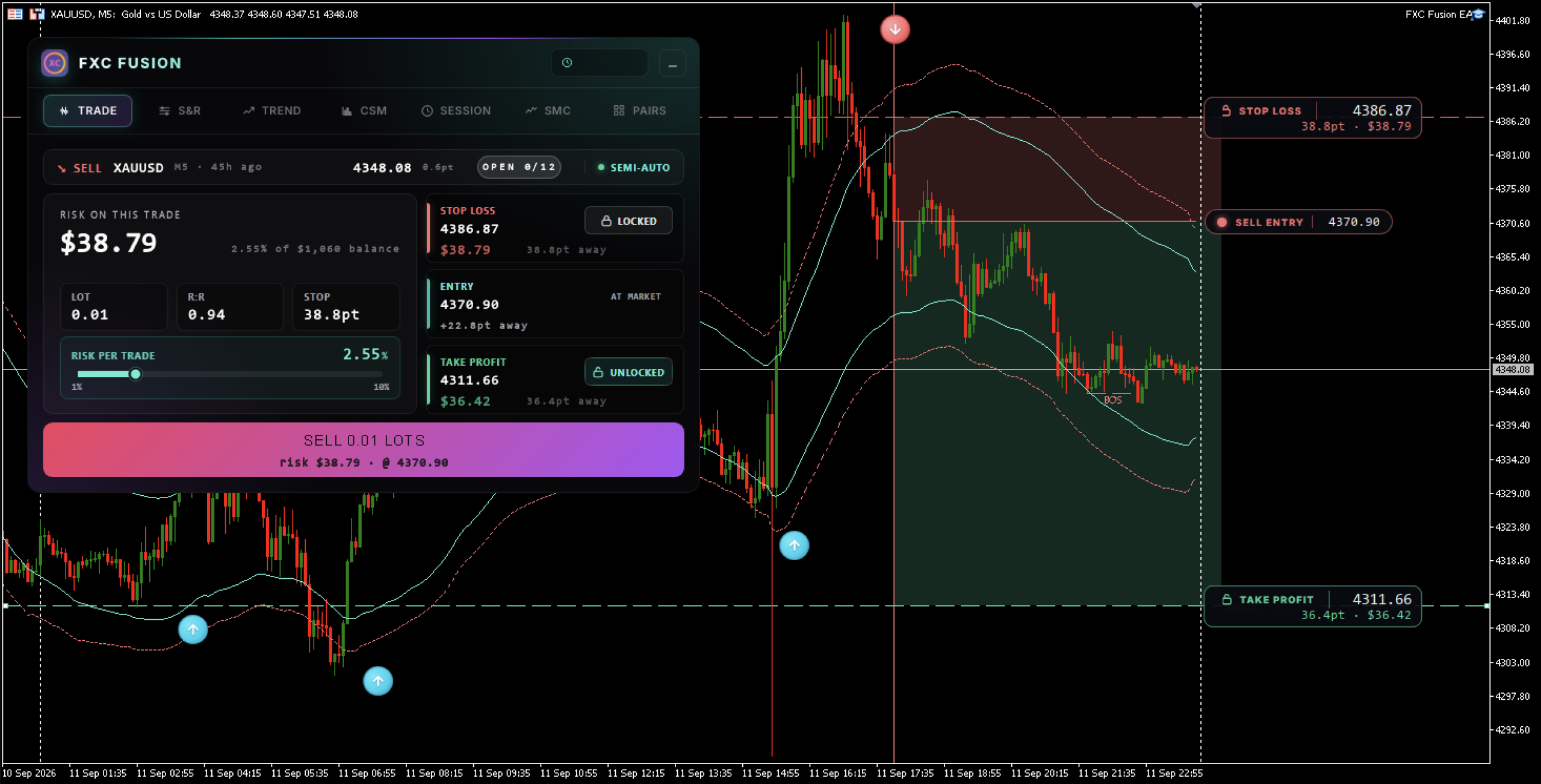
Most SMC tools draw the zones and stop there. Fusion measures them: order blocks, fair value gaps and liquidity, each with its price span, how many bars old it is, whether it is still unmitigated, and how far away it sits in pips. Structure is read twice, swing and internal. Eight chart layers toggle from the panel. See it live in the cockpit →

Never repaints. Period.

Signals can fire mid-candle, the moment the setup qualifies. Once an arrow shows up, it stays. It doesn't shift, doesn't disappear, doesn't wait for candle close.

One scored trade per pair, per day

Q1–Q5 quality score. No coil, no trade, the engine stays silent. Structurally can't overtrade.

9-timeframe trend matrix

M1 to Monthly, every timeframe scored UP / DOWN / RANGE into one bias verdict.

Currency strength meter

All 8 majors ranked by equal-weighted daily move. Confirms which side of the trade has flow behind it.

Session clock + auto-GMT + volatility

Sydney / Tokyo / London / NY on one 24h clock. Auto-detects your broker's GMT offset. Liquidity curve shows when to take the trade.

Graded S&R zones

Up to 500 zones over 1,000 bars, rated Weak → Untested → Verified → Proven.

MT4 & MT5 · any broker · auto symbol-suffix resolution Push · email · on-chart popup & sound · every alert carries the full plan
05 How it works

One coil. One trade. Graded before you see it.

Fusion hunts coiled consolidations across the market and trades the breakout out of them. Only setups that pass two gates and earn a Q1–Q5 score ever make it to your chart. Hover the timeline to see what happens at each stage.

quiet
the coil forms
breakout window
closed
00:0003:0007:0012:0024:00
The coil, a tight consolidation The breakout window, where the signal fires The single graded signal
GATE 01

The coil

Checks: a real, tradable consolidation has formed.
Rejects: dead, too-tight ranges and news chaos.
GATE 02

Breakout

Checks: a true candle close beyond the coil, or a fakeout that wicks past and closes back inside.
Rejects: wicks that never close, mid-coil noise.
GRADE 01

Trend

Scores: whether the higher timeframes agree.
Docks points for fighting the trend.
GRADE 02

Momentum

Scores: whether there's room left to run.
Hard-rejects trades that chase an exhausted move.
GRADE 03

Volatility

Scores: whether the market is actually moving.
Hard-rejects flat, lifeless conditions.

The two gates decide if a setup exists. The three grades score how good it is. That final Q1–5 is the confidence rating printed beside every arrow.

06 A day with Fusion

You're not watching the chart. Fusion is.

One decision a day, and the whole trade is drawn before you make it. The rest of your day stays yours.

The quiet hours

A coil forms

Price compresses into a tight range. Fusion records the coil silently. Nothing to watch, nothing to do.

The active window

The coil breaks, and gets scored

The breakout clears both gates. Fusion scores it Q4/5 and draws the entry, stop and three targets on your chart.

The second it fires

Your phone buzzes, awake or not

Push, email and a sound on the chart, each carrying the full plan. The signal can land while you sleep, it waits for you.

Your one decision

Ten seconds, two ways to take it

Place it yourself at the levels Fusion drew, one-tap the Auto EA to fire the SL and TPs for you, or let full-auto take it inside your filters while you're away.

Soon after

TP1 and TP2 tag, you're flat

The trade walks Active → TP1 → TP1+TP2 on its own. One decision made, one trade taken. Back to your day.

07 Auto EA · optional add-on

Same engine. One click, or fully automated.

The Auto EA bolts onto Fusion's TRADE tab and turns every graded signal into a trade. One-click execute, split trades across TPs, or run it full-auto across every pair you watch with your filters in charge.

Semi-auto One-click execute, split across TPs
FXC EA CONNECTED
AUTO OFF
NEW SIGNAL 4s ago
BUY · GBPUSD · 1.34050
LOT SIZE0.10
RISK$8.50
TP1+5p TP2+10p TP3+15p
QUALITY
  • Pick 1, 2, or 3 TPs via the toggles. EA opens that many trades, same SL.
  • Lot is split automatically: 1 TP = full lot, 2 TPs = ½ each, 3 TPs = ⅓ each.
  • Set your lot size + see risk in $ before you commit.
  • Break-even auto-arms after TP1 hits. No babysitting the chart.
Full-auto Multi-pair, hands off, your filters in charge
FXC EA CONNECTED
AUTO ON
AUTONOMOUS 2 / 7
Today+$32.10
3Filled
1Missed
2Open
03:24BUY GBPUSD @ 1.34050+12p
03:11SELL EURJPY @ 168.412+TP1
02:58SKIP AUDUSD · drift 6.2pdrift
02:42BUY XAUUSD @ 2418.30+TP1
  • Multi-pair watcher: star a pair, EA runs it. Take signals across every pair you'd watch yourself.
  • Quality filter: minimum Q-score per trade. Q3+ only? Q4+ only? Your call.
  • Risk caps + session gates: max trades per day, max loss per day, only certain sessions.
  • Live feed of every executed and skipped trade with the why-skipped reason logged.
Bundle pricing +$50 in this drop · $87 anytime later same lifetime licence either way
08 Alerts

You don't have to watch the chart

Fusion watches every pair you turn on. When a graded signal fires, the alert comes to you with the whole plan, not just a beep.

Push to your phoneThe MetaTrader mobile app pings you the moment a signal fires, wherever you are.
EmailA full written record of every signal, in your inbox. Searchable trail of what fired and when.
On-chart sound & popupAt your desk? A sound + a popup the moment it fires, no missing it.
Multi-pair watcherAlerts fire across every pair you've turned on. Run multiple setups at once, never miss the one that triggered first.
The whole plan, in the messagePair, side, entry, stop with pip risk, TP1 and the Q-score. Not a bare "BUY EURUSD".
09 Proof

Real signals. No cherry-picking.

Screenshots, recordings and member reviews, wins and losses, dated. Added here as they come in.

Three trades, start to finish
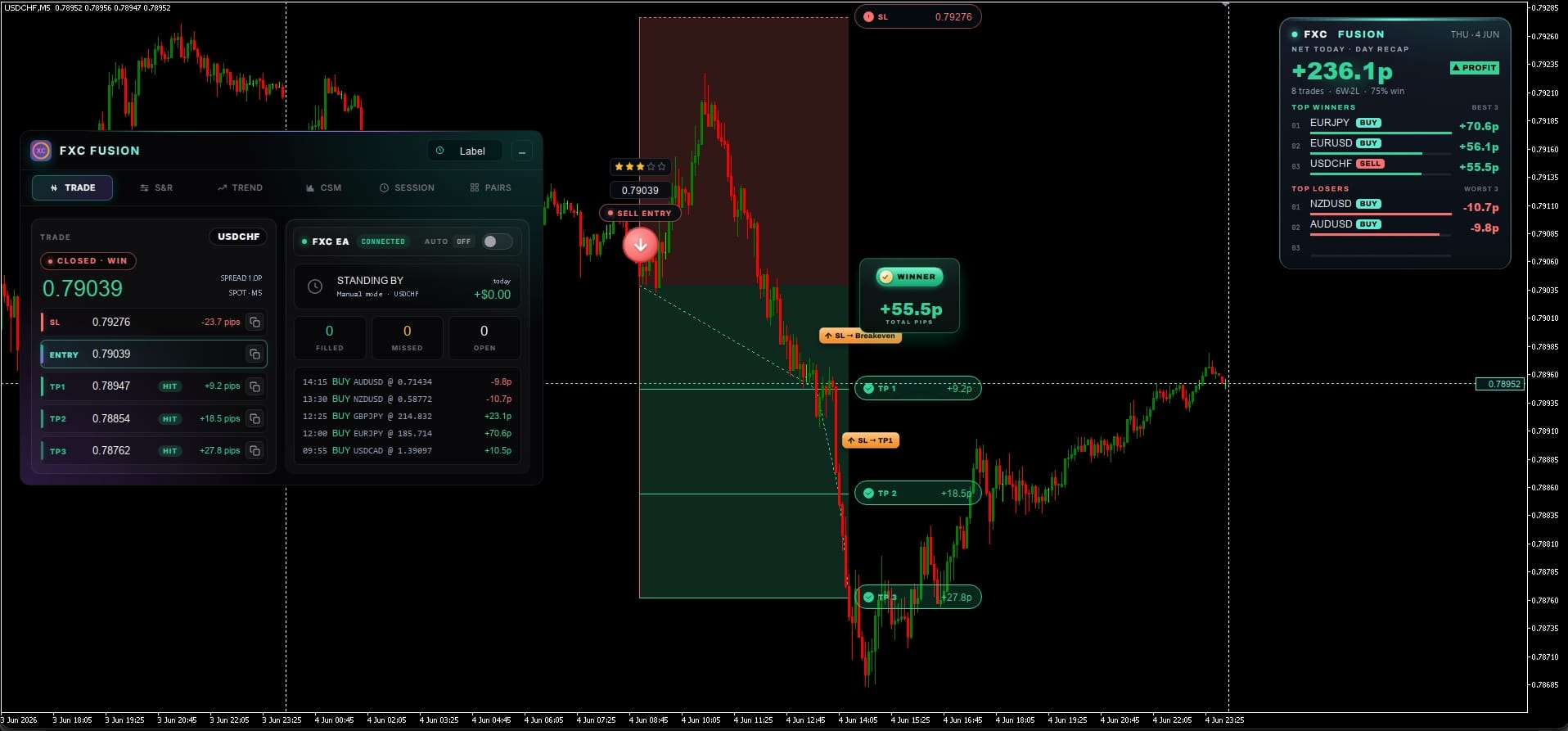
FXC Fusion USDCHF M5 SELL signal, all three take-profits hit, stop trailed to breakeven, plus 55.5 pips
USDCHF · M5 · SELL ★★★

Clean break, all three targets

Price broke lower out of the coil. Fusion drew the entry, stop and three take-profits up front, then TP1, TP2 and TP3 all filled with the stop trailed to breakeven, so the trade could not turn red on the way.

+55.5p TP3 · full run
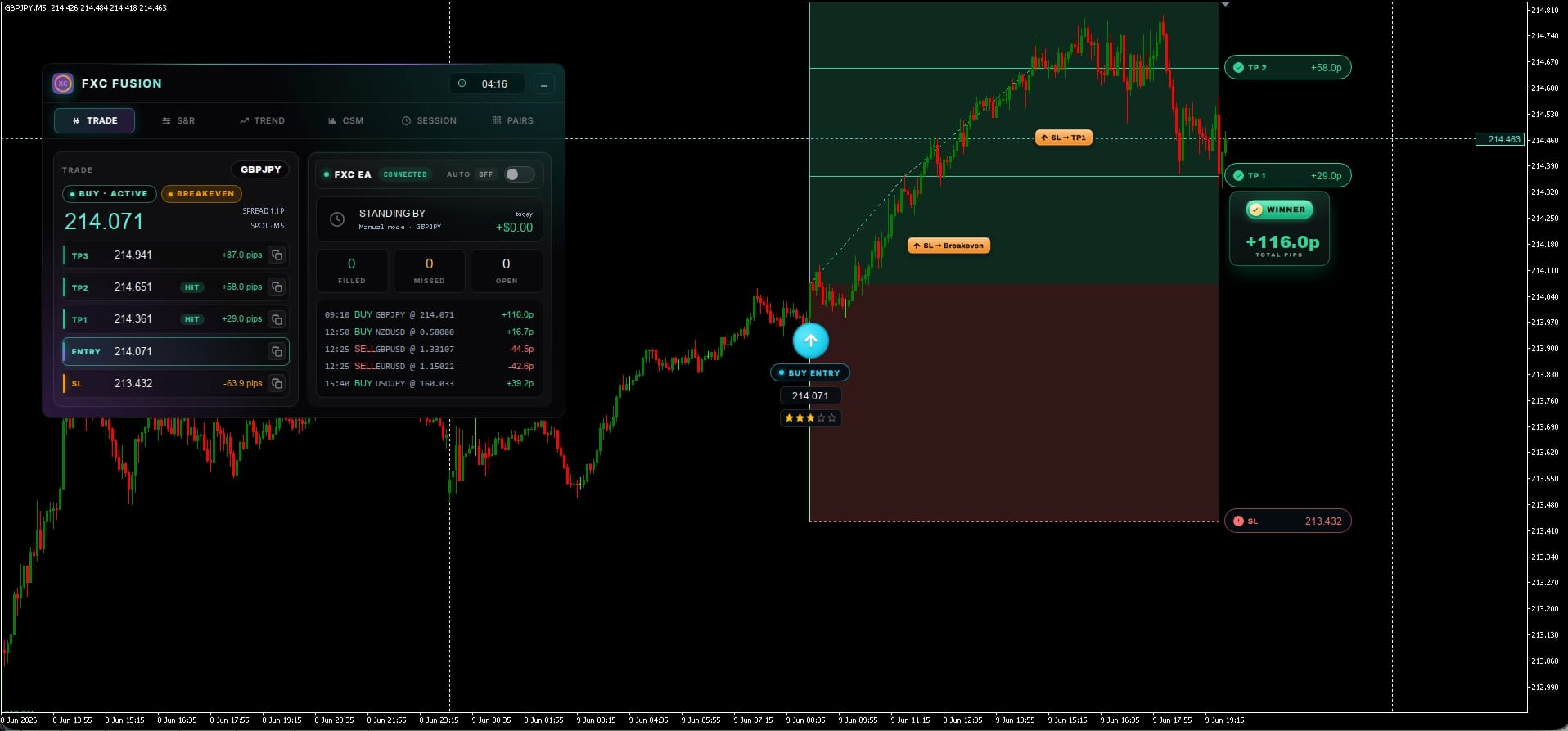
FXC Fusion GBPJPY M5 BUY signal up 116 pips with TP1 and TP2 banked and the stop trailed up
GBPJPY · M5 · BUY ★★★

One setup, +116 pips

A long out of a tight range. TP1 and TP2 banked, and the stop trailed up behind price to lock the trade in profit while the runner stayed open for TP3.

+116.0p TP1 + TP2 · runner open
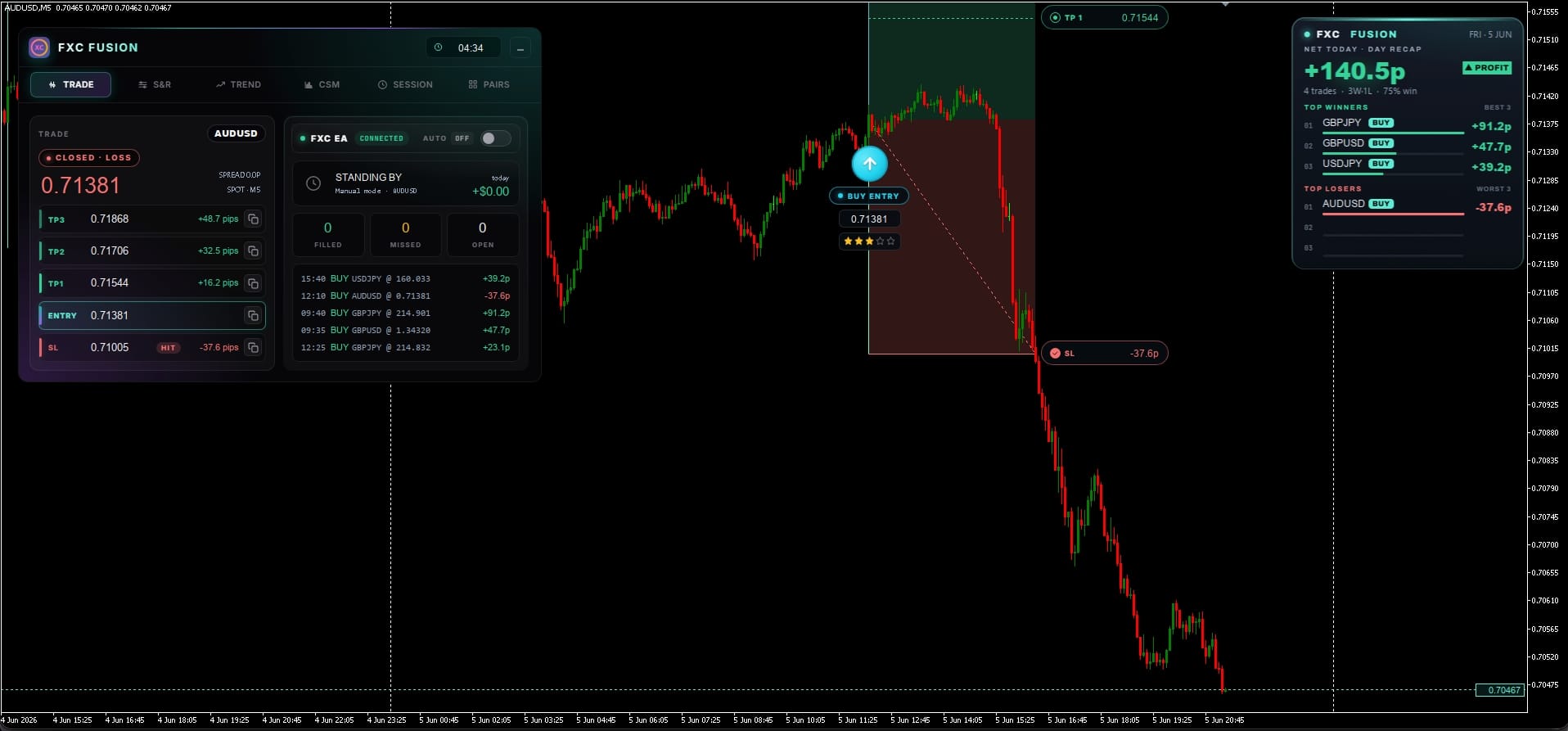
FXC Fusion AUDUSD M5 BUY signal stopped out for 37.6 pips on a day that still closed in profit
AUDUSD · M5 · BUY ★★★

A loss, shown on purpose

Not every setup works. This long pushed up, reversed, and tagged the stop for a defined loss. The risk was fixed before entry, and the same trading day still closed green.

−37.6p stopped out
More recent signals
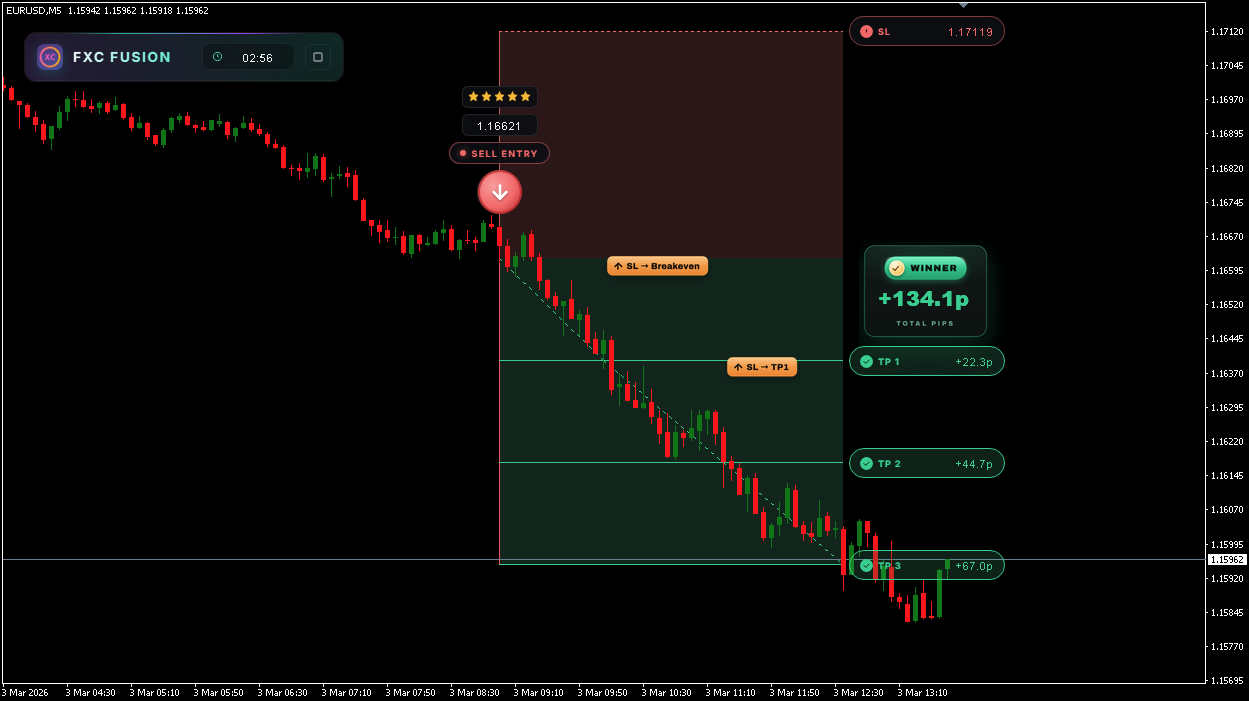
EURUSD M5 SELL signal, all three targets hit, plus 134.1 pips
EURUSD · M5 · SELL · 5★, textbook breakdown out of the range, all three targets. +134.1 pips.
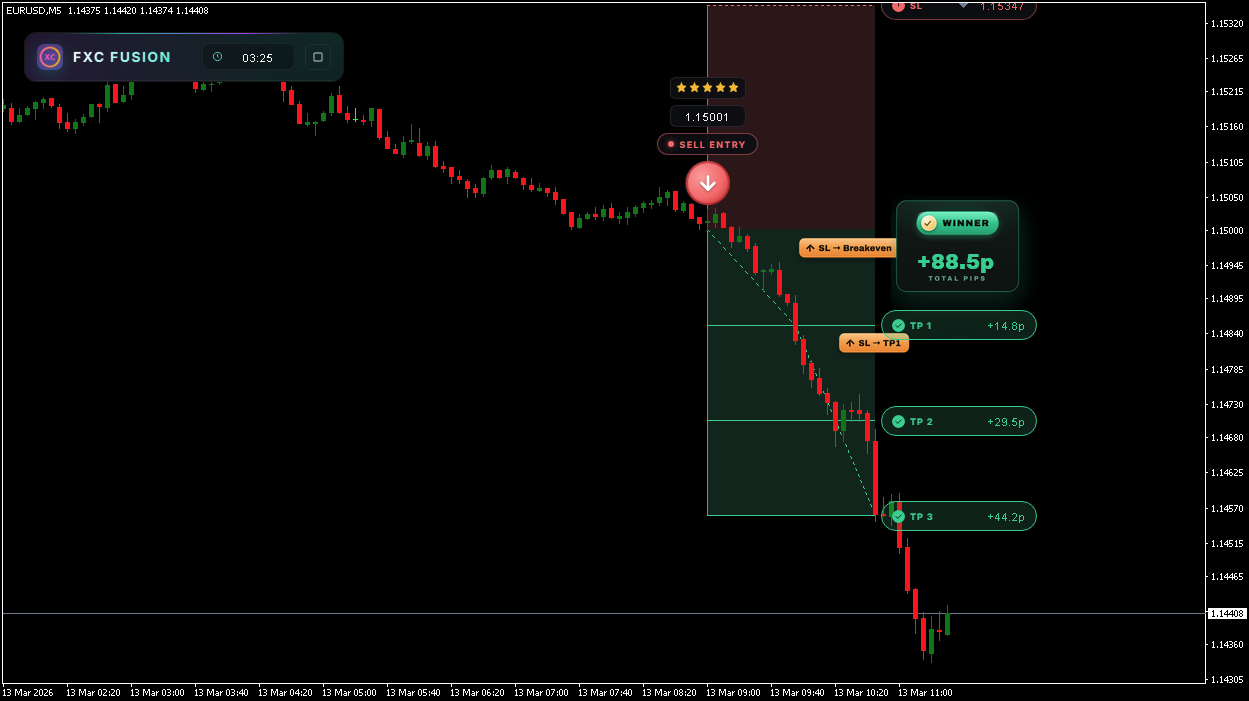
EURUSD M5 SELL signal, clean run to TP3, plus 88.5 pips
EURUSD · M5 · SELL · 5★, top-graded setup, clean run to TP3. +88.5 pips.
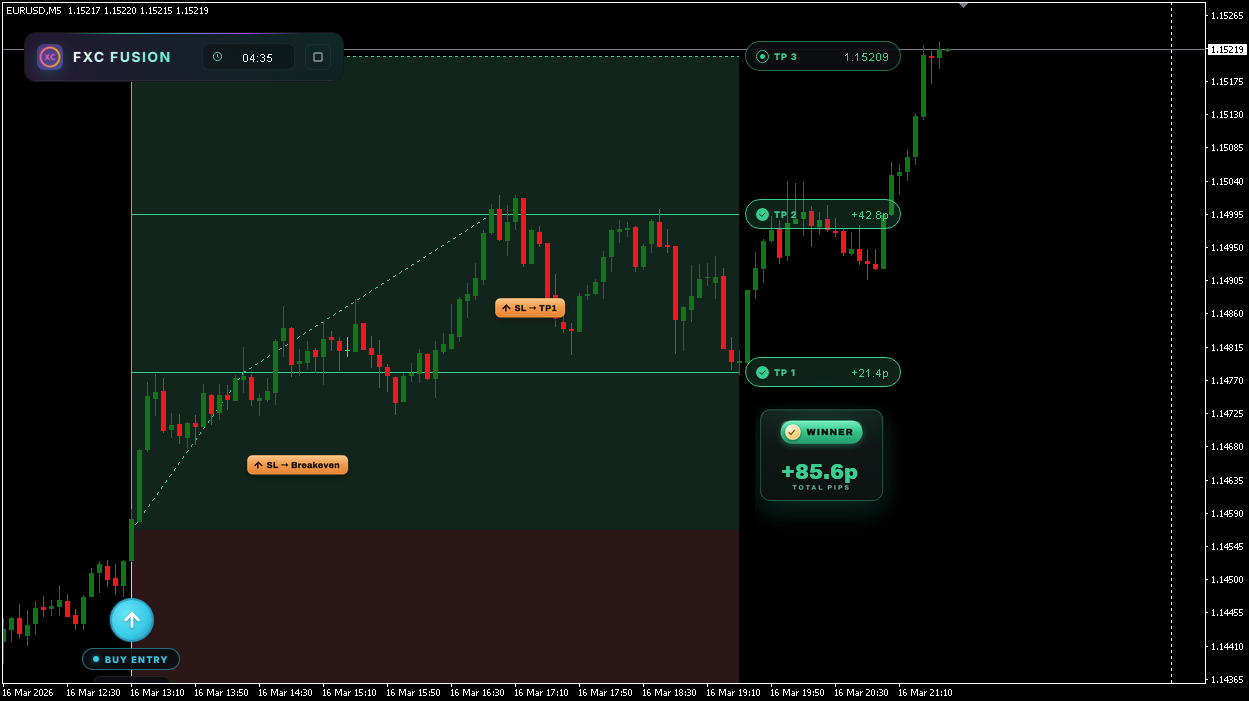
EURUSD M5 BUY breakout from a long coil, plus 85.6 pips
EURUSD · M5 · BUY, break out of a long coil; TP1 + TP2 banked, stop trailed. +85.6 pips.
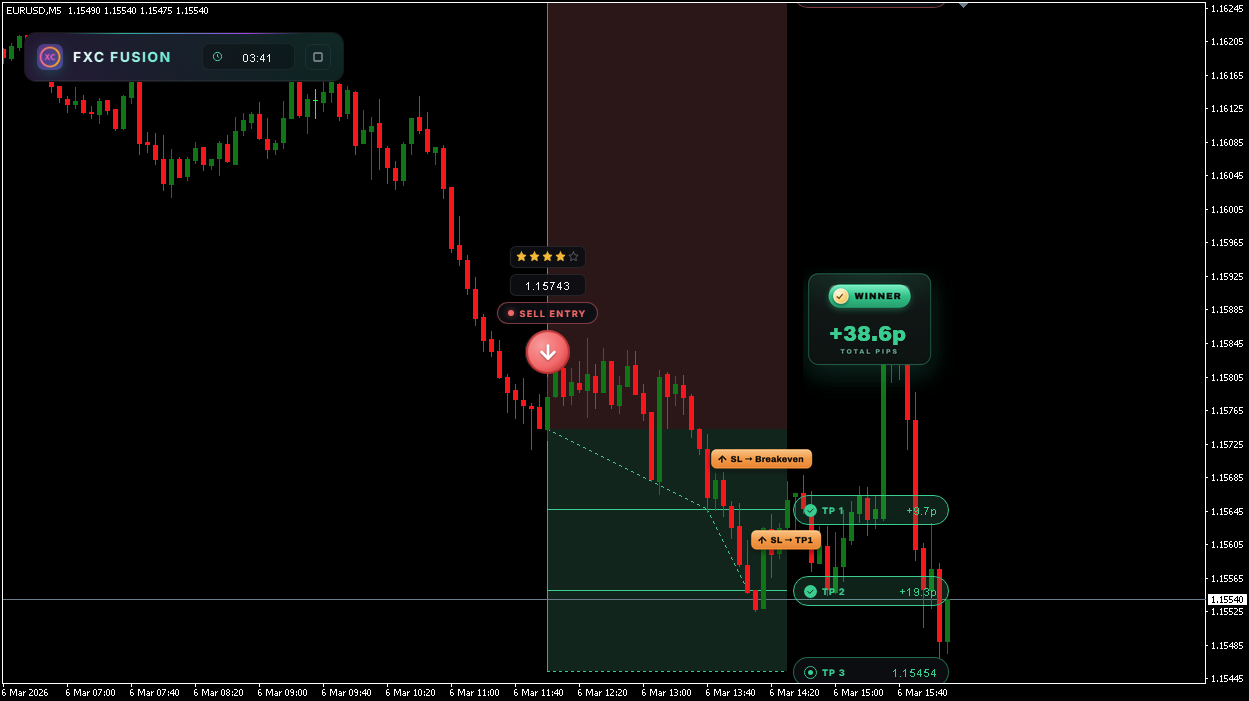
EURUSD M5 SELL signal, TP1 and TP2 hit, plus 38.6 pips
EURUSD · M5 · SELL · 4★, TP1 + TP2 hit, stop trailing behind. +38.6 pips.
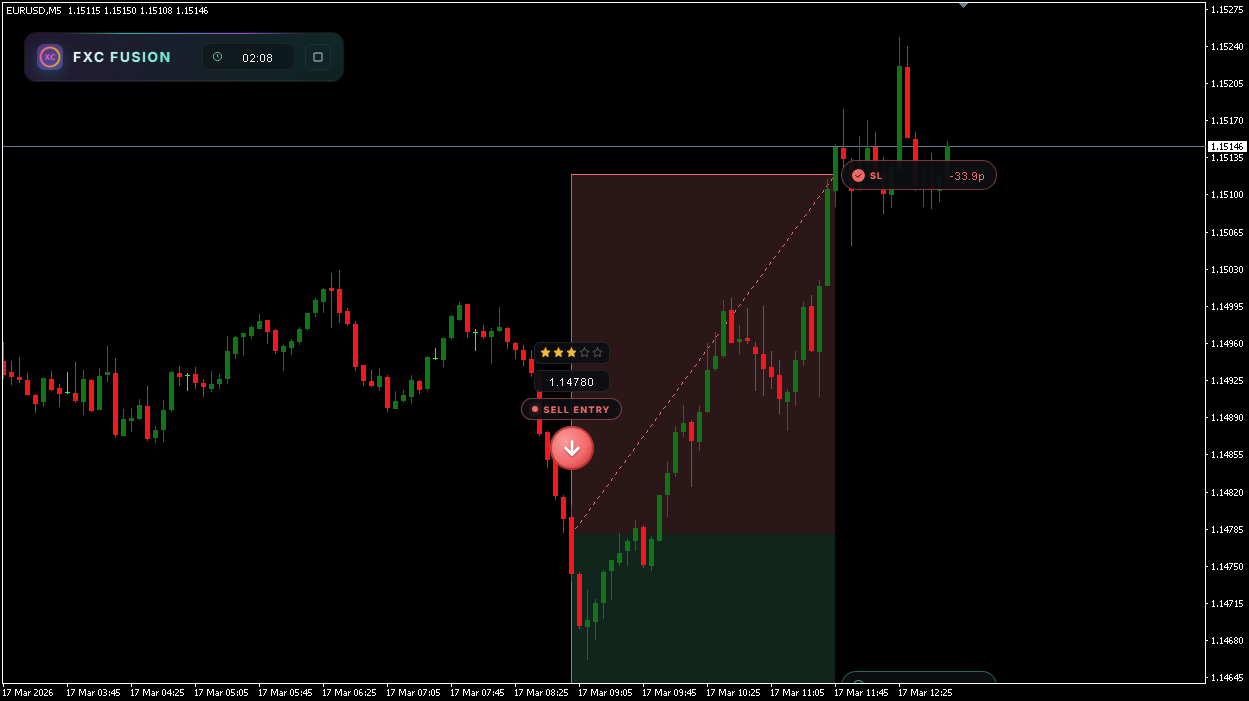
EURUSD M5 SELL signal stopped out for a 33.9 pip loss
EURUSD · M5 · SELL, a loss shown on purpose. Price reclaimed the range and tagged the stop. −33.9 pips. No edge wins them all.
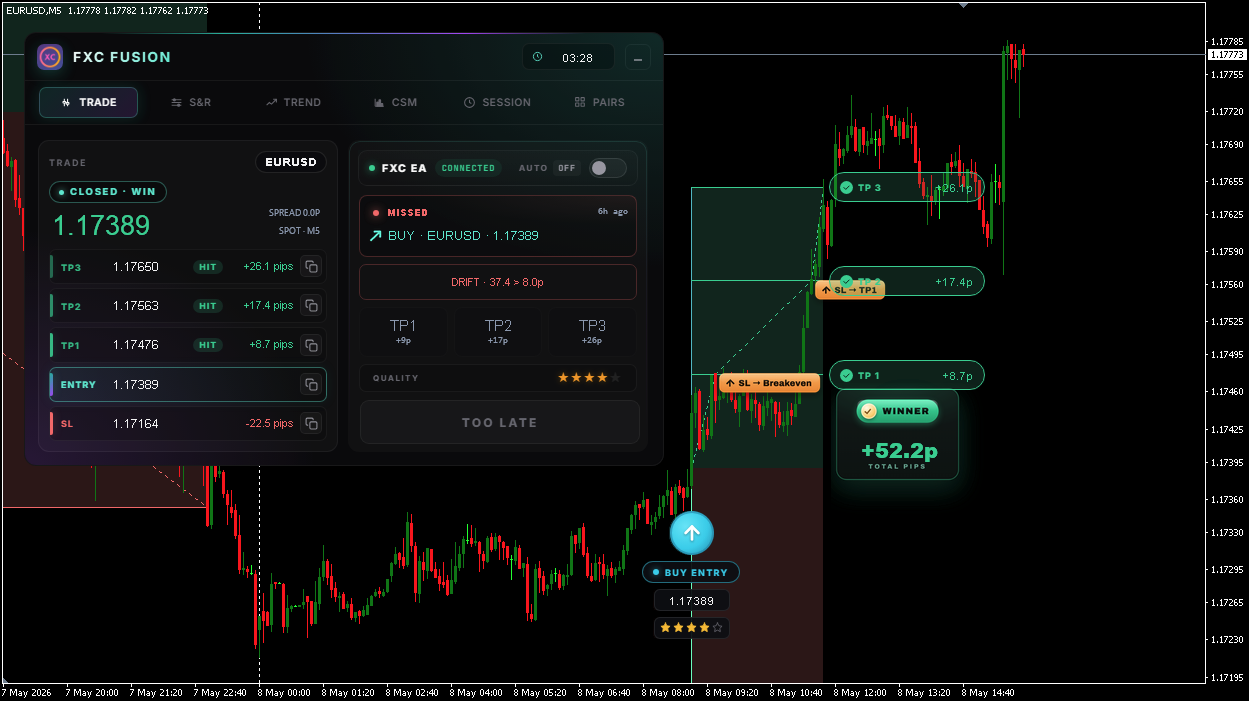
FXC Fusion marking a signal too late after price drifted past the entry limit
Too late to buy. By the time you could act, price had already run 37 pips past the entry (limit 8p). Flagged TOO LATE so you don’t chase a worse fill.
What buyers say
★★★★★
Been using FXC Fusion for a while now and it's honestly great. The signals are really good but the support is what makes it stand out. They reply super fast and always help, fixed my bugs quick and even added a new feature just for my special use case which I wasn't expecting. They keep sending updates too so it's basically an all in one indicator now. Feels like I'm getting way more than I paid for. Definitely recommend.
Trustpilot4 Jul 2026
★★★★★
Really great indicator and EA. I love the way the developers are open to suggestions and how quickly they fix the bugs. It's my main entry indicator and it's very good.
Trustpilot1 Jun 2026
I've installed and the SMC looks great. Now I don't need a separate indicator for it.
By email4 Jul 2026
I have never seen a support service as effective as yours in recent times. Please keep it up.
By email26 Jun 2026
Thank you so much for this FXC Fusion tool. It has given me some good trades over one week of usage now.
By email3 Jul 2026
I'm currently testing the software on an FTMO demo account, and so far it's performing well.
By email5 Jul 2026
I love all your responses to all my mails as they are strictly honest responses to the issues raised. Thank you for putting me first.
By email4 Jul 2026
You're a proactive team and I'm sure this system is here to stay.
By email24 Jun 2026
10 The difference

Fusion vs a typical indicator

Same chart, same broker. Here's where the gap is.

 
Typical indicator
FXC Fusion
Signals
10+ a day, spammy
One graded trade per pair, per day
Repaint
Often, shifts after close
Never. Fires mid-candle, then locks
The plan
Direction only
Entry + SL + TP1/2/3 + zones drawn
Confidence
Every signal looks equal
Scored Q1–5 before you see it
Confluence
One idea, an MA cross
A gate plus three grading filters
Context
Just the arrow
A 7-panel cockpit around every trade
Discipline
Encourages overtrading
Structurally can't overtrade you
11 More than the signal

Take none of the signals. Keep the workstation.

Two of the seven panels are about the Fusion signal. The other five are a read on the market that works however you trade, with your setups, your rules and your entries.

TRADE
S&R
TREND
CSM
SESSION
SMC
PAIRS
Two show the Fusion signal Five are yours whether you take a signal or not
SMCNewest
Structure, order blocks, fair value gaps and liquidity, each one measured in pips instead of just drawn.
S&R zones
Every level around price, graded by how many times it has actually held.
Trend
Nine timeframes scored into one bias, so you know what you are trading against.
Currency strength
Eight majors ranked, so you put the strong one against the weak one.
Session clock
Who is open, and when the liquidity you need actually turns up.
Next up
A trade assistant, for traders who bring their own setups
Set your risk, put your entry and stop where you want them, and it sizes the trade for you. Market, limit or stop, then tracked and marked on your chart from open to close. None of it needs a Fusion signal.
See the roadmap →
12 Built by ForexCracked

Not a faceless vendor. Real traders behind every line of code.

FXC Fusion is built by the team behind ForexCracked.com, real traders with 10+ years experience each. After 6+ years testing what works and what doesn't, we built our first own indicator.

1,200+ EAs & indicators tested by us
2M+ free downloads delivered
100K+ traders use us each month
Independent broker & prop-firm reviewer since 2019
A trading audience that would notice if a tool didn't deliver
One support team for the indicator, the setup, and every drop after
More about us →
13 Shipped, and shipping

The indicator you buy today is not the one you had last week

Most tools go quiet after launch. This one has shipped nine times in its first four weeks, and every buyer got all of it free. Here is the whole record, and what is coming next.

9
Releases
27d
Since launch
~3d
Between ships
v1.15
Live now
Every release, to scale 21 Jun → 18 Jul 2026

What is coming

Roadmap

A compatibility fix first, then three that feed each other: the assistant sizes the trade, the calendar tells it what is coming, and sentiment tells you who is already on the other side.

Guided by you Whatever you ask for next The last slot on this board is not ours to fill. Tell us what you need and it goes up here. Fusion is built by the people running it on live charts, and every drop so far has been shaped that way.

Every release since launch

Newest first. Small fixes are grouped. Every update is free for every licence.
v1.1518 Jul 2026 Live now
  • New: Multi-timeframe support for the indicator.
  • Improved: Smart Money Concepts is out of beta, optimised, with everything found during the beta fixed.
  • Improved: A batch of smaller features and refinements across the cockpit.
v1.118 Jul 2026 1 release
  • Bug fixes and small improvements.
v1.104 Jul 2026 Big one
  • New: Smart Money Concepts engine and a seventh cockpit panel, in beta. Swing and internal structure, order blocks, fair value gaps, equal highs and lows, premium and discount, previous day, week and month levels. Eight chart layers you toggle from the panel.
  • Improved: Quality score is now frozen the moment a signal commits, so the score you see is the score the EA traded. It can no longer drift between the chart, the alert and the dashboard.
  • Fixed: The EA could take a setup below your minimum quality filter when scoring inputs were still warming up. It now waits instead of guessing.
v1.0628 Jun 2026
  • Improved: Range filter now defaults to ATR instead of a fixed distance, so it adapts to the pair and the session rather than treating EURJPY like EURCHF.
v1.01 – v1.0522 – 25 Jun 2026 4 releases
  • Bug fixes and small improvements.
v1.0021 Jun 2026 Launch
  • Drop 1. The breakout engine, the graded signal, the cockpit and the companion EA.

Every licence gets every update. No upgrade fee, no version tiers, no paid rescue of a feature we broke.

14 Why only 50

We don't sell Fusion on tap. On purpose.

Fusion's edge is one mechanical price line. That kind of edge only keeps working while the line stays uncrowded, so we limit how many traders are ever on it.

1
The edge is one price lineFusion trades the breakout of a coiled range, the same kind of level every day.
2
Crowds turn that line into baitWhen too many traders stack the same order and the same stop on the exact same price, the market spikes to grab those stops, then reverses. The edge becomes the trap.
3
So we cap the crowdA small batch each month keeps too many identical orders off that line. Fewer hands, a cleaner level, an edge that still works next month.
Each dot is one trader's buy order and stop, parked on the same price.

When this drop is gone, it's gone until the next one.

50 LICENCES · lower than every future drop · next drop reopens at $447
· Track record

Every drop costs more than the last

This drop is lower than every future drop. The longer you wait, the more it costs.

Drop 1 · closed $247 June Drop
Drop 2 · now $347 you're here
Drop 3 · next $447 and up
Drop 1 sold out in 5 Days
4,056 on the waitlist for this drop
16 Get started

Running in about two minutes

No subscription portal, no licence-key dance. Buy it, install it, attach it.

Secure your licence

Checkout takes a minute. You get the file and the setup guide instantly.

Download FXC Fusion

One indicator file plus the recommended-settings preset.

Drop it into MetaTrader

Into the MT4 or MT5 Indicators folder, the guide shows the exact spot.

Attach to any chart

Drag it on, and the cockpit is live. Works on any broker, any pair.

17 FAQ

Everything about pricing, drops, the EA and the indicator

The honest answers, how each drop is priced, what the EA add-on actually does, when signals appear, and what happens if you miss a drop.

Pricing & value

Why does each drop cost more than the last?

We release a limited batch of licences at a time, and every drop is priced higher than the one before. This is Drop 2 at $347; the next drop opens at $447. Buy in any drop and you own the indicator for life at the price you paid, so the earlier you buy, the less you ever pay.

How does the pricing escalation actually work?

Each drop is a fixed price, and every drop costs more than the last. Right now it is Drop 2 at $347, and the next drop opens at $447. You pay the price of whichever drop you buy in, and once you buy you own the indicator for life regardless of what later drops sell at.

If I miss this drop, can I still get this price later?

No. Each price belongs to its own drop. If Drop 2 at $347 closes before you buy, the next opportunity is Drop 3 at $447. Waitlisters get the 24-hour head-start, so they have the best chance of catching their preferred drop.

Why cap each drop at 50 licences?

We want every buyer to actually use the indicator and have access to support. 50 keeps the community small enough to talk to directly. It also keeps the indicator's edge from being diluted by thousands of identical users hitting the exact same setups.

Is the licence a one-time payment or a subscription?

One-time payment, lifetime licence. No renewals, no monthly fees. All future indicator updates and new cockpit panels are included free for as long as you own the licence.

Can I pay with crypto?

Yes. We accept USDT on TRC20 (Tron) or BEP20 (BNB Smart Chain), with a small discount versus card. Use the "Pay with crypto" link on this page, or email [email protected]. Send the payment, reply with your proof, and we set up your access right away.

How drops work

What's a "drop"?

A drop is a release window where 50 licences become available at a fixed price. When 50 are claimed, or the window closes, the drop ends and the page switches to a waitlist for the next one.

When does the next drop happen?

Drops run on a roughly monthly cadence. The exact next-drop date is announced inside the waitlist email once the current drop closes. Pricing follows the escalation, the next drop opens at $447.

How does the 24-hour waitlist head-start work?

If you're on the waitlist, the buy button unlocks for you 24 hours before the public sees it. That window is when most drops sell out. The earlier you join the waitlist, the better your odds of catching your preferred drop.

What if a drop sells out before I get in?

You stay on the waitlist for the next drop. Your spot rolls over until you actually buy. You'll still get the 24-hour head-start, just at the next drop's price.

Does the waitlist reserve me a licence?

No. The waitlist gets you 24-hour early access, first-come, first-served within that window. It doesn't hold a licence. The earlier you click the buy button once it unlocks, the better.

Auto EA add-on

What is the Auto EA add-on?

It expands Fusion's seven-panel cockpit into a full execution panel. From the same chart you can one-click open a trade with the stop-loss and TP1/2/3 levels pre-filled from the indicator's plan, run semi-auto where the EA prepares the trade and you approve it, or run full-auto with your own filters: sessions, pairs, risk caps, daily trade limits, and a minimum quality-score filter. It only ever trades the indicator's scored signals, never its own logic.

How does the EA pricing work?

+$50 if you bundle the EA with the indicator during this drop. $87 if you add the EA later, after the drop closes. Either way, it unlocks the same lifetime EA licence.

Do I need the EA to use Fusion?

No. The Fusion indicator is the core product and works on its own. The Auto EA is for traders who want to automate or speed up execution. You can always add it later at $87.

Does the EA take trades on its own logic, or follow the indicator?

It follows the indicator. The Auto EA reads the same scored signals the indicator draws on your chart, entries, stops and take-profits come from Fusion's plan. In semi-auto mode you approve each trade; in full-auto it executes respecting your filters and risk settings.

The indicator

Does FXC Fusion repaint?

No, never. Signals can fire mid-candle the moment a setup qualifies, you don't have to wait for the candle to close. Once an arrow appears, that's it: it stays where it appeared, never shifts position, never disappears. What you see in a backtest is exactly what you would have seen live.

Is the indicator itself a robot?

No. The Fusion indicator detects the setup, scores it, and draws the full entry / stop / take-profit plan on your chart. You decide whether to take the trade. (Execution automation is handled by the optional Auto EA add-on, see the Auto EA section.)

Which pairs and timeframes does it work on?

Any pair your broker offers. The breakout engine runs on M5 by default (M1 optional), and the seven-panel cockpit works on every chart timeframe.

What time of day do breakout signals usually appear?

A signal can fire any time inside a roughly 5-hour active window, around 07:00 UTC to 12:00 UTC in your local time, whenever a coiled range breaks and clears the gates. It's the setup that triggers the signal, not a fixed clock time. Outside that window the cockpit panels (S&R, trend, sessions, CSM) still run, but breakouts are rarer.

Will it work on my broker?

Yes. FXC Fusion runs on both MetaTrader 4 and MetaTrader 5, on any broker. It auto-detects broker symbol suffixes so your pairs resolve with no manual setup.

Do I need trading experience to use it?

You should already know your way around MetaTrader and how to place an order. FXC Fusion removes the guesswork, the setup, the score and the full plan are done for you, but it's a decision tool, not a beginners' autopilot.

Early access

FXC Fusion lands Tue, Jul 21 · 05:00.

50 licences at $347. Next drop reopens at $447. Waitlisters get the 24-hour head-start before the public.

Get 24h early access
You're on the waitlist. We'll email you 24 hours before public.
From ForexCracked

More from the team behind Fusion

Six years of free indicators, expert advisors, strategy guides and broker reviews, all on ForexCracked.com.

FXC Fusion is a technical-analysis indicator for MetaTrader 4 & 5. The indicator analyses the market and draws the trade plan; it does not place orders on its own. The optional Auto EA add-on executes only the trades, pairs and risk limits you configure, and you remain responsible for every order it places. You can disable it at any time.
Nothing here is financial advice, and no result or profit is guaranteed. Trading forex and CFDs carries a substantial risk of loss and is not suitable for everyone; you can lose more than your initial deposit. Past performance and example trades do not indicate future results.
© 2026 ForexCracked.com. Drop schedule and pricing are set per release; see the FAQ for the current cadence.