

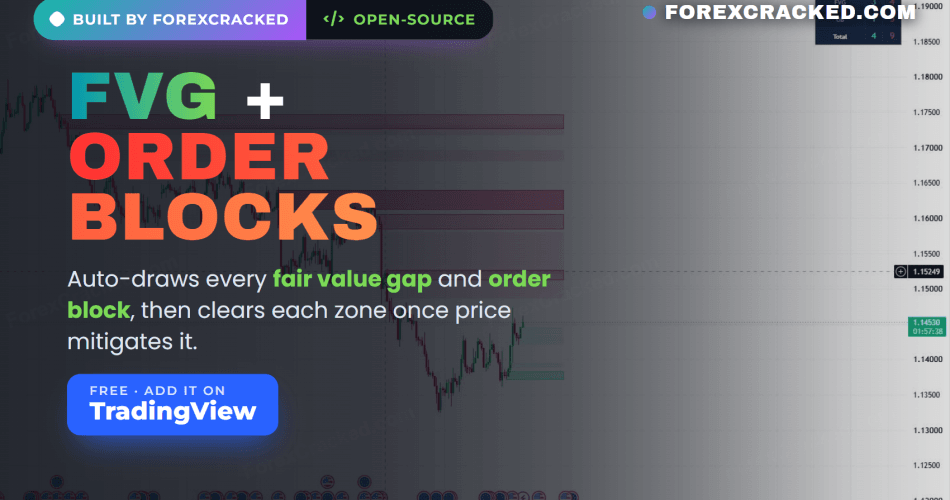
An order block and FVG indicator saves you the one job every smart money trader gets tired of: redrawing the same zones on every chart. We kept marking fair value gaps and order blocks by hand, wiping them, and drawing them again the next session, so we built one clean toolkit that does both for us. It is free and open-source on TradingView, it draws every fair value gap and order block as a zone, and it clears each one the moment price has traded through it. Your chart stays clean, and only the levels that still matter are left on it.
Key Takeaways
- Free, open-source TradingView toolkit that auto-draws both fair value gaps and order blocks as clean zones on any market and timeframe
- It clears each zone the moment price mitigates it, and ages out the old ones, so the chart only ever shows levels that are still in play
- Fair value gaps draw as soft fills and order blocks draw as bolder bordered blocks, so you can tell the two footprints apart at a glance
- A positionable panel keeps a live count of bullish and bearish gaps and blocks, and alerts fire on every new one
What the order block and FVG indicator does
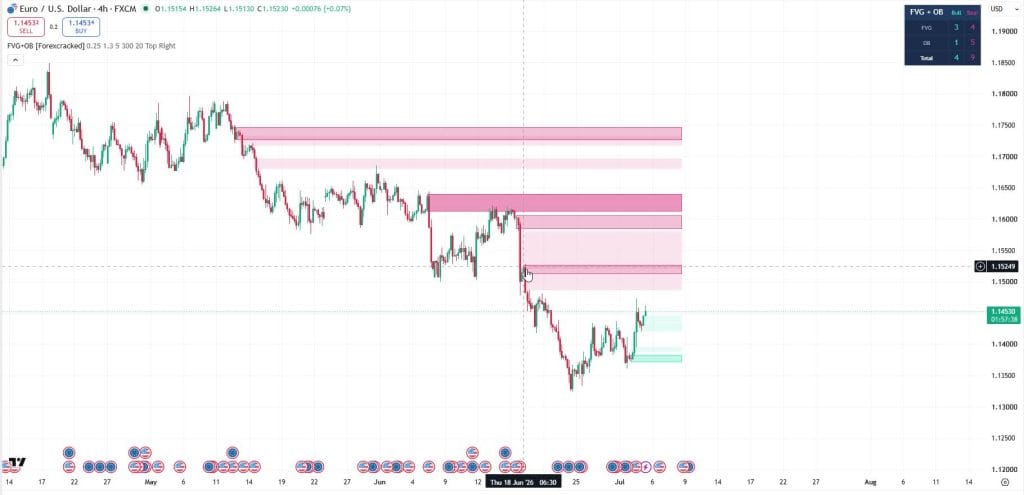
The toolkit watches every closed candle and marks two of the most watched smart money footprints as they form. A fair value gap is a three-candle imbalance, a spot where price moved so fast it left an unfilled gap between the wicks. An order block is the last opposing candle before a strong move away, the area where the move likely originated. Instead of you scrolling back and drawing these by hand, the indicator finds them, boxes them, and keeps them on the right side of your chart until they are used up. That last part is the point. A gap or block only stays on the chart while it is unmitigated, so you are never looking at stale levels.
How it finds fair value gaps
A bullish fair value gap forms when the low of the current candle sits above the high from two candles back, which leaves a clean gap in between. A bearish one is the mirror: the high of the current candle sits below the low from two candles back. Tiny gaps are noise, so the toolkit ignores any gap smaller than a fraction of the current ATR, which you control with the Min FVG size setting. Fair value gaps draw as a soft fill with no border, teal for bullish and pink for bearish, so they sit quietly in the background.
How it finds order blocks
An order block starts with a displacement candle, a strong move whose body is larger than a multiple of ATR that you set with the Displacement input. When a strong bullish candle prints, the toolkit looks back a few bars for the last bearish candle before it and marks that as a bullish order block. When a strong bearish candle prints, it marks the last bullish candle before it as a bearish order block. Order blocks draw more solid and carry a colored border, so they stand out from the softer gap fills. That visual difference matters when both footprints stack in the same area, which is often the highest-interest spot on the chart.
The part we actually built it for: auto-mitigation
Marking zones is the easy half. Keeping a chart clean is the hard half, and it is why most people give up on drawing these by hand. The toolkit manages every zone for you. Active zones extend to the right so you can see them approaching. When price closes through a zone, that zone is mitigated and the toolkit deletes it. When a zone gets too old to matter, it ages out and is removed. You set the maximum age in bars. The result is a chart that thins itself out, showing only the gaps and blocks that price has not yet dealt with.
The dashboard
A compact panel shows the live count of unmitigated bullish and bearish fair value gaps and order blocks, plus a combined total. It reads at a glance, so you can tell whether the chart is loaded with bearish supply above or bullish demand below without counting boxes yourself. Drop it in any corner with the Panel position setting.
Settings
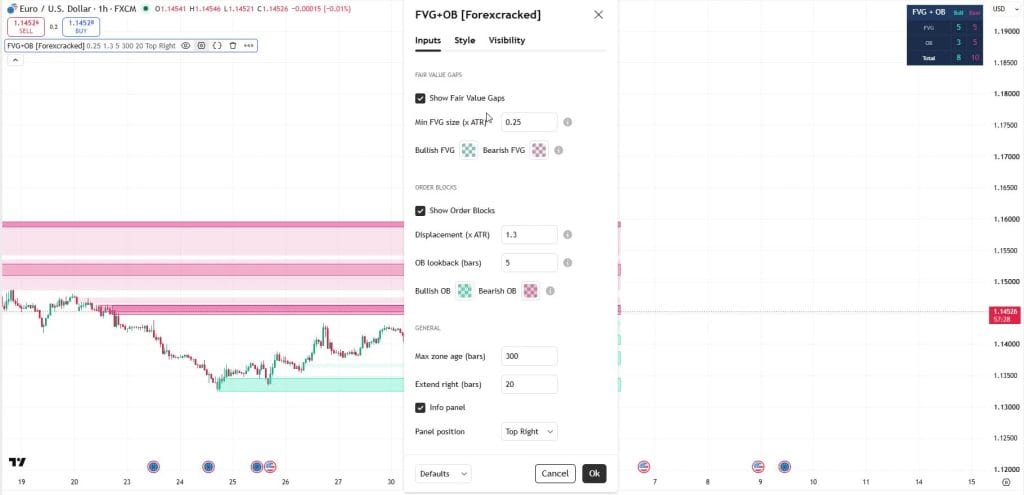
The defaults are a sensible starting point, and most traders will only touch two inputs:
- Show Fair Value Gaps: on, with Min FVG size at 0.25x ATR. Raise it to hide small gaps and keep only the meaningful ones.
- Show Order Blocks: on, with Displacement at 1.3x ATR. Raise it if you only want blocks left by the strongest moves.
- OB lookback: 5 bars. How far back to find the opposing candle before a displacement.
- Max zone age: 300 bars, and Extend right: 20 bars.
- Info panel: on, positioned top right by default.
Higher timeframes produce fewer and stronger zones, so if your chart feels crowded, step up a timeframe before you start hiding things.
How to add it on TradingView
- Open the script page: FVG + Order Block Toolkit [ForexCracked] (link below).
- Click the star to add it to your favourite indicators.
- On your chart, open the Indicators menu, go to Favourites, and click FVG + Order Block Toolkit [ForexCracked].
- Open the settings to set your gap size, displacement, and panel position.
FVG + Order Block Toolkit [ForexCracked]
![FVG + Order Block Toolkit [ForexCracked]](https://www.forexcracked.com/wp-content/uploads/2026/07/fvg-ob-chart.jpg)
A free, open-source toolkit that auto-draws fair value gaps and order blocks on TradingView and clears each zone once price mitigates it.
Pros
- Auto-draws both order blocks and fair value gaps
- Clears zones the moment price mitigates them
- FVGs and OBs are visually distinct
- Positionable live-count panel
- Free, open-source, works on any market/timeframe
Cons
- Marks structure, does not predict or trade for you
- A zone is an area of interest, not a signal
- Best paired with a higher-timeframe bias and your own confirmation
Summary
We built this after getting tired of redrawing the same fair value gaps and order blocks on every chart, then wiping them once price traded through. The toolkit finds both footprints for you, draws them as clean zones, and deletes each one the moment price mitigates it, so your chart only ever shows the levels that are still in play. A positionable panel keeps a live count of bullish and bearish gaps and blocks. Free and open-source.
 Need a TradingView account?The free plan runs this indicator, with charts, alerts and watchlists.
Start free
Need a TradingView account?The free plan runs this indicator, with charts, alerts and watchlists.
Start free

 Built by ForexCrackedWe tested 1,200+ indicators. Then we built our own.Six years of reviewing EAs and indicators went into FXC Fusion: two engines, the seven-panel cockpit, MT4 and MT5, from the team behind this site.
How to trade with it
Treat the zones as areas of interest, not automatic trade signals. The cleanest use is simple: decide your higher-timeframe bias first, then wait for price to return to an unmitigated order block or fair value gap in that direction. When it does, drop to your entry timeframe, confirm with your own read of the candles, and use a stop beyond the zone. A fair value gap sitting inside an order block is a stronger area than either on its own, because two footprints agree there. Size every trade off your stop distance at a fixed account risk, and remember the toolkit marks structure, it does not predict where price goes next.
Built on the same concepts as our MT4 tools
This toolkit bundles two footprints we also publish as standalone MetaTrader indicators. If you trade MT4 or MT5, grab the individual Order Blocks indicator and Fair Value Gaps (FVG) indicator, add the BOS & CHoCH market structure indicator to read the trend behind them, or browse the full free forex indicators library.
Frequently Asked Questions
The FVG + Order Block Toolkit is free and open-source. Add it to your charts here: FVG + Order Block Toolkit on TradingView
Risk disclaimer: The FVG + Order Block Toolkit is an analytical tool that marks fair value gaps and order blocks from price action. It does not predict future price movement and it does not place trades. Results depend on market conditions, your settings, and your own execution and risk management. This is shared for educational purposes and is not financial advice.


Discussion no comments yet
Is this still working?
Nothing here yet
No one has asked anything about FVG + Order Block Toolkit: A Free Order Block and FVG Indica yet. First question gets answered.