FXC Currency Strength
See which currencies are strong and which are weak, all 8 on one bar.
MT4 and MT5 in one zip. No sign-up, the file downloads straight away.
- Use it on as many accounts as you like, demo or live
- Every update free, and your chart tells you when one is out
- Chart template in the zip, ready to load
Currency strength meter MT4 and MT5
FXC Currency Strength is a free currency strength meter that puts the 8 major currencies on one bar from weak to strong, measured across all 28 pairs. It rates your chart's pair and lists the pairs furthest apart.
A currency's reading is how far it has moved against the other seven over the last 12 closed bars, each pair in its own normal size. 0 is unchanged, and the scale runs from -10 to +10.
It does not place trades. It shows you the picture, and you decide.
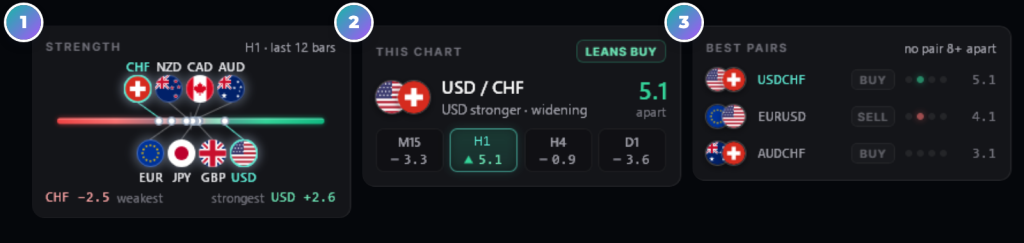
- 1The strength barEvery currency's flag at its reading, weak on the left, strong on the right.
- 2This chartYour pair's two currencies, how far apart they are, here and on M15, H1, H4 and D1.
- 3Best pairsThe three widest gaps your broker quotes, and which timeframes lean the same way.
Currency strength meter mt4 on real charts, every week
How to read the strength panel
The gap between two currencies decides the words on this chart's card. Each flag and row also has a tooltip with the numbers.
How to use FXC Currency Strength
Four steps, on any chart. The panel measures all 8 currencies whichever pair it's on.
- 1Add it to a chart. It finds your broker's symbol names and adds the pairs it needs to Market Watch.
- 2Read the strength bar. The strongest currencies sit to the right and the weakest to the left.
- 3Check your pair. The This chart card shows how far apart its two currencies are, here and on M15, H1, H4 and D1.
- 4Look at Best pairs. It lists the three widest gaps among the pairs your broker quotes.
A BUY or SELL tag reads the gap, not a trade. It has no entry, stop or target, so the decision stays yours.
Currency strength meter features
8 currencies on one bar
Each flag sits at its reading from weak to strong, with a streak from where it was 3 bars ago.
All 28 pairs
Every currency is measured against the other seven, not just the dollar.
Moves in their normal size
Each pair's move is divided by its own usual move, so a JPY cross and a CHF cross count alike.
Four timeframes at once
Pills show your pair's gap on M15, H1, H4 and D1, whatever timeframe the chart is on.
Best pairs
The three widest gaps among the pairs your broker quotes, with dots for the timeframes that lean the same way.
No repaint on the live bar
Readings come from closed bars, so the live bar never moves them. They change when a bar closes.
Alerts
A currency reaching your level, or a new strongest or weakest. Popup, sound, push or email. Off until you turn them on.
Readable by EAs
Eight buffers hold each currency's reading, -10 to +10, for the last 300 closed bars.
FXC Currency Strength: questions, inputs and versions
Questions about FXC Currency Strength
Is it really free?
Yes. It is yours to keep, on MT4 and MT5.
Does it place trades for me?
No. It is an indicator. It shows you the picture, and you place the trade.
Do I need an account?
No. The download starts straight away. You need one to leave a review.
Why does the panel show fewer than 28 pairs?
Your broker doesn't quote them all. Each currency is averaged over the pairs that are there, the footer turns amber, and its tooltip names the missing ones.
Does it work on gold or an index?
Yes, as a reading of the one major currency in that symbol: on XAUUSD the card shows the dollar alone. On a chart with none of the 8, it lists the pairs with the widest gaps.
Does it repaint?
Not on the live bar: readings use closed bars, so they change when a bar closes. A chart reload works them out again from your broker's stored bars.
Can an EA read the strength?
Yes. Buffers 0 to 7 are EUR, GBP, AUD, NZD, USD, CAD, CHF and JPY, from -10 to +10, for the last 300 closed bars.
FXC Currency Strength inputs
FXC Currency Strength versions and changelog
- 1.005 Nov 2026Latest
- New: first release.
Before you download: installing FXC Currency Strength
- A computer or a VPS. The MetaTrader phone apps can't run custom indicators.
- Allow DLL imports. The update check uses it. The chart template in the zip already has it on.
- In the zip: the MT4 and MT5 files and a chart template.
More help: How to install EAs and indicators in MT4 and MT5.
Download the zip and follow the guide. At the end, load the chart template FXC Currency Strength.
Install guideFXC Currency Strength reviews
Requests for FXC Currency Strength
Vote on what we build for FXC Currency Strength next, or add your own idea.
No requests for this one yet.
Adding a request takes a free account. We read every request first, so yours shows here once it's on the list.
An idea for a new indicator or EA? Ask on the roadmap
More dashboard tools

Wedge Patterns
Triangle Patterns