FXC London Breakout
The London breakout strategy on your chart: the Asian range, the first close past it, and the trade's stop and targets.
MT4 and MT5 in one zip. No sign-up, the file downloads straight away.
- Use it on as many accounts as you like, demo or live
- Every update free, and your chart tells you when one is out
- Chart template in the zip, ready to load
London breakout strategy on your chart
FXC London Breakout is a free London breakout strategy indicator for MT4 and MT5. It marks the Asian range as a box, and when an M5 bar in the London session closes past it, it shows the trade: entry, stop and three targets.
Signals are decided when an M5 bar closes: a breakout needs the close more than 2 pips past the Asian high or low, not a first touch of the line. So it does not repaint: once drawn, an arrow stays where it is. A dashboard shows both sessions, the range with its buy and sell lines, and what is holding a side back. There's one signal a day at most.
It does not place trades. It shows you the day's trade, and you decide. Its hours are your broker's server time, so set them for your broker first: the how-to-use steps below show how.
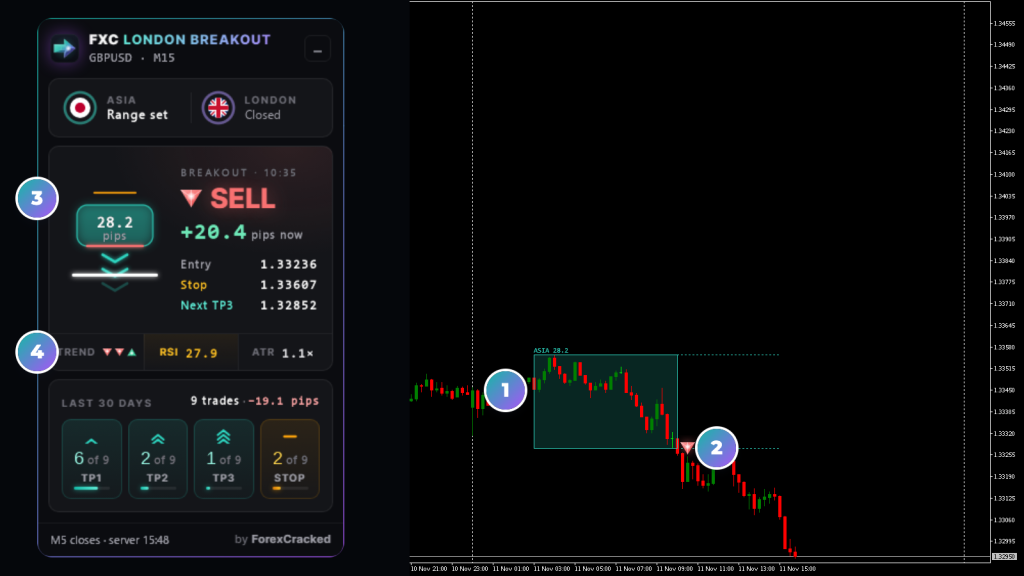
- 1The Asian boxThe range from 03:00 to 10:00 server time, with its size in pips. Grey when it's too small or too wide to trade.
- 2The arrowOn the chart bar holding the signal's M5 close: below it for a buy, above it for a sell.
- 3The tradeEntry, stop and TP1 to TP3 on the dashboard, beside the range they're measured from.
- 4The lampsThe trend on M15, H1 and H4, then RSI and ATR, amber when they hold a side back.
London breakout strategy on real charts, every week
Reading the London breakout dashboard
The word in the middle says where the day stands. The lines beside the box and the lamps under it say why.
How a London breakout signal is made
The same four steps every day, on your broker's server clock. A buy is drawn here; a sell is the mirror.
- 1The Asian range. M5 bars from 03:00 to 10:00 build the box. It has to be 15 to 80 pips, or there's no trade that day.
- 2The break. From 10:00 to 15:00, the first M5 bar that closes more than 2 pips over the high is a buy, under the low a sell.
- 3The filters. RSI over 70 holds a buy back, under 30 a sell, and a quiet ATR holds both. A later bar can still signal.
- 4The trade. Entry at that close. The stop is the range's other side plus 5 pips, and TP1 to TP3 sit 50, 100 and 150% of the range past the edge.
A fakeout turns it round. With Trade Judas Swing on, a bar that pokes more than 2 pips over the range and closes below its middle is a sell, if its body is at least 30% of the range. The mirror is a buy.
Then the day is done. One signal at most, even if its stop is hit.
How to use FXC London Breakout
Five steps, with a GBPUSD M15 chart as the example.
- 1Set the hours for your broker. They're your broker's server time; nothing adjusts them. On a GMT+2 winter, GMT+3 summer server, the defaults read as the table below. If your server's 10:00 isn't 08:00 in London, move all four hours by the difference. The dashboard's footer shows the server clock.
- 2Add it to the chart. Any timeframe under H4 shows the boxes and arrows. The breakout is read on M5 closes, whatever the chart shows.
- 3Before 10:00, watch the range build. BUILDING shows the high and low so far. When Asia ends the box is set, or it turns grey: too small or too wide, no trade.
- 4In the window, wait for the close. WAITING shows the buy and sell prices and how far away each is. A lock means RSI or ATR is holding that side back.
- 5When an M5 bar closes past a line, the arrow and the alert come, and the dashboard shows the entry, stop and three targets. Click the arrow to draw them. That's the day's one trade.
| Default hours | Server time | London time |
|---|---|---|
| Asian range | 03:00 to 10:00 | 01:00 to 08:00 |
| Signal window | 10:00 to 15:00 | 08:00 to 13:00, from the London open |
It places no trades. It shows the day's trade; the order, the size and the exit stay yours.
London breakout indicator features
Asian range, London window
M5 bars from 03:00 to 10:00 server time build the range, and only a close from 10:00 to 15:00 can signal. You set all four hours.
Decided at the M5 close
A breakout needs an M5 bar to close more than 2 pips past the Asian high or low: a touch isn't enough. It does not repaint: decided at the close, an arrow stays where it is.
Fakeout reversals
With Trade Judas Swing on, the default, a bar that pokes past the range and closes back beyond its middle is a trade the other way. Its body must be at least 30% of the range.
Entry, stop and three targets
Entry at the signal close, the stop past the range's other side plus 5 pips or an ATR multiple, and TP1 to TP3 at 50, 100 and 150% of the range. Click an arrow to draw them.
RSI and ATR filters
No buy with RSI 14 over 70, no sell under 30, and no trade while ATR is under half its 20-bar average. A later bar in the window can still signal.
A quality score from the trend
Each signal gets a quality score out of 5. A trade against the 50 and 200 EMAs on M15, H1 and H4 scores lower, but the trend never blocks one.
A London breakout dashboard
Asia and London with rings that fill as they run, the range with its buy and sell lines, each target as it's reached, and what is holding a side back.
Alerts with the whole trade
One alert when the day's signal bar closes, by popup, sound, email or push, with the entry, stop, three targets and the quality score.
FXC London Breakout: questions, inputs and versions
Questions about FXC London Breakout
Is it really free?
Yes. It is yours to keep, on MT4 and MT5.
Does it place trades for me?
No. It is an indicator. It shows you the picture, and you place the trade.
Do I need an account?
No. The download starts straight away. You need one to leave a review.
Does the London breakout signal repaint?
No, on closed bars. A signal is decided when its M5 bar closes, not when price first touches the line, and once drawn an arrow stays where it is. The box and its high and low move while Asia runs. An older arrow's quality score can drop a point as the days pass, because it reads a sliding window of M15 bars.
Does the trend filter block counter-trend signals?
No. The 50 and 200 EMAs on M15, H1 and H4 only score a signal: one against them gets a lower quality, shown in the alert and the arrow's tooltip. The filters that hold a break back are RSI and ATR.
Why is there no trade today?
The dashboard says why. Mondays and Fridays are days off by default, the Asian range has to be 15 to 80 pips, and a break must come by 15:00 server time and get past RSI and ATR. There's one trade a day at most, so nothing follows the first, even after its stop.
Does it work on gold?
Not at the defaults. On gold a pip counts as 0.01, so an Asian range of a few dollars reads hundreds of pips and every day shows Too wide. No signal comes on gold unless you change Minimum and Maximum Asian Range.
FXC London Breakout inputs
FXC London Breakout versions and changelog
- 1.0011 Nov 2026Latest
- New: first release.
Before you download: installing FXC London Breakout
- A computer or a VPS. The MetaTrader phone apps can't run custom indicators.
- Allow DLL imports. The update check uses it. The chart template in the zip already has it on.
- In the zip: the MT4 and MT5 files and a chart template.
More help: How to install EAs and indicators in MT4 and MT5.
Download the zip and follow the guide. At the end, load the chart template FXC London Breakout.
Install guideFXC London Breakout reviews
Requests for FXC London Breakout
Vote on what we build for FXC London Breakout next, or add your own idea.
No requests for this one yet.
Adding a request takes a free account. We read every request first, so yours shows here once it's on the list.
An idea for a new indicator or EA? Ask on the roadmap
More dashboard tools

Pivot Points
Supply and Demand