FXC Super Trend
A trend line that trails like a stop, and a panel that shows how close the next turn is.
MT4 and MT5 in one zip. No sign-up, the file downloads straight away.
- Use it on as many accounts as you like, demo or live
- Every update free, and your chart tells you when one is out
- Chart template in the zip, ready to load
What FXC Super Trend shows
FXC Super Trend draws a line that follows the trend and only moves one way, with a dotted band beside it and an arrow when a bar closes on a turn. A panel shows how close the next turn is.
The line and the turn come from the chart's highs and lows. ATR only sets the band's width and the arrow's distance, so this isn't the classic ATR Supertrend.
It does not place trades. It shows you the picture, and you decide.
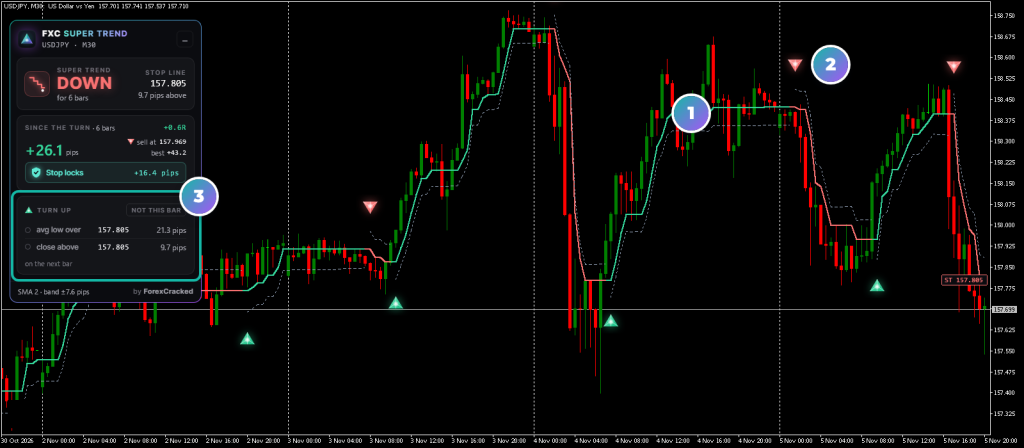
- 1The line and the bandMint in an up trend, red in a down trend, with the band dotted beside it.
- 2The arrowOn the closed bar where the trend turned.
- 3The turn cardThe two things the next turn needs, and the gap to each.
FXC Super Trend on real charts, every week
How to read the Super Trend panel
The top card gives the trend. The middle card reads it as a trade from the turn's close. The bottom card watches the turn away from it, and every part has a tooltip with the numbers.
How to use FXC Super Trend
Four steps, on the chart you trade. The panel reads that chart's timeframe.
- 1Add it to your chart. The line follows the trend and only moves one way. An arrow marks a bar that closed on a turn.
- 2Read the top card. It gives the trend, how many bars since the turn, and how far price is from the line.
- 3Read the middle card. It reads the trend as a trade from the turn's close, with the line as the stop.
- 4Watch the turn card. It says "not this bar", "possible now" or "on this bar", with each condition and its gap.
The panel's trade is a reading. No trade exists, so the decision stays yours.
How it differs from classic Supertrend
FXC Super Trend isn't the classic ATR Supertrend. The name is close, but the line and the turn are built differently.
| Classic Supertrend | FXC Super Trend | |
|---|---|---|
| The line | Built from ATR | Built from highs and lows |
| A turn | Price closes through the line | Two conditions on one bar |
| ATR | Sets the line | Sets the band and the arrow's distance |
| Panel | None as standard | The trend, the trade since the turn, the next turn |
Price through the line doesn't turn the trend by itself. The turn card shows both conditions and the gap to each.
Super Trend line and arrow features
A line that only moves one way
In an up trend it can only rise, in a down trend it can only fall, so it reads as a trailing stop.
Two conditions for a turn
The average of the highs or lows has to cross the trigger level, and a bar has to close past the previous bar's low or high.
Arrows on closed bars
An arrow prints when a bar closes on a turn, so live ticks can't repaint it. Its close is in the tooltip.
The trade since the turn
R, pips now, the furthest it has reached, and what a stop on the line would lock or risk.
The next turn, live
Both conditions as prices with the gap to each, and a countdown to the bar's close.
A band from ATR
A dotted band beside the line. You set its ATR period and how wide it is.
Alerts
Popup, sound, push or email when a bar closes on a turn, with the pair, timeframe and close.
Readable by EAs
The lines, bands and turns are in buffers. A hidden copy in an EA draws nothing and sends no alerts.
FXC Super Trend: questions, inputs and versions
Questions about FXC Super Trend
Is it really free?
Yes. It is yours to keep, on MT4 and MT5.
Does it place trades for me?
No. It is an indicator. It shows you the picture, and you place the trade.
Do I need an account?
No. The download starts straight away. You need one to leave a review.
Is this the classic Supertrend?
No. The classic one builds its line from ATR. Here the line and the turn come from the chart's highs and lows, and ATR only sets the band and the arrow's distance.
Why hasn't the trend turned when price is through the line?
A turn needs two things on one bar: the average of the last highs or lows past the trigger level, and a close past the previous bar's low or high. The panel's turn card shows both and the gap to each.
Do the arrows repaint?
Not on live ticks: an arrow is decided once, when its bar closes. The line, its colour and the panel can turn on the live bar and turn back before it closes. A chart reload works everything out again from the bars your chart has, so a chart with different history can differ near its oldest bars.
Can an EA read the signals?
Yes. Buffers 0 and 1 are the up and down lines, 2, 3, 6 and 7 the bands, 4 a turn up and 5 a turn down. Buffers 4 and 5 hold the arrow's price, and are empty on other bars.
FXC Super Trend inputs
FXC Super Trend versions and changelog
- 1.005 Nov 2026Latest
- New: first release.
Before you download: installing FXC Super Trend
- A computer or a VPS. The MetaTrader phone apps can't run custom indicators.
- Allow DLL imports. The update check uses it. The chart template in the zip already has it on.
- In the zip: the MT4 and MT5 files and a chart template.
More help: How to install EAs and indicators in MT4 and MT5.
Download the zip and follow the guide. At the end, load the chart template FXC Super Trend.
Install guideFXC Super Trend reviews
Requests for FXC Super Trend
Vote on what we build for FXC Super Trend next, or add your own idea.
No requests for this one yet.
Adding a request takes a free account. We read every request first, so yours shows here once it's on the list.
An idea for a new indicator or EA? Ask on the roadmap
More trend tools

Fibonacci Levels
Ultra Trend Pro