FXC Ultra Trend Pro
Trend arrows that wait for price to stretch to the outer band, each with its own stop.
Card or PayPal. Your licence key shows on screen and comes by email.
- Use it on 5 MT4 or MT5 accounts
- MT4 and MT5 files on one licence
- Every update free
- 14-day refund, whichever way you pay
- Help within 24 hours, 24/7. Ask a question
- No sponsor messages on our free indicators
A forex trend indicator with filters
FXC Ultra Trend Pro is a forex trend indicator for MT4 and MT5. It draws a trend line between two volatility bands, and prints an arrow only when price has stretched to the outer band and the line turns, with a stop on every arrow.
The line turns on the chart's own highs and lows. The bands sit around a 56 period average of the close, 2 and 3 ATR either side, and they decide which turns get an arrow.
A panel on the chart shows the trend, how far price is stretched, what the next arrow still needs, the levels in pips and the trend on every timeframe. It does not place trades: you decide.
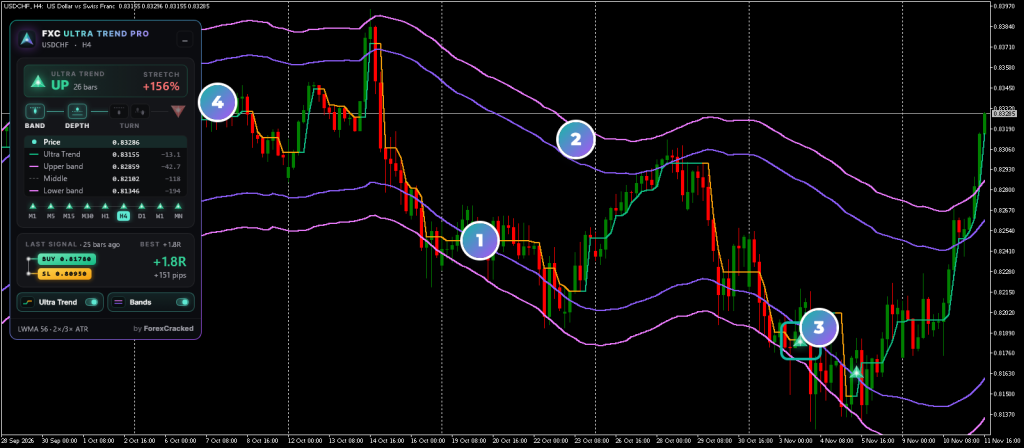
- 1The trend lineGreen while the trend is up, orange while it's down. Up, it only rises; down, it only falls.
- 2The volatility bandsViolet at 2 ATR from their middle, pink at 3 ATR. Price reaching a pink band is what an arrow waits for.
- 3The arrowOn the closed bar where the line turned, after a band touch. Click it to see its entry and stop.
- 4The panelThe trend, the stretch, the next arrow's conditions, the levels and every timeframe.
Forex trend indicator on real charts, every week
How to read the Ultra Trend Pro panel
Read the banner first, then the row of lamps: each one lights when the next arrow has what it needs. Every part has a tooltip with the numbers.
How to use FXC Ultra Trend Pro
A buy, step by step, on the chart you trade. A sell is the same, upside down.
- 1Add it to your chart. The line follows the trend. The violet bands sit 2 ATR from their middle, the pink ones 3 ATR.
- 2Wait for the stretch. Price has to reach the lower pink band first. The panel's Band lamp lights when it has.
- 3Watch the turn. The close must sit far enough below the middle (Depth), then the line has to turn up. The arrow lamp lights, with a countdown to the bar's close.
- 4Read the arrow and its stop. The arrow prints at the close. Click it to see the entry and the stop on the chart: the last ZigZag swing, plus the padding for that timeframe.
The panel's trade is a reading. It shows how the last arrow is doing from its close, in R. No trade exists, so the decision stays yours.
Trend line, band and arrow features
A trend line from highs and lows
It turns when the average low clears the line's trigger and a bar closes past the last high, or the mirror for down.
Two volatility bands
An LWMA of the close, or an SMA in Keltner mode, with 2 and 3 ATR either side. You set the period and both widths.
Filtered arrows
An arrow needs a touch of the outer band since the last one on that side, and a close far enough from the middle. ADX can be added.
Arrows on closed bars
An arrow is decided once, when its bar closes, and alerted then. The live bar never gets one.
A stop on every arrow
The last ZigZag swing beyond the arrow's bar, plus a padding in pips that you set per timeframe.
The next arrow, step by step
Lamps for the band, the depth, ADX and both turn conditions, with a countdown when the arrow is due at the close.
Every timeframe at a glance
The same trend line on M1 to MN, one triangle each, with your chart's timeframe lit.
Alerts
Popup, sound, push or email for each arrow, for a close beyond a band, and when the line turns on any of the nine timeframes.
FXC Ultra Trend Pro: questions, inputs and versions
Questions about FXC Ultra Trend Pro
Does it work on MT4 and MT5?
Yes. One licence gives you both files.
How many accounts can I use it on?
Five MT4 or MT5 accounts, demo or live. You can move a slot to a new account in My products.
Does it place trades for me?
No. It is an indicator. It shows you the picture, and you place the trade.
Do updates cost extra?
No. Every update is free, and the panel on your chart tells you when one is out.
What if it isn't for me?
Ask for a refund within 14 days of buying: ask us, or open a ticket from My products. No reason needed.
Do the arrows repaint?
An arrow is decided once, when its bar closes, and alerted then. The line can turn and turn back on the live bar until it closes. At the default ZigZag Backstep of 1, an arrow's stop stays put once it prints.
Can an EA read the arrows?
No. FXC Ultra Trend Pro is a premium indicator, and a hidden copy inside an EA gets no licence, so its buffers stay empty. It's made for the chart.
Why does it need Allow DLL imports?
The licence check uses it. The chart template in the download turns it on. Without it, MetaTrader 5 won't start the indicator, and MetaTrader 4 shows an alert saying so.
What happens if the licence can't be checked?
MetaTrader shows an alert with the reason, for example a key already on 5 accounts, and the indicator takes itself off the chart. A chart that was already licensed keeps working for 7 days without a check.
Not answered here? We reply within 24 hours, 24/7.Ask us
FXC Ultra Trend Pro inputs
FXC Ultra Trend Pro versions and changelog
- 1.0115 Nov 2026Latest
- Changed: the licence check is updated; nothing changes on the chart.
- 1.0011 Nov 2026
- New: first release.
Before you buy: installing FXC Ultra Trend Pro
- A computer or a VPS. The MetaTrader phone apps can't run custom indicators.
- Allow DLL imports. The licence check uses it. The chart template in the zip already has it on.
- In the zip: the MT4 and MT5 files and a chart template, on one licence.
More help: How to install EAs and indicators in MT4 and MT5, or open a support ticket.
Get the zip from your success screen or My products and follow the guide. At the end, load the chart template FXC Ultra Trend Pro. Your licence key is already in it, so the panel shows Licence active.
Install guideMoving to a new VPS or broker? Free up a slot in My products first.
Stuck installing or activating? Open a support ticket and pick this product.
FXC Ultra Trend Pro reviews
Requests for FXC Ultra Trend Pro
Vote on what we build for FXC Ultra Trend Pro next, or add your own idea.
No requests for this one yet.
Adding a request takes a free account. We read every request first, so yours shows here once it's on the list.
An idea for a new indicator or EA? Ask on the roadmap
More dashboard tools

Super Bands
MA Crossovers