

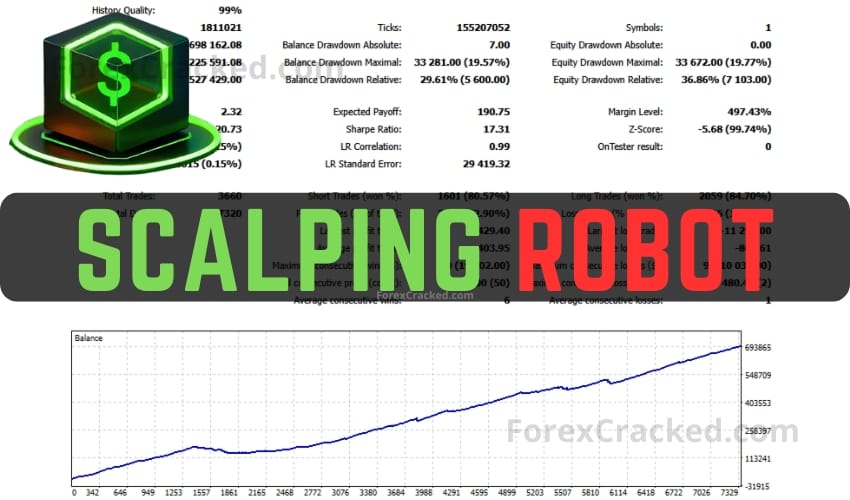
The Poverty Scalper Robot is an automated trading tool designed to identify and execute short-term trades on the M1 timeframe. It operates with five widely used currency pairs and seeks to capitalize on minor price fluctuations. The algorithm is structured to find high-probability entry and exit points, executing trades quickly in an attempt to maximize trading opportunities.
Key Takeaways
- How to download Poverty Scalper Robot: grab the free file below, then drop it into MetaTrader’s Experts folder using File > Open Data Folder. Two minutes, no signup.
- It trades the M1 chart across five major forex pairs, placing its own take profit and stop loss on every trade.
- There is no APK. This is an expert advisor that runs inside MetaTrader, not an Android app. Your phone can watch it, but cannot run it.
- The step everyone misses: the Algo Trading button at the top of MetaTrader must be green. Red means the robot sits there doing nothing.
- Works on MT4 and MT5. Same install, different folder (MQL4 or MQL5).
- M1 scalping is spread-sensitive. A robot that scalps the one-minute chart lives or dies on your broker’s spread, so demo it on your own broker first.
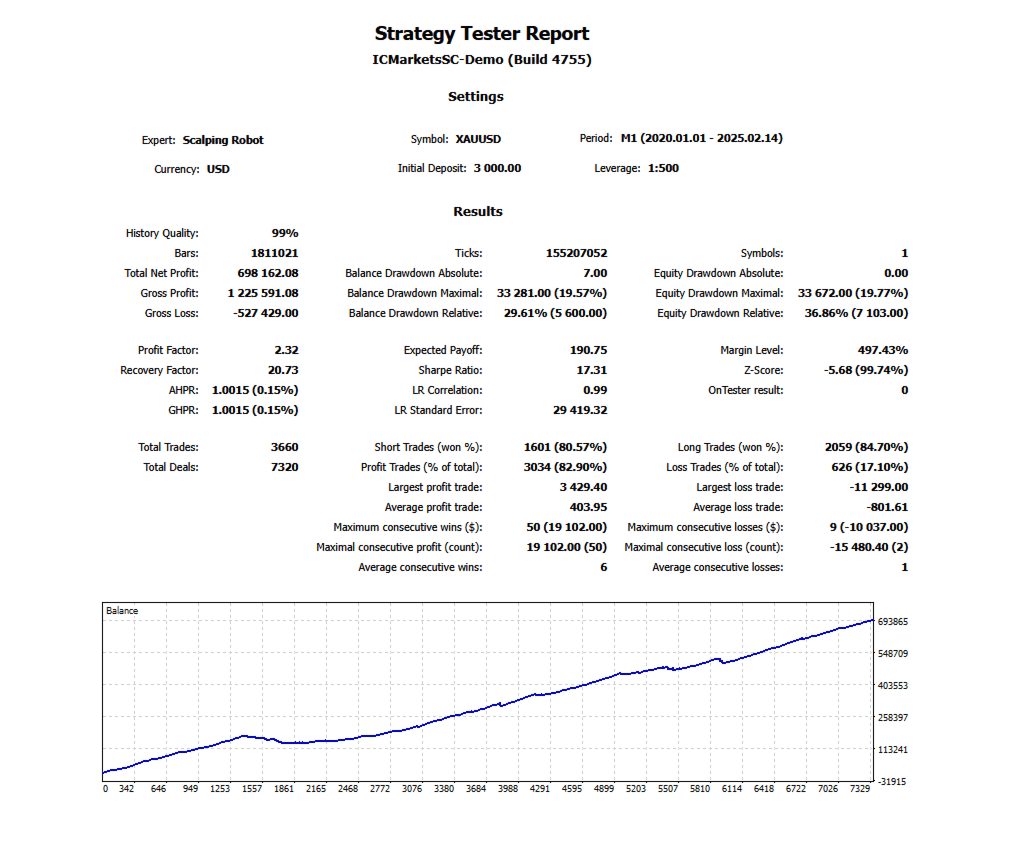
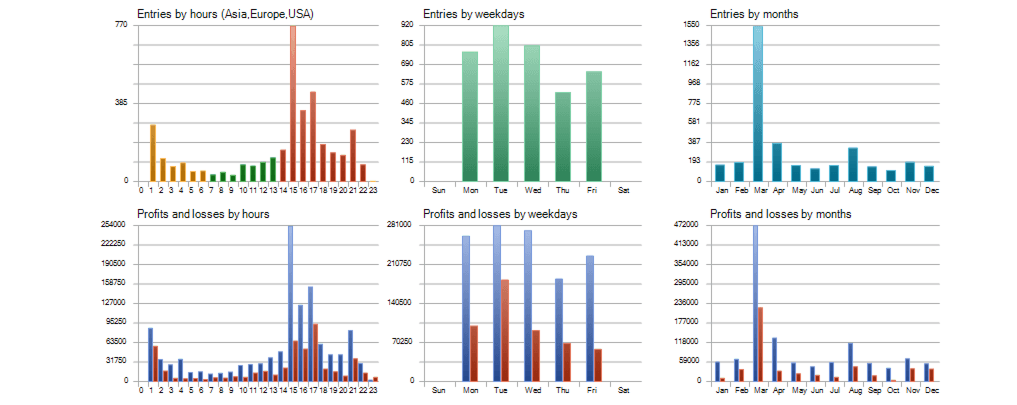
- No published track record. There is no verified live signal for this robot, so treat any number you see quoted elsewhere with suspicion.
The robot follows a scalping strategy, meaning it opens and closes trades frequently, targeting small profits from each movement. It operates from Monday to Friday, entering trades based on the signals generated by its algorithm. Each trade is set with predefined Take Profit and Stop Loss levels to manage risk. Additionally, there is an extra security feature (max drawdown percentage) to help control potential losses.
The robot setup is straightforward. By default, all parameters are set and ready to use. users only need to adjust the lot size according to their risk preferences. Additionally, the accompanying panel shows helpful information such as the forex calendar, daily pips gained, daily profit figures, and the current market session status.
If you want to use this robot alongside manual analysis, be sure to browse our forex indicators library for complementary tools.
How to Download Poverty Scalper Robot on MT4 and MT5 (Install Guide)
Poverty Scalper is an expert advisor, not an app. You download one file, drop it into MetaTrader’s Experts folder, and switch algo trading on. It takes about two minutes, and there are exactly two places people get stuck.
Step 1: Download the file
Use the free download button on this page. No signup, no payment. The file ends in .ex4 for MetaTrader 4, or .ex5 for MetaTrader 5. If you came here expecting an APK, read the next section first.
Step 2: Open the right folder
In MetaTrader, go to File > Open Data Folder. Don’t go hunting for MetaTrader inside Program Files. The folder you need isn’t there, and that’s the number one reason an install fails before it starts.
In the window that opens, go into MQL4 (MT4) or MQL5 (MT5), then into Experts, and drop the file in.
Step 3: Restart and attach it to a chart
Close MetaTrader completely, then open it again. A refresh won’t do it. In the Navigator panel on the left, open Expert Advisors. Poverty Scalper will be sitting there. Drag it onto the chart you want it to trade.
Step 4: Turn on algo trading
When the settings window opens, go to the Common tab and tick Allow Algo Trading. Then look at the Algo Trading button at the top of the platform. It has to be green. If it’s red, the robot sits on the chart and does nothing, which is why most people think it’s broken when it isn’t.
How you know it worked: a smiley face appears in the top-right corner of the chart. A sad face means algo trading is still off.
Is There a Poverty Scalper APK or Android App?
No, and there won’t be one. Poverty Scalper is an expert advisor: a file that runs inside MetaTrader. It isn’t an Android application, so there’s no APK, and any site offering you a “Poverty Scalper APK” isn’t offering you this robot.
What people actually want when they search for it is reasonable though, and you can have it.
Can you run it from your phone?
You can watch it from your phone. You can’t run it from your phone. The MetaTrader mobile app doesn’t run expert advisors at all. That’s a limit of the app, not of this robot.
The setup people are really looking for
- Run the robot on MetaTrader on a VPS, a machine that stays on around the clock so it never stops
- Install the MetaTrader mobile app and log into the same account
- The robot trades on the VPS, your phone shows the trades live
That gives you the phone experience without a phone app that can’t exist. An M1 scalper especially should never run on a home laptop that sleeps or drops its wifi, because a missed exit on an open trade costs real money.
Please test in a demo account first for at least a week. Also, please familiarize yourself and understand how this Scalping EA works, then only use it in a real account.
Recommendations for Scalping Robot
- Minimum account balance of 1000$.
- Works best on EURUSD, GBPUSD, USDJPY, EURJPY and XAUUSD. (Work on any Pair)
- It works best on M1. (Work on any TimeFrame)
- Scalping Robot should work on VPS continuously to reach stable results. So we recommend running this Scalping Forex Robot on a reliable VPS (Reliable and Trusted FOREX VPS – FXVM)
- Low Spread, Slippage, and quick execution account is Recommended, especially during rollover time (Find the Perfect Broker For You Here)
Settings That Actually Matter
| Setting | What to do |
|---|---|
| Timeframe | M1. That’s what it was built for. Putting it on H1 doesn’t make it safer, it just makes it something else. |
| Pairs | Stick to the five majors it ships for. Exotics have wider spreads and an M1 scalper cannot absorb that. |
| Risk control | Start at the lowest setting the robot allows. You can raise it after you have seen a month of your own results, not before. |
| Take profit / stop loss | Leave the defaults until you have demo data. The robot places its own on every trade. |
| Broker spread | The one that decides everything. Run it on a raw or ECN account if you have one. A 2 pip spread on M1 eats the edge. |
| Uptime | VPS. An M1 robot with an unmanaged open trade is the whole risk. |
Who This Robot Is For
- Traders who want a hands-off M1 scalper on the majors and already have a VPS, or will get one
- People on a raw or ECN spread account, where scalping actually has room to work
- Anyone happy to run a demo for a few weeks before risking real money
Who It’s NOT For
- Anyone looking for a phone app. There isn’t one, and there won’t be.
- Traders on a wide-spread standard account. M1 scalping and a 2 pip spread don’t mix.
- Anyone who wants to run it on a home laptop that sleeps overnight
- Traders who need a verified track record before they’ll test something. There isn’t one for this robot.
Updated on 2025/09/18
Poverty Scalper Robot V5
An M1 scalping expert advisor for five major forex pairs. Places its own take profit and stop loss on every trade, with a risk-control setting and an on-chart stats panel.
Pros
- Places its own take profit and stop loss on every trade, so no position is left without an exit
- Has a built-in risk-control setting rather than a fixed lot size hard-coded in
- Shows live trading stats on the chart, so you can judge it without digging through the account history
- Ships preconfigured for the five major forex pairs, so the parameters are set by default and you mainly adjust the lot size to your own risk
- Built specifically for M1 rather than a higher-timeframe robot dropped onto a fast chart
Cons
- No published live signal or verified track record, so its real performance is unknown
- M1 scalping is highly spread-sensitive, and on a standard wide-spread account the edge can disappear entirely
- Needs a VPS to run properly, which is an extra cost most beginners don't budget for
- Fixed to five majors, so there's no way to point it at whatever you actually trade
Summary
A genuinely useful free M1 scalper for the majors, with real risk control and its own TP/SL on every trade. The catch: there is no published track record, so demo it on your own broker's spread before you trust it with real money.

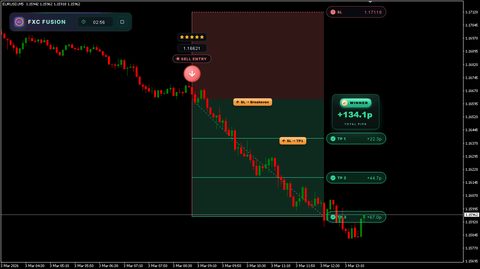
 Built by ForexCrackedWe tested 1,200+ indicators. Then we built our own.Six years of reviewing EAs and indicators went into FXC Fusion: two engines, the seven-panel cockpit, MT4 and MT5, from the team behind this site.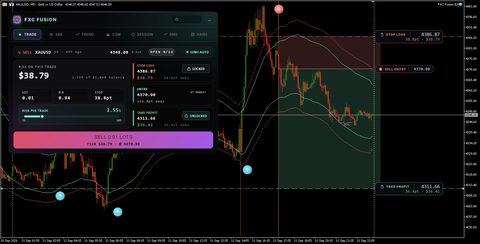
Your download will start automatically. If it doesn’t, click here.Right now a download can take up to a minute to start. Please wait a moment, or use click here.
- Read More Bitcoin Trading Bot FREE Download
How It Compares to Our Other Free Scalpers
- Scalping Forex Trading Robot for MT5 is the one to try if you’re on MetaTrader 5 and want a scalper built for it rather than ported to it.
- EURUSD Forex Scalping Robot ships with its source code, so if you want to read what a scalper is actually doing before you run it, start there.
- Luxor Scalping Robot MT4 is the single-pair alternative if running five majors at once feels like too much exposure.
Frequently Asked Questions
Conclusion
The Scalping Robot is intended for traders who prefer an automated approach to scalping. It aims to capture small price movements and includes built-in risk management features. Users should be aware of market conditions and costs associated with frequent trading when using this type of strategy.
While this scalper performs well in ranging markets, you should always diversify your automated strategies. Browse our verified library to find the best forex EA for your specific risk tolerance and broker setup.
More From ForexCracked
Browse our full collection of free forex expert advisors, or narrow it to the scalper EA collection and our free MT5 robots. If you’re new to MetaTrader 5, the MT5 EAs and indicators hub covers the tools worth starting with. Running an M1 scalper properly means keeping it online, so read how to get a forex VPS for free, and pick your account carefully using our forex broker reviews, because spread decides whether a scalper works at all. If the robot loads but never trades, our guide to why MT4 EAs and indicators stop working covers every cause we’ve seen. And if you want to understand the risk model before you run anything automated, read up on martingale robots and why we flag them.
Risk disclaimer. Trading forex carries risk and you can lose money. Poverty Scalper has no published live track record, so nobody can honestly tell you what it returns, including us. Run it on a demo account with your own broker for a few weeks before it touches real money, and only ever risk money you can afford to lose. This page is educational content, not financial advice.


Discussion 68 comments
Is this still working?
is there an MQL5 version of this ea?
Only the MT4 version is available for this one. There is no MT5 version on the site right now. The closest MT5 scalpers on the site are RoyalPrince MT5 Scalper EA (https://www.forexcracked.com/forex-ea/royalprince-mt5-scalper-ea-free-download/) and Mavrik Scalper EA (https://www.forexcracked.com/forex-ea/mavrik-scalper-ea-free-download-mt5-xauusd-ai-robot-review/). They are different products, not the same EA. to get notified if mt5 update comes , join Telegram https://t.me/forexcracked or subscribe to the newsletter in the site footer
Exness
the file i downloaded doent contain MQL5 to use to use the file of “ex5”
Where can I download it please
why there is no MT5 file in download file? only MT4
Where i can download it pls?
This bot is exiting, but I can only use it for testing. The new MT4 prevent it from running. Have anyone found an updated version that works on the latest MT4 release?
I need a robot 🤖, poverty scalper robot 🤖 trading app
I want money indeed robot
Can’t attach it on new MT4 build, please update.
Ok
Alguem tem este robo atualizado? ele parou de funcionar hoje !
Esse robo parou de funcionar? Alguem tem a atualização dele !!! se tiver e poderem me enviar nao consigo entrar com ele mais !
Forex trading
how to paste this robot to chart, i cannot see ok option
Alguem tem um set bacana para este robo, ele é um otimo robo mais quebra a conta se nao tiver um stoploss
Does this robot have an expiration date?
Admin please jesko upload here
Working on nasdaq very good
Fake EA. Don’t use it!!!!!
Fake backtest. Disguised martingale!!!
Orrible Back test on eurusd
EL PROBLEMA QUE HA HABIDO CON ESTE ROBOT QUE NO HAN SUBIDO LOS INDICADORES NECESARIO DENTRO DE LA CARPETA DE DESCARGA, SOLO HAN SUBIDO EL ROBOT ,SIN INDOCADORES, POR ESO EL ROBOT LO UNICO QUE HACE ES ABRRI COMPRAS O VENTAS HASTA QUE PETE LA CUENTA
It’s good
Excellent, I tried it for two weeks and it was very wonderful
Edit: It’s dangerous
Hello sir, could you please share the scalping robot 3.0 source code with me if you have it?
I don’t like it. No SL, completely different from tester, earn $2, loss can be $100, bad in trends and so on. Waste of time
Can we get the 5.0 versions? Thank you admin!
i use this ea it work my fund 100$ it profit 45$ and next day 60$ 120% in two day it work but now 16/4 gold new hight it not work i lost 50$ but it ok
it work on sideway not trend
onde faz o download? Não em lugar nenhum.
The new Version 4.0 has a Stop Loss parameter. Wonder if Admin will be so kind as to provide us that new version ?
Run on demo and use EA copy to real account
That’s a brilliant idea…didn’t ever come to my mind !!! Thanks
Just to update, I closed all my positions manualy in lost, aboout 150$ lost, as I said this EA doesn’t have any automatic SL as it says. and the EA in the backtest is 100% different from demo, and on demo it works 100% different from a live account. I don’t recomend this EA if you love your money.
so Just to give an update on this, I used it on demo, 5 pairs, gold, EURUSD, USDJPY, EURJPY, GBPUSD and it worked fine, on the smallets lot 0.01 I got like 272 $ profit in 3 days. so I tried on Real Account with 500 $ from Tuesday until now I’m floating in Lose, I Manualy closed gold on lost because yesterday movement the robot insist on selling, the other pairs got my lost back, but it always keeps floating in lose, bearly wins trades. to be honest I think this Robot is good if the price is Ranging if it takes one deriction the robot will margin you, because until now I don’t see any Auto SL as the Arthour says. and another advice if you run a pair against dollar, try to run another one with Dollar movement. but again It bearly wins trade if the market moving in one deriction, so today is 14-mar, I have 21$ in lost, and 90$ floating in loss, pairs opens USDJPY, GBPUSD , GBPJPY, EURJPY, USDCHF. I will update if the robot will get himself out of this shithole. and I removed EA from XAUUSD.
Thanks for the update. In my case, I have been testing it on a demo account for 1 week. I tried this EA on different types of accounts and Zero is the one that had the best results, which makes sense because these accounts offer almost 0 spread and low commissions. so far it has generated around $50 per day, set the execution time outside of the NY session to avoid volatility and so far it seems to work well. My idea is to try it for 2 more weeks and see the results to just move to a real account. I advise adjusting the daily drowdown by 20% to avoid large losses
sorry, I forgot to clarify that I have only tried the EA in XAUUSD
I use it on 2 accounts
Darwinex account it works fine
VantageFX demo it doesn’t take any trade
I have the message : Scalping Robot 3.0 EA XAUUSD,M1: Sellstop price is too close – block new trades
thanx to Azman and Trader92 for the advices
Same here, 1-2 % daily profit, with 3% around DD
Don’t be greedy
Please share some setting
Default settings, just adjust lot size. 500/0.01
what do you mean by 500/0.01
you mean 0.01 lots ?
whats the 500 stand for
do we put that in there as well or just 0.01
thank you
0.01 lot per $500
ohh i see what you mean, ok i get it
thank you for your reply
How can I setup this scalping EA on the inputs
Yes, I can confirm the cracked version supplied here is limited intentionally so people wont be able to modify the settings that is why it behaves weird, also it doesnt have stop loss and open max trades and if the price goes against your trades it just keep them there and doesnt do much eventually blow out your account, garbage EA…
Got the right settings had 6 trades in with 100% win rate and 89% gain already. 😀
share some settings
share settings please
well i guess you are lucky that it opens trades, because for me it opened 2 trades in 4 days now, and i am running it on all the pairs
what type off acc u used? Standard or cent or RAW or ECN.. probably the spread of std/cent caused less trade.. im using RAW/ECN and look good.. with 1000$ capital, i got 50++/day
Yeah for me it opens a lot of trades in XAUUSD and in US100 nasdaq and DJ30, these work fine, but in other forex pairs it only opens 1 or 2 when I try it in the strategy tester, but again there is a problem here, I think the Author of the EA programed the EA with certain template for the tester so when people test it it will look fine and good, but when use it on real account or live demo account it works differently. I get like 20 to 30% drawdown just to close it on 3 dollar profit. but in the Tester it only gets 1 – 5 % drawdown and 10$ profit.
this EA is werid, in the strategy tester it works that it opens a buy and a few pips it opens a sell the same lot size but in the end it closes in the profit, which is good, but when try it in the demo account it works differently, it opens a buy and if the price goes down it keeps opens buy and buy which makes the drawdown really high. if it work the same as the strategy tester this EA will be the perfect EA, but I knew that is too good to be true unfortunaly. I will keep testing it in the demo and see what happens.
yes, the backtest and live test is different. still profitable if you try at gold but the risk is too high since there is no SL like on the backtest
i noticed that as well
and it doesnt trade that much
i have it running on all pairs and only had 2 trades in 2 days and only on the gold market
weird
Why this EA close trades at profit of $3 no matter what lot size you select on settings, anyone has idea?
Can I have the mq4 file of this EA?
click on the download button
the file is all there
Hello, I haven’t seen MQL4. Can you share it with me?
How to connect to metatrade
Why is the bot not working on real account
Link
Kenya
Nairobi
Can I get a robot