

In the world of automated Forex trading, the FXStabilizer PRO EA is a legend. Originally priced at $739, it has built a reputation as one of the few Grid systems that can actually survive long-term market cycles.
While many older versions found online are broken or outdated, the version available here at ForexCracked has been tested and verified to work on the latest Metatrader 4 builds in 2026.
Whether you are looking to automate your income with its “Durable” mode or seeking aggressive gains with “Turbo” mode, this guide will show you how to install, configure, and profit with FXStabilizer PRO EA.
What Makes FXStabilizer PRO EA Different?
Unlike cheap scalpers that stop working after a few months, FXStabilizer PRO uses a unique algorithm designed for longevity. It is a Grid/Martingale system, but with a crucial difference: it calculates the “Hard Drawdown” limit to prevent margin calls.
Key Features of This Version:
Multi-Currency Support: Optimized for AUDUSD, EURUSD, EURJPY, USDJPY, USDCAD, CHFJPY, EURGBP, and GBPCHF.
- Unlocked for Unlimited Accounts: Use it on as many Demo or Live accounts as you wish.
- Two Distinct Modes:
- Durable Mode: The recommended setting for steady, long-term growth. It trades less frequently but handles market crashes significantly better.
- Turbo Mode: A high-frequency setting that maximizes profit potential but increases risk.
Please test in a demo account first for at least a week. Also, Make yourself familiar with and understand how Ilan FXSTABILIZER Pro Robot works, then only use it in a real account.
Recommendations for FXSTABILIZER PRO EA
- Minimum Account balance of 500$(High risk), We recommend a 100$ Cent account.
- Work Best on EURUSD, EURJPY, USDJPY, USDCAD, CHFJPY, EURGBP, GBPCHF, and AUDUSD(Work on any currency pair)
- Work Only on H1 TimeFrame (Work on any time frame)
- The strategy With this EA is to profit fast and then withdraw fast. Withdraw the deposit after doubling the deposit. (This EA has real good potential with this method)
- For best performance, We Recommend running Forex Robot FREE Download 24/5. Recommend using a VPS (Reliable and Trusted FOREX VPS – FXVM)
- Low Spread ECN account is also recommended (Find the Perfect Broker For You Here)
Input Parameters For this MT4 Forex EA
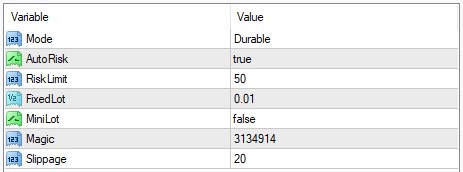
- Durable mode has a reliable and stable style of trading. It is perfect for a long time trading. The minimal deposit needed for Durable mode is $2500 using a 0.01 lotan class="fc-gloss-tip" data-slug="lot" tabindex="0">lot.
- Turbo mode is an aggressive and more profitable style of trading of FXSTABILIZER. It is the best for risky trading with maximal profit. The minimal deposit needed for Turbo mode is $150 using 0.01 lot.
- If you leave Autorisk as enabled, Fxstabilizer will set the first lot automatically, based on your deposit. If you disable Auto risk, the EA will set the first lot based on the next Fixed lot parameter. You can set there any lot you want.
- RiskLimit is money management of Fxstabilizer. You can limit your maximal losses using this option. It is a part of your deposit (in percentages), which you can risk.
- If your account has a mini/micro lot (do not confuse it with a cent account), you should enable minilot option. Be careful, in case of improper use. You can get bigger losses.
- Usually, Magic number of FXSTABILIZER is unique, so you can use it with other Eas without any problem. Change its value only if your other EA uses the same magic number.
- You should leave slippage as default to prevent the interruption of the EA’s logic. But there is a possibility to change it if needed.
We recommend trading 24/5 on AUDUSD currency pair only, using durable mode with enabled AutoRisk and Risklimit 50% (or less). Recommended leverages are 1:200 – 1:1000. Minimal possible leverage is 1:100, but By reducing a value of risklimit, leverage can be even smaller
Strategy Analysis: How It Profits
FXStabilizer Pro EA operates by building a “basket” of trades.
- Counter-Trend Entry: It identifies overbought/oversold conditions and enters against the trend.
- Smart Averaging: If the market moves against the position, it adds new trades at calculated intervals (Grid).
- Profit Closure: Once the total basket reaches a net profit, it closes all trades simultaneously.
Expert Tip: For 2026 market conditions, we strongly recommend running the AUDUSD pair on Durable Mode. This pair has shown the most stability for grid strategies this year.
Installation Guide (Important)
Since this is an unlocked version, you must follow these steps precisely to ensure it runs correctly on your MT4 terminal:
- Load Preset: We have included a
.setfile optimized for current volatility. Load this in the Inputs tab. - Download: Get the file from the link below.
- Allow DLLs: Go to Tools > Options > Expert Advisors and strictly check the box “Allow DLL Imports”. This is required for the EA’s logic to function.
- Timeframe: Attach the EA to the H1 (1-Hour) chart. Do not use M1 or M5.
2026 Alternative: A Modern Suggestion
While FXStabilizer Pro EA is a fantastic “classic” robot, the Forex market has evolved. Algorithms today deal with faster news spikes than they did in 2018.
If you enjoy the automated profits of FXStabilizer but want a bot that is specifically built for 2026’s High Volatility, we recommend testing the Medici Forex EA.
- Why consider the alternative? The Medici EA includes a News Filter that stops trading during NFP and FOMC events—a feature that FXStabilizer lacks.
- Performance: It offers similar monthly gains with lower drawdown risk.
Check Out the Medici Forex EA Review Here
Download FXStabilizer PRO EA (Unlocked)
This package includes the fully functional EA (.ex4), the required libraries (.dll), and optimized presets.
Mirror Download FXStabilizer PRO EA – Free Version
FAQ
Is this version safe for Live accounts?
Yes, this version has been tested and is stable. However, because it is a Martingale strategy, you should always start with the minimum lot size (0.01) and ensure you have sufficient balance.
What is the minimum deposit?
For Durable Mode, we recommend a minimum of $1,000 on a Standard account or $100 on a Cent account. Grid systems need “breathing room” for drawdown.
Why is the EA not opening trades immediately?
FXStabilizer Pro EA is not a scalper. It waits for specific market conditions. It may take 12-24 hours to open the first trade. Be patient.
Recommended Resources
To get the best performance out of FXStabilizer Pro EA, you need the right environment:
- Low Spreads: Grid systems pay a lot of spread. Use a Zero Spread Forex Broker to save money on every trade.
- 24/7 Uptime: Do not run this on your home laptop. Use a Reliable Forex VPS to ensure the EA never disconnects while managing open trades.
- Risk Management: Learn how to calculate safe lot sizes with our Forex Risk Management Guide.
Risk Warning: Automated trading involves significant risk. FXStabilizer Pro EA uses a Martingale strategy which can be risky during extreme market trends. Past performance is not indicative of future results. Always test on a Demo account first.


Discussion 17 comments
Is this still working?
Hello fellow traders,
I can’t backtest this EA. Any idea what’s wrong ?
Download Link doesn’t work. Could you update the link please?
Download does not work
Hello,
I have the error Order Modify Error 1
Could somenone do a check?
I‘ve the same problem. OrderModify Error 1 in GPBCHF.
It requires verification
I can’t seem to be able to do backtests, I keep getting ordersend error 131. Does anyone know how to get backtests?
where is the download button?
ok got it. tnx fxc
el link de descarga?
Backtest requires you to enter .dll how do I get backtest?
If you want to lose money, use this EA.
The link is broken
It works fine
Can you paste the link that works here?
I have back tested this, and essentially its martingale and you lose all your money at some point. My backtests go all the way back to 2004… not 2014 like in the screenshots above.
Have anyone use it and got Good profit?