

You know the move. The SMI dives under minus 40, hooks back up through its signal line, and the chart looks like it’s begging you to buy. Sometimes it is. Sometimes that hook is just a pause in a slide that keeps going. A plain stochastic momentum index indicator can’t tell you which of the two happened more often on the chart in front of you. This one can.
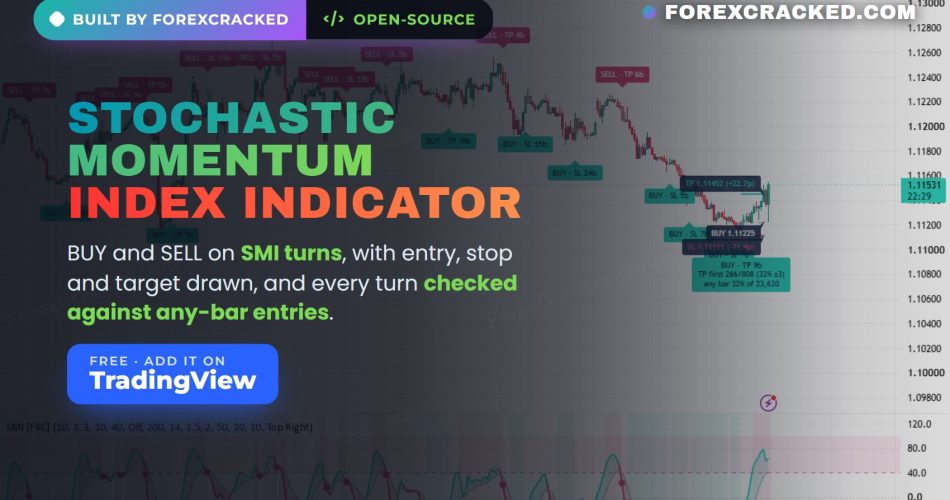
Stochastic Momentum Index (SMI) Signals + Stats is free and open-source on TradingView. It draws the SMI in its own pane, the way you expect, and puts the work on the price chart: a BUY or SELL when the SMI crosses its signal line after a close in a zone, an entry, stop and target for that turn, and a record of how every one of those plans ended. Then it does something none of the SMI indicators on TradingView’s first search page did when we checked in October 2026. It opens the same trade on every bar of the chart, counts those plans the same way, and prints both numbers side by side.
On EURUSD 1-hour, the first chart we published it on, SMI BUY turns reached their target before their stop 33% of the time. The same trade, opened on any bar, got there 32% of the time. That’s worth knowing before you trade the next hook.
Key Takeaways
- The stochastic momentum index (SMI) is a momentum oscillator that shows where the close sits against the midpoint of its recent high-low range, on a scale of minus 100 to plus 100
- Free, open-source stochastic momentum index indicator for TradingView: the SMI, its signal line and the plus and minus 40 zones in a pane, with BUY or SELL printed on price when the SMI closes in a zone, then crosses its signal line on a closed bar before getting back to zero
- Every signal gets a plan, and the newest one is drawn on the chart: entry at the signal close, stop 1.5 ATR away and a target at twice the stop distance, with the stop and the target multiple both editable
- Every plan is followed until the stop or the target is touched, or 50 bars pass, and the same plan is also started on every bar for comparison. The panel and the newest label show both figures with their sample sizes, and a rough noise band on the signal figure
- Candles are colored by the SMI, everything is calculated on the chart’s own timeframe, and signals don’t change after they print
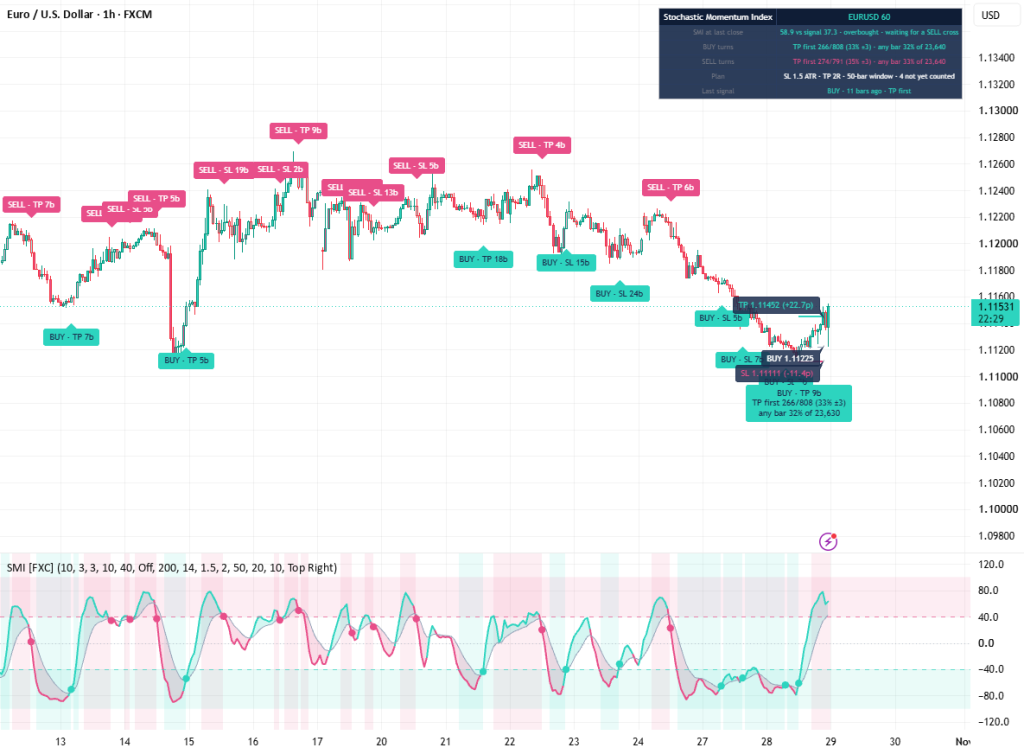
Table of Contents
What is the stochastic momentum index?
The stochastic momentum index (SMI) is a momentum oscillator William Blau introduced in 1993. It measures where the close sits against the midpoint of the recent high-low range, with the distance and the range smoothed separately. It runs from minus 100 to plus 100 and reads zero when the close sits right in the middle of the range.
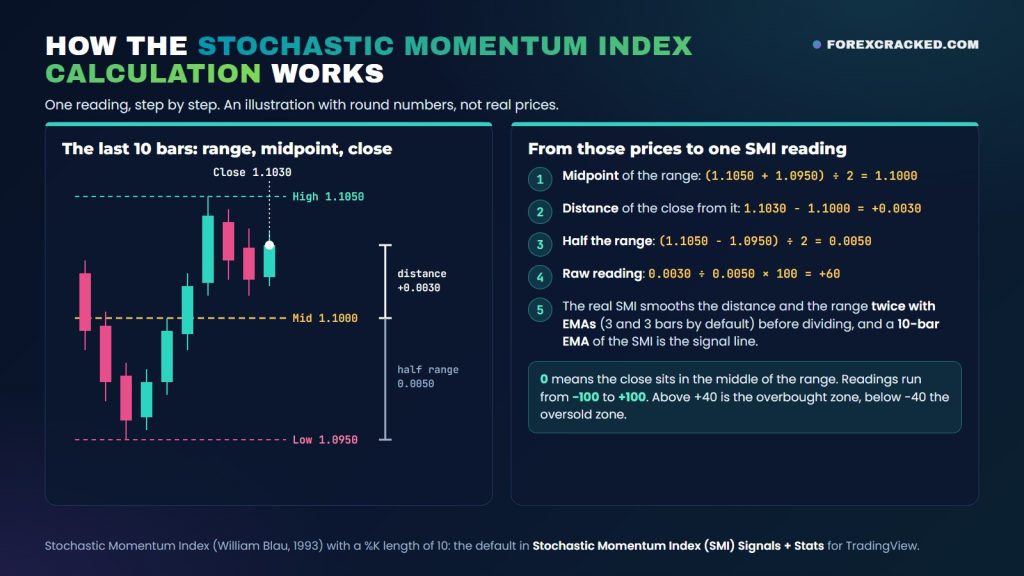
It reads the same position as the stochastic oscillator George Lane popularized, which runs from 0 at the low of the range to 100 at the high. Before any smoothing, the SMI is just the stochastic on a different scale: the close in the example below reads 80 on the stochastic and +60 on the SMI. Blau’s real change is the smoothing. He runs the distance and the range through two EMAs each before dividing, where the textbook slow stochastic averages the finished reading. The result is a calmer line.
You’ll also see it called the SMI indicator or the stochastic momentum indicator. TradingView ships a built-in version called Stochastic Momentum Index (SMI), and the line in this indicator follows the same formula. Its signal line is a 10-bar EMA, slower than the built-in’s 3-bar default and inside the 3 to 12 bars Blau suggested for it. The bigger difference is everything it does after the line turns.
How the stochastic momentum index calculation works
The stochastic momentum index calculation, or SMI calculation, takes four steps. Here they are with the default settings:
- Take the highest high and the lowest low of the last 10 bars (the %K length), and the midpoint between them.
- Measure how far the close sits from that midpoint, and measure the full range, high minus low.
- Smooth both numbers twice with exponential moving averages: 3 bars, then 3 bars again.
- Divide the smoothed distance by half the smoothed range and multiply by 100. That’s the SMI. A 10-bar EMA of the SMI is the signal line.
The stochastic momentum index formula, in one line: SMI = 100 × smoothed distance ÷ (smoothed range ÷ 2), where smoothed means an EMA of an EMA.
With round numbers: a high of 1.1050 and a low of 1.0950 put the midpoint at 1.1000. A close at 1.1030 sits 0.0030 above it, and half the range is 0.0050, so the raw reading is 0.0030 ÷ 0.0050 × 100 = +60.
How do you read the SMI indicator?
Start with the zero line. Above zero, the close has been sitting in the upper half of its recent range, so momentum leans up. Below zero, it’s been in the lower half.
Then the zones. Above plus 40 is the overbought zone and below minus 40 the oversold zone. A reading out there means the close has been pressed against one edge of the range for a while, which can mean a stretched move or a strong trend. The SMI on its own can’t tell you which.
Crosses of the signal line show the SMI turning. A cross up while the SMI is deep in the oversold zone is a classic bullish read, and a cross down from the overbought zone is the bearish one. Divergence, where price makes a new high and the SMI doesn’t, is another common read. This indicator doesn’t mark divergence.
None of those readings tell you how often a turn actually worked on your chart. This indicator counts it.
Stochastic momentum index vs stochastic, stochastic RSI and RSI
All four read momentum, but each one measures something different:
- Stochastic momentum index (SMI): the close against the midpoint of the high-low range, with the distance and the range each smoothed twice.
- Stochastic oscillator: where the close sits inside the recent high-low range.
- Stochastic RSI: where RSI sits inside its own recent high-low range, using the stochastic formula on RSI instead of price. Some platforms show it from 0 to 1, with levels at 0.8 and 0.2.
- RSI: average gains against average losses.
| Range | Common levels | |
|---|---|---|
| SMI | -100 to +100 | +40 / -40 |
| Stochastic | 0 to 100 | 80 / 20 |
| Stochastic RSI | 0 to 100 | 80 / 20 |
| RSI | 0 to 100 | 70 / 30 |
If the regular stochastic feels jumpy, the SMI’s double smoothing calms it down. Stochastic RSI goes the other way: it runs the stochastic formula on RSI, so it moves much faster than RSI itself and hits its extremes far more often. RSI measures something else again: average gains against average losses, without looking at the range. None of them is better in general. Pick the one whose behavior suits your timeframe, then check how its signals have actually played out.
One name to watch: the SMI Ergodic Oscillator sounds the same but isn’t. It’s another Blau oscillator, built on his True Strength Index rather than the high-low range.
What this stochastic momentum index indicator for TradingView adds
The SMI line itself is standard. Most of what we added sits on the price chart:
- Candles colored by the SMI. Teal while the SMI is above zero, pink below it. Teal fades when the SMI dips under its signal line and pink fades when it climbs over, so every BUY prints on a faded pink candle and every SELL on a faded teal one.
- BUY and SELL at zone turns. Printed on the candle, with a matching dot on the SMI in its pane.
- The newest plan. Entry, stop and target lines. The entry line shows its price, and the stop and target lines show their price and their distance from the entry, in pips on 5-digit and 3-digit forex quotes and in price units elsewhere.
- An outcome on every label. “BUY · TP 9b” means that plan reached its target first, 9 bars after the signal.
- The comparison. The newest label and the panel show how earlier turns on that side did, next to the same plan opened on any bar.
- A light background in the SMI pane while a side is set up and waiting for its cross.
- The trend EMA on price, when the trend filter is on.
When does it print BUY or SELL?
A BUY needs two things, in this order:
- A closed bar with the SMI at minus 40 or lower. That sets the BUY side up, and the SMI pane shades teal while it waits.
- The SMI crossing above its signal line on a closed bar before it gets back to zero. That bar gets the BUY.
SELL is the mirror image: a close at plus 40 or higher, then a cross below the signal line before the SMI gets back to zero. So every BUY prints with the SMI still below zero, and every SELL with it above zero.
Each cross of the signal line uses up the setup on its side, even when the trend filter blocks the signal. Any later close inside the zone sets it up again, so a second hook in the same dip can print a second BUY. Signals are read on closed bars only, and once they print, they don’t move.
The optional trend filter uses an EMA on your chart’s timeframe, 200 bars by default. “With the trend” keeps only BUY signals above the EMA and SELL signals below it, and “Against the trend” flips that. The comparison uses the same filter, so both figures always describe the same kind of bar.
The plan, and how every outcome gets counted
Every signal gets the same kind of plan:
- Entry: the signal bar’s close.
- Stop: 1.5 ATR away, using a 14-bar ATR.
- Target: twice the stop distance, so 2R.
From the next bar on, the indicator watches for the first touch of the stop or the target. A bar that opens beyond the target counts as target first. Any other bar that touches both lines counts as stop first, the cautious reading. If neither line is touched within 50 bars, the plan counts as neither, and its label reads “none in 50b”.
The outcome goes on the label when the bar that touches the line closes. The plan only joins the panel’s counts once its 50 bars are up, so a plan that hits its target in 3 bars and one that takes 40 are counted on the same terms. Count them the moment they land and the newest plans would only show their quick outcomes, which at a 2R target are mostly stops.
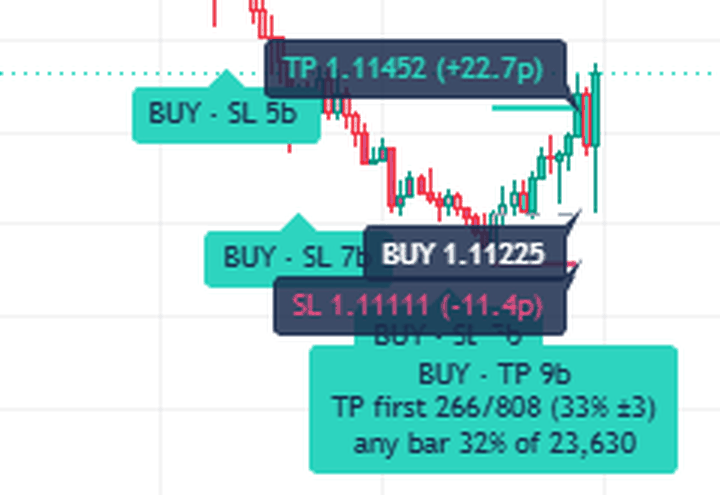
Plans are drawn and followed only on standard charts: bars, candles, hollow candles, line, area and the other types that plot real prices. Heikin Ashi, Renko, Kagi, Line break, Point & figure and Range charts draw calculated prices instead of the ones the market traded at, so on those the indicator still marks the turns but draws no plan and keeps no record.
The awkward number: did SMI turns beat entering anywhere?
Here’s the uncomfortable part, and the reason the indicator exists.
A turn signal only earns your attention if its trades did better than the same trade taken at any old time. So the indicator also opens the same plan on every closed bar of the chart, with the same stop, target, window and trend filter, and counts those plans exactly the same way. That’s the any-bar figure.
On the EURUSD 1-hour chart above (TradingView’s FXCM feed, default settings), the panel read:
- BUY turns: target first 266 times out of 808, 33% give or take 3 points. The same plan on any bar: 32%, out of 23,640.
- SELL turns: target first 274 times out of 791, 35% give or take 3. Any bar: 33%, out of 23,640.
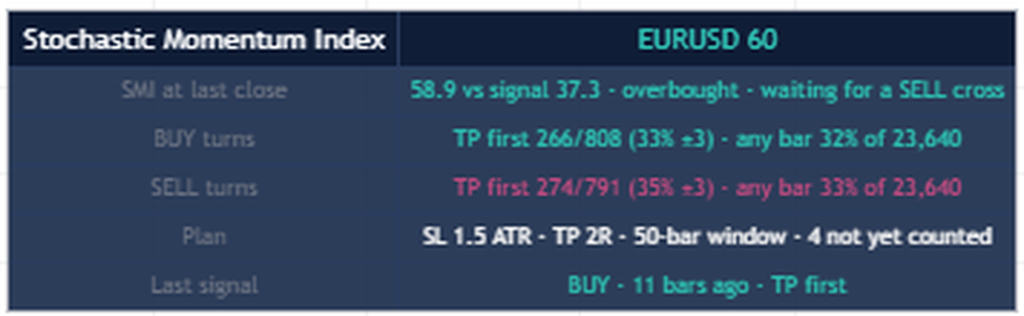
Both gaps sit inside the noise. On that chart, at those settings, an SMI turn did about as well as entering on any bar. We got the same answer before publishing, from three years of EURUSD 1-hour data on a different feed: BUY turns reached the target first 32% of the time, the same as any bar, and SELL turns 34% against 33%.
The ± next to each signal figure is a rough 95% noise band, and it narrows as signals add up: about 21 points with 20 signals, 9 with 100 and 3 with 800. A gap inside it can’t be told apart from luck. Signals cluster too: most start within 50 bars of the previous signal on that side, and the any-bar plans start on every bar, so neither figure is a set of independent trades. Read the band as a rough guide.
Then there’s break-even: at 2R, one target for every two stops comes out even before spread and commission. That’s a third of the plans that touch a line, and both sides on that chart sit close to it. Hover a count on the panel to see the TP first and SL first numbers for that check.
None of this means the SMI is useless. It means the turn on its own didn’t add anything on that chart, at those settings. Your symbol, timeframe and settings will give their own numbers, and now you can see them.
Best stochastic momentum index settings
There’s no single best setting, and we’d be wary of anyone who sells one. Here’s what each one does:
- %K length (10): how many bars the high-low range covers. Shorter reacts faster and turns more often. Longer is slower and steadier.
- Smoothing (3 and 3): more smoothing gives a calmer line and fewer crosses, at the cost of later turns.
- Signal line (10): a shorter signal line crosses sooner and more often. TradingView’s built-in SMI uses 3. We picked 10 so that fewer small wiggles count as turns.
- Zone level (40): raise it to 50 or 60 and only deeper dips set up a signal, so you get fewer, more stretched turns.
For intraday charts, start with the defaults, then change one setting at a time and watch the two figures on the panel. The any-bar figure moves with the stop, the target and the filter too, which keeps the comparison fair. A gap you only find after trying dozens of combinations on old bars is mostly luck, and it tends to shrink on new ones.
The panel and TradingView alerts
The panel sits on the price chart, top right by default. Under its title, row by row:
- SMI at last close: the SMI against its signal line, the zone it’s in, and which side is waiting for a cross.
- BUY turns and SELL turns: each side’s count next to its any-bar figure. Hover one for the full TP first, SL first and neither numbers.
- Plan: the stop, the target and the window, and how many plans aren’t counted yet.
- Last signal: its side, how many bars ago it printed, and how it ended.
For alerts there are three conditions: SMI BUY turn, SMI SELL turn and SMI any turn. An alert set to “Any alert() function call” sends the same signals with the plan’s entry, stop and target in the message on standard charts. Set alerts to fire once per bar close, since signals only print when the bar closes.
All inputs and their defaults
The inputs, in the order they appear:
- %K length (range): 10. First smoothing (EMA): 3. Second smoothing (EMA): 3. Signal line (EMA): 10. Zone level (+/-): 40.
- Trend filter: Off, With the trend, or Against the trend. Trend EMA length: 200. BUY / SELL labels on price: on.
- ATR length: 14. Stop distance (x ATR): 1.5. Reward : risk: 2. Outcome window (bars): 50.
- Minimum n before a percentage prints: 20. Below that, only the sample size prints, so a figure built on six signals never passes for one built on two hundred.
- Compare with the same plan from any bar: on. Latest plan on price: on.
- Colour candles by SMI: on. Project the plan right (bars): 10. Panel on price: on. Panel position: Top Right, Top Left, Bottom Right or Bottom Left. Bullish, bearish and label-ground colors are editable.
How to add it on TradingView
- Open its TradingView page: Stochastic Momentum Index (SMI) Signals + Stats [ForexCracked].
- Click Add to favorites, or click Use on chart to load it straight away.
- On your chart, open the Indicators menu, go to Favorites, and click Stochastic Momentum Index (SMI) Signals + Stats [ForexCracked].
- Load plenty of history so the record has something to count. A 1-hour or 4-hour chart is a good place to start.
Stochastic Momentum Index (SMI) Signals + Stats [ForexCracked]
![Stochastic Momentum Index (SMI) Signals + Stats [ForexCracked]](https://www.forexcracked.com/wp-content/uploads/2026/11/stochastic-momentum-index-indicator-tradingview-eurusd-1h.png)
A free, open-source stochastic momentum index indicator for TradingView that prints BUY and SELL on SMI zone turns, draws entry, stop and target, and checks every turn against the same plan opened on any bar.
Pros
- Every turn is compared with the same plan opened on any bar, on the same terms
- Sample size next to every counted figure, and a rough noise band on each signal figure
- Entry, stop and target drawn the moment a turn prints, with stop and target distances in pips on forex
- Signals on closed bars only, from the chart's own timeframe
- Candles colored by the SMI, so the reading sits on the price chart
Cons
- On EURUSD 1-hour at default settings, SMI turns tied the any-bar figure
- Fixed ATR stop and target only, no swing-based stops
- Record covers loaded history only and ignores costs
- Only the newest plan stays drawn on the chart
- No divergence marking and no higher-timeframe reading
Summary
An SMI turn on its own doesn't tell you much. This stochastic momentum index indicator draws the SMI the usual way, prints BUY or SELL when it crosses its signal line after a close in a zone, and draws the entry, stop and target on that bar. Then it follows every plan to its outcome and opens the same plan on every bar of the chart, so the panel shows whether SMI timing did better than entering anywhere, with the sample size and a noise band. Free and open-source.
 Need a TradingView account?The free plan runs this indicator, with charts, alerts and watchlists.
Start free
Need a TradingView account?The free plan runs this indicator, with charts, alerts and watchlists.
Start free

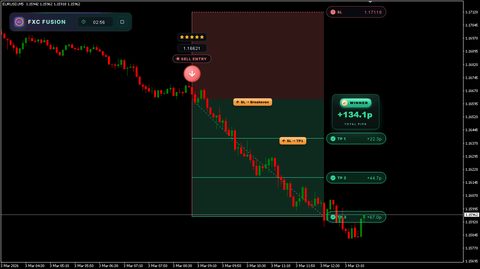
 Built by ForexCrackedWe tested 1,200+ indicators. Then we built our own.Six years of reviewing EAs and indicators went into FXC Fusion: two engines, the seven-panel cockpit, MT4 and MT5, from the team behind this site.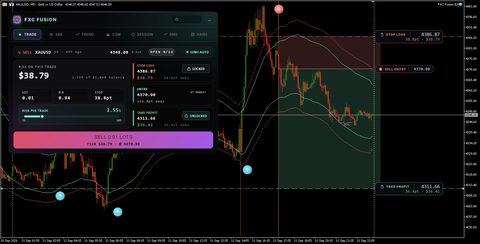
Your download will start automatically. If it doesn’t, click here.Right now a download can take up to a minute to start. Please wait a moment, or use click here.
How to trade with it
A simple stochastic momentum index strategy with this indicator takes four steps:
- Read the panel first. On the pair and timeframe you trade, compare each side’s TP first figure with its any-bar figure. If the gap sits inside the ± band, the turn isn’t adding anything there, so don’t trade it on its own. If it clears the band, check break-even too: at 2R that means more than one target for every two stops, and a little more once spread and commission are paid.
- Test, don’t tune. Try the trend filter or a deeper zone level, one change at a time. Keep a change only if its gap clears the band and still holds when you load more history.
- Use the plan’s stop. If price takes out the stop, the turn failed. Get out.
- Size off the stop. Same fixed risk on every trade, measured from entry to stop.
In a strong trend the SMI can sit in one zone for a long stretch and keep printing turns against the move. That’s what the “With the trend” setting is for, and the gap to the any-bar figure tells you whether it helped on your chart.
What doesn’t it do?
- No divergence, no higher timeframes. Everything comes from the chart you’re on.
- It isn’t a backtest. It counts touches of a fixed plan, without spread, commission or slippage, and it places no orders.
- The record covers loaded history only. The counts start at the first bar your chart loads, so they can shift a little after a reload, and they don’t carry from one pair or timeframe to the next.
- Only the newest plan stays drawn. Earlier signals keep their label and outcome, up to roughly the 500 most recent. Signals older than that keep only their dot in the SMI pane.
- Fixed ATR plans only. The stop and target sit a set number of ATRs away. There are no swing-based stops.
How we built and checked it
We built Stochastic Momentum Index (SMI) Signals + Stats from scratch in Pine Script v6 and published it open-source on October 28, 2026 (CC BY-NC-SA 4.0). The SMI line follows Blau’s formula. Everything on the price chart is our own work, and the full code is on its TradingView page, so you can check it.
Three separate reviews went through the code before publishing. One looked only for compile errors. The other two covered the counting logic and TradingView’s publishing rules. We also rebuilt the signal and outcome logic outside TradingView and ran it on three years of EURUSD 1-hour data. That test caught a real bug. When the SMI crossed zero and its signal line on the same bar, the indicator still printed a signal, so 6 to 8% of signals landed on the wrong side of zero. We fixed it before release. The same test showed the tie you saw above, and we chose to print it plainly rather than bury it.
Indicators to pair with it on TradingView and MetaTrader
Want something to pair with it, or a MetaTrader version? On TradingView, our Adaptive Supertrend indicator gives you a trend direction to weigh SMI turns against, and our liquidity sweep indicator for TradingView flags stop hunts at swing highs and lows and keeps a record of how each of its plans ended.
On MetaTrader, the Stochastic Momentum with Arrows indicator for MT4 is built on the SMI, and the SMI Ergodic Oscillator for MT4 and MT5 is another of Blau’s momentum oscillators, built on his True Strength Index. For the classic stochastic there’s the Full Stochastic indicator for MT4, and the Double Stochastic RSI indicator blends the stochastic with RSI. New to community scripts? Our guide shows how to install TradingView custom scripts. Or browse all of our TradingView indicators and the full free forex indicators library.
Frequently Asked Questions
Add Stochastic Momentum Index (SMI) Signals + Stats on TradingView
Stochastic Momentum Index (SMI) Signals + Stats is free and open-source. Add it to your charts here: Stochastic Momentum Index (SMI) Signals + Stats on TradingView
Risk disclaimer: Stochastic Momentum Index (SMI) Signals + Stats marks SMI turns and draws trade plans from price alone. It doesn’t predict price and doesn’t place trades. The outcome record and the any-bar comparison describe past plans on your chart, without spread, commission or slippage. Results depend on market conditions, your settings, and your own execution and risk management. This is shared for educational purposes and is not financial advice.


Discussion no comments yet
Is this still working?
Nothing here yet
No one has asked anything about Stochastic Momentum Index Indicator for TradingView That Che yet. First question gets answered.