

You’ve seen “EA” all over forex forums and download pages, usually next to a screenshot of a curve going up, and nobody stops to explain it. So what is an expert advisor? It’s a program that runs inside MetaTrader and trades for you. It reads the chart, checks its rules every time price moves, and opens and closes trades without a click from you.
What people get wrong is the next part: an EA does exactly what its code says, and that isn’t the same as making money.
We’ve reviewed over 1,500 EAs since we opened ForexCracked in 2019. For this guide we also wrote one, put its code on the page and tested 42 settings of it on EURUSD. None of the 42 made money in both test periods.
Key Takeaways
- An expert advisor (EA) is an automated trading program for MetaTrader 4 and MetaTrader 5. Forex robot and trading bot usually mean the same thing
- It sits on a chart, wakes up on each new tick, and can open, change and close trades by itself. An indicator can’t trade, and a script runs once and quits
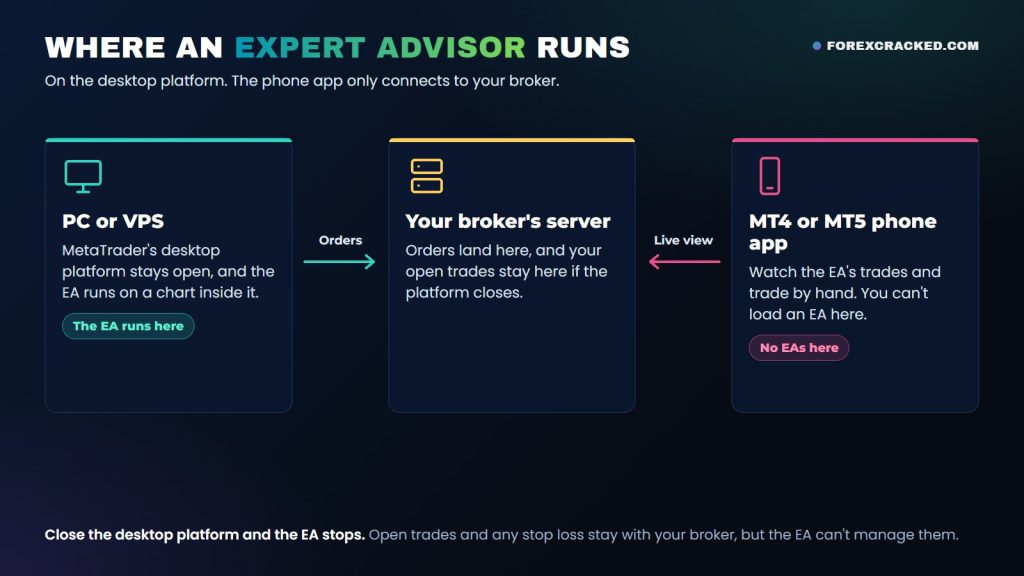
- It only runs while the desktop platform is open, which is why people rent a VPS. The MT4 and MT5 phone apps don’t run EAs
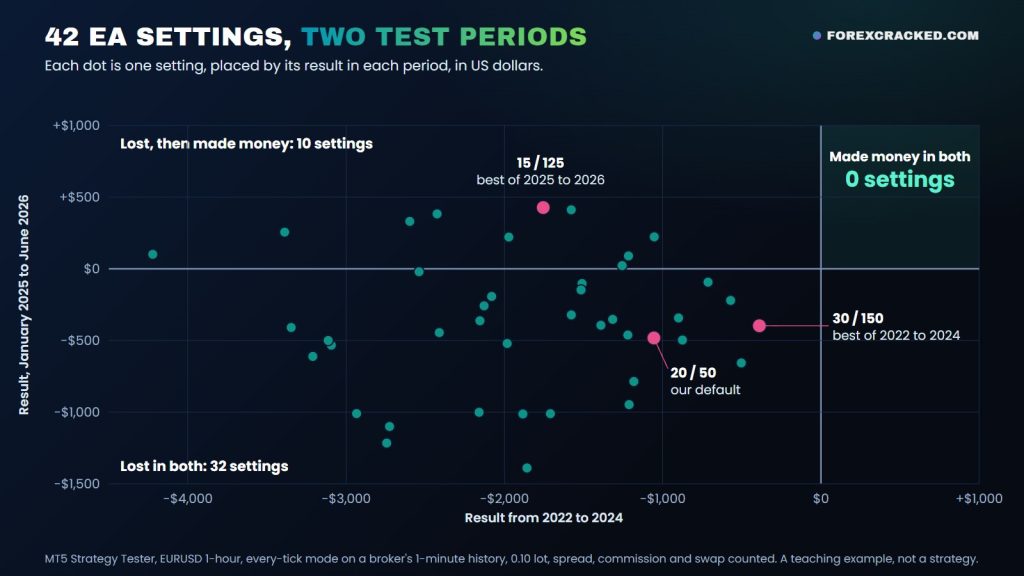
- In our test on complete EURUSD history, with spread, commission and swap counted, none of 42 settings made money from 2022 to 2024. Ten made money over the next 18 months, and all ten had lost in the first period
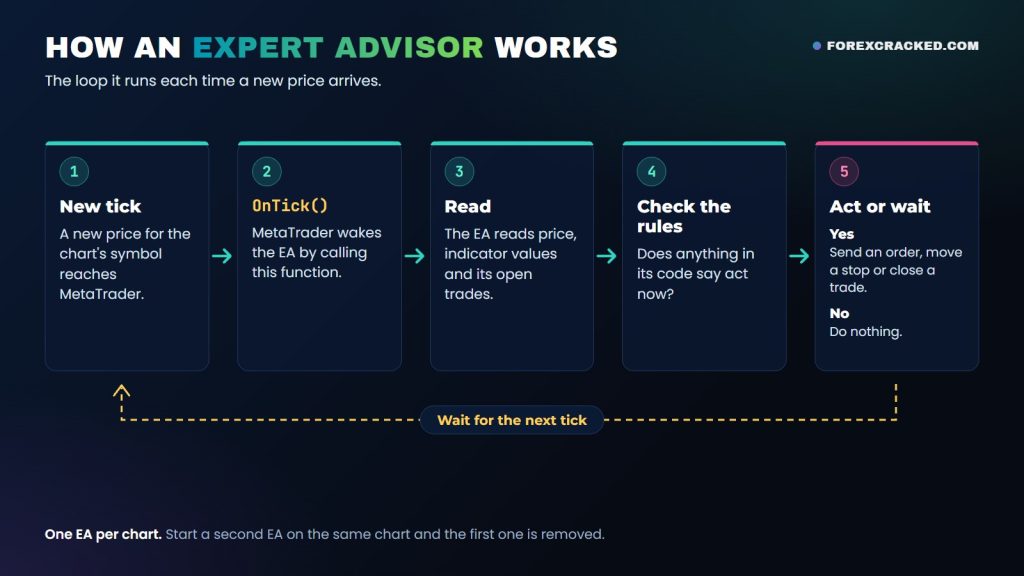
Table of Contents
What is an expert advisor in forex?
An expert advisor in forex is software that follows a trading plan for you on MetaTrader. You put it on a chart, and it watches the market and places the trades the plan calls for. People hear “expert advisor” and picture a human, but the expert advisor meaning is simpler than that: “expert” is just MetaTrader’s word for the program.
The expert advisor definition in the MT5 help reads: “mechanical trading systems that allow complete automation of analytical and trading activities.” MetaQuotes, the company behind MetaTrader, also calls them trading robots. Expert advisor, EA, forex robot and trading bot are four names for one thing. So what is EA trading? Letting one of them place your trades.
MT4 EAs are written in a language called MQL4, and MT5 EAs in MQL5. You’ll get them as .ex4 and .ex5 files, or sometimes as .mq4 and .mq5 source code. The two platforms aren’t interchangeable, so download the version built for yours. Not sure which you need? Our MT4 vs MT5 comparison sets them side by side.
How does an expert advisor work?
Ticks drive everything an EA does. A tick is a new price from your broker. When one arrives for the chart’s symbol, MetaTrader calls a function inside the EA named OnTick, and the EA goes through its rules.
- A new tick arrives for the chart the EA is on.
- MetaTrader wakes the EA by calling OnTick.
- The EA reads what it needs: price, indicator values, its open trades.
- It checks those against its rules.
- If a rule fires, it sends an order, moves a stop or closes a trade. If not, it does nothing and waits for the next tick.
No ticks, no work, which is why most EAs sit idle over the weekend.
Two platform rules catch people out. Only one EA can run on a chart, and if you start a second one, the first is removed, so two EAs need two charts. And switching off auto trading doesn’t switch off the EA. The MT5 help says it “does not disable them completely” and “only prohibits Expert Advisors from trading.” If you want it gone, remove it from the chart.
What’s inside an EA? Under 50 lines of real code
Here’s a real one. We wrote this small MT5 EA for this article. It buys when a fast moving average crosses above a slow one and sells on the opposite cross, and it compiled in MetaEditor with 0 errors and 0 warnings. It’s a teaching example, not a strategy to trade.
#include <Trade/Trade.mqh>

input int    FastMA = 20;    // Fast moving average
input int    SlowMA = 50;    // Slow moving average
input double Lots   = 0.10;  // Trade size

CTrade trade;
int fast, slow;

int OnInit()
  {
   fast = iMA(_Symbol, _Period, FastMA, 0, MODE_EMA, PRICE_CLOSE);
   slow = iMA(_Symbol, _Period, SlowMA, 0, MODE_EMA, PRICE_CLOSE);
   return INIT_SUCCEEDED;
  }

void OnTick()
  {
   double f[2], s[2];
   if(CopyBuffer(fast, 0, 1, 2, f) < 2 || CopyBuffer(slow, 0, 1, 2, s) < 2)
      return;

   bool up   = f[0] <= s[0] && f[1] > s[1];   // fast crossed above slow
   bool down = f[0] >= s[0] && f[1] < s[1];   // fast crossed below slow
   if(!up && !down)
      return;

   if(PositionSelect(_Symbol))
     {
      long type = PositionGetInteger(POSITION_TYPE);
      if((up && type == POSITION_TYPE_BUY) || (down && type == POSITION_TYPE_SELL))
         return;                              // already on the right side
      trade.PositionClose(_Symbol);
     }

   if(up)
      trade.Buy(Lots);
   if(down)
      trade.Sell(Lots);
  }
Three parts do the work. The inputs at the top become the boxes you fill in when you attach an EA, so “settings” just means numbers like these. OnInit runs once when the EA starts. OnTick is the loop from the last section.
Then look at trade.Buy and trade.Sell at the bottom. They’re what let it trade, and MetaTrader prohibits order functions like OrderSend inside indicators.
Most EAs you download follow this shape, with more rules.
Expert advisor vs indicator vs script
All three run on a MetaTrader chart, and people mix them up constantly. An expert advisor analyzes price and trades by its rules, an indicator analyzes price and draws on the chart, and a script does one job when you start it.
| Places trades? | How it runs | |
|---|---|---|
| Expert advisor | Yes | Almost non-stop |
| Indicator | No | While it’s on the chart |
| Script | Yes | Once, then it quits |
MetaQuotes puts it bluntly: “Indicators cannot trade,” and “if an Expert Advisor works almost continuously, a script executes its function and quits.”
If you want signals and you’d rather click the trades yourself, an indicator is what you’re after, and you can stack as many as you like on one chart. We keep lists of free MT4 indicators and free MT5 indicators.
The kinds of EA you’ll run into, and what hurts each one
Most EAs belong to a handful of families. Learn the family and you’ll know how it tends to lose before you read a word of the sales page.
- Trend following EAs hold a move in one direction, like our example. Choppy markets hurt them, because each false cross is a small loss.
- Scalper EAs take very small moves, many times a day. Spread and execution decide almost everything for them.
- Breakout EAs wait for price to leave a range, then trade the break. False breaks are what hurt them.
- Grid EAs add trades at fixed price steps. A long move with no pullback hurts them most, because the open trades keep piling up.
- Martingale EAs raise the trade size after a loss to win it back in one go. The curve looks smooth until one losing run gets big enough.
- Hedging EAs hold buys and sells at the same time. They need a broker that offers hedging, because on MT5’s netting system you can only hold one position per symbol.
- Prop firm EAs are built around a firm’s daily and total loss limits. One bad day can end the challenge.
An EA sold as “AI” still lands in one of these families. It’s a program on a chart like any other.
How to use an expert advisor in MT4 and MT5
You can get an EA running in a few minutes:
- In MetaTrader, click File, then Open Data Folder.
- Open MQL4 then Experts on MT4, or MQL5 then Experts on MT5, and paste the .ex4 or .ex5 file there.
- Restart the platform and find the EA in the Navigator panel.
- Double-click it or drag it onto a chart. The properties window opens.
- Check the inputs, tick Allow live trading on MT4 or Allow Algo Trading on MT5, and click OK.
- Turn on the AutoTrading button on MT4 or the Algo Trading button on MT5.
- Look at the upper right corner of the chart. The EA’s name and icon appear there once it has started. On MT4, a smiley means it can trade and a sad face means it can’t, so go back to steps 5 and 6.
Our guide on how to install an EA on MT4 and MT5 covers the same steps in more detail, along with backtesting, DLL imports and web requests.
Two more things can trip you up. If an EA asks you to allow DLL imports, the MT5 help calls that “potentially dangerous” and says to allow it “only for trusted applications.” And if an MT4 EA worked fine, then stopped after a platform update, our guide to MT4 EAs and indicators not working covers what we saw and what to do.
Where an EA runs: PC, VPS or phone
Close MetaTrader or shut down the PC and your EA stops, because terminal shutdown is one of the events that unloads an EA. Your open trades and any stop loss stay on your broker’s server, but the EA can’t manage them. A trailing stop stops following price as well: the MT5 help says it “is executed in the trading platform rather than on the server like Stop Loss.”
So a VPS earns its place here. It’s a rented server that keeps MetaTrader running day and night. The virtual hosting help says an EA needs a “constant connection to a trade server and uninterrupted power supply,” and a home PC can’t always give you that. We’ve written up how to get a forex VPS for free.
Now the phone question, because the answer disappoints people. The MT4 and MT5 apps don’t run EAs, and no setting changes that. As an MQL5 forum moderator put it, “you can’t use custom indicators or any EAs and/or algorithmic trading on the mobile MT4/5 apps.” You can still run the EA on a PC or VPS and watch its trades from the phone app, because the app signs in with the same login.
Do expert advisors really work? What our test showed
In one sense, always: an EA does what it’s told. Whether that makes money depends on the rules, the market and your broker’s costs. So instead of giving you an opinion, we tested it.
We took the small EA above and ran 42 combinations of its two settings in the MT5 Strategy Tester, with the fast average from 5 to 30 and the slow average from 50 to 200. The setup was EURUSD 1-hour, 0.10 lot and a $10,000 start, in the tester’s every-tick mode on a broker’s 1-minute history. Spread comes from that history, commission is $7 per lot, and swap uses today’s rates, so all three are in the numbers. All 42 ran on January 2022 to December 2024, then all 42 ran again on January 2025 to June 2026. We set the settings and the dates before the first run and never changed them.
None of the 42 made money in the first period. Ten made money in the second, and all ten had lost in the first. These are the best three of each period, 2022 to 2024 first:
| Fast / slow | 2022 to 2024 | 2025 to June 2026 |
|---|---|---|
| 30 / 150 | -$389 | -$397 |
| 30 / 200 | -$503 | -$657 |
| 25 / 150 | -$571 | -$220 |
| 15 / 125 | -$1,755 | +$427 |
| 30 / 100 | -$1,578 | +$412 |
| 25 / 100 | -$2,425 | +$383 |
No setting made money in both periods, and 32 lost in both. The best of 2022 to 2024, 30 / 150, lost $389.05 and then lost another $397.26. The best of the second period, 15 / 125, made $427.32 right after losing $1,754.87. Those six rows cover 137 to 249 trades in the first period and 82 to 119 in the second.
Costs did real damage too. Before commission and swap, 30 / 150 was up $34.70 in the first period. Those two costs, with swap at today’s rates, took $423.75 and left it at -$389.05.
A backtest’s top row is where people get caught. The tester’s optimization runs a strategy “several times with different sets of parameters” so you can pick the best combination. That’s useful, and it’s also how a pretty backtest gets made: run enough settings on the right dates and one of them will look great. Test only the second period and 15 / 125 looks like a find. The top row tells you what suited those dates. It doesn’t tell you what comes next.
This is one simple strategy on one pair, so it can’t tell you all EAs fail. It does show what a single backtest is worth on its own.
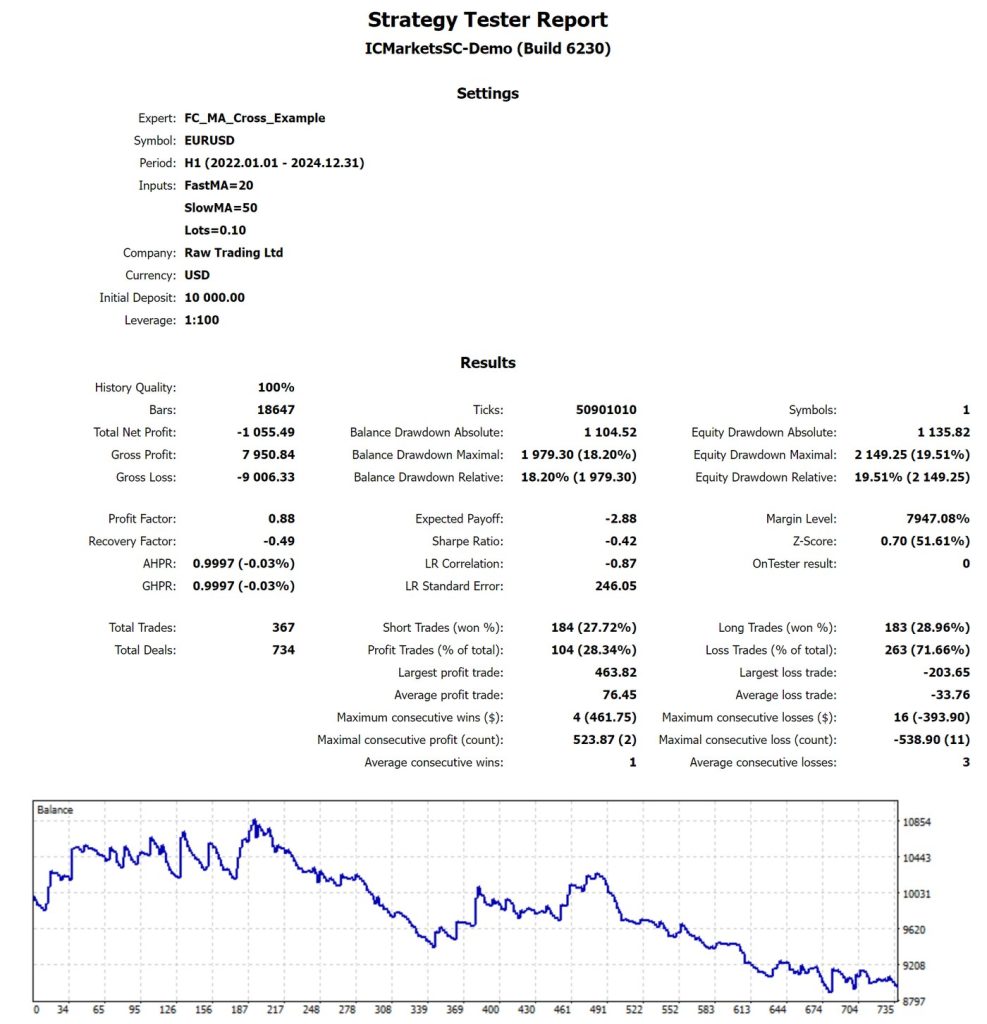
We learned one more lesson the hard way. Our first run used a EURUSD data file that turned out to be missing six months of prices across the two periods, four of them inside 2022 to 2024. It had no commission or swap either, and its report still said “100% real ticks.” It showed our default 20 / 50 up $382.20. Our review caught the gap: three years of 1-hour EURUSD should be about 18,700 bars, and that report had 16,535. On complete history with commission and swap counted, the same EA on the same dates lost $1,055.49.
Before we’d trust any EA, we want to see five things:
- A live record with real money, running for months and checked by a third party
- Results from dates the rules weren’t tuned on, which is the test we just ran
- A backtest with the right bar count for its dates, plus spread, commission and swap
- A stop on every trade, and no grid or martingale hiding behind a smooth curve
- A demo run with your own broker, since spread and execution differ between brokers
Our 12-point EA scam checklist goes deeper. Roughly 4 in 10 EAs get flagged on our first read.
Expert advisor pros and cons
What an EA does well:
- It follows its rules on every tick, with no hesitation and no panic exits
- It can watch the market day and night from a VPS
- You can run it on years of past prices before you risk a cent
Where it falls short:
- It only knows what’s coded, so it keeps trading when the market changes
- It stops when the platform stops, and it can’t run on a phone
- A good backtest is easy to find and proves very little on its own
Free, paid or build your own
Is an expert advisor free? Plenty are. ForexCracked has more than 500 EA pages, so start with our free MT4 expert advisors, free MT5 EAs and indicators or the full free forex EA download list. For a shortlist, see the best free forex EAs for small deposits.
Paid EAs are sold on the MQL5 Market and by independent sellers. A price tag proves nothing, so hold paid EAs to the same five things.
To build your own, the MQL5 Wizard assembles an EA from ready-made signal, money management and trailing stop modules, and its help says you can do it “even without programming skills.” For anything custom, you’ll need to learn MQL5 or hire a developer.
Can you use an expert advisor at a prop firm like FTMO?
At FTMO, yes, within limits. Other firms set their own rules. FTMO’s FAQ says that as long as your trading is legitimate, in line with proper risk management and outside its Forbidden Trading Practices, it has “no reason for limiting or restricting your trading strategy, whether it’s discretionary trading, algorithmic trading or EAs.”
The same page adds three catches. Other traders may already run the same third-party EA, and you could be denied if you exceed FTMO’s maximum capital allocation rule. Its platform servers limit you to 200 orders at a time and 2,000 positions a day. And if an EA overloads a server, FTMO may ask you to change its logic or parameters.
We keep a list of prop firm EAs if you want a starting point.
Frequently Asked Questions
Find your first EA
Now you know what you’re looking at. Browse our free MT4 expert advisors or the full list of free forex EA downloads.
Risk disclaimer: Expert advisors are software and can’t see the future. The test results in this article are past results from a simple teaching example on one pair, and they don’t predict anything. Forex trading is risky, and you can lose money with an EA just as you can without one.


Discussion no comments yet
Nothing here yet
No one has asked anything about What Is an Expert Advisor? How EAs Work on MT4 and MT5 yet. First question gets answered.