

Forex AI Chat EA is an AI EA for MT5 that links the platform to an AI model such as ChatGPT, DeepSeek or Grok, so you can chat with it and let it trade forex pairs like AUDCAD, NZDCAD and EURUSD. For this 2026 review we ran more than 100 backtests on six pairs, read every start-up line it prints, and set its two live accounts beside our results. Free download, with our set files, at the bottom.
The AI part needs your own API key, and no backtest can run it. Without a key the EA trades a set of built-in rules, and those lost money on all six pairs in 2026. What makes it profitable is an optional Recovery mode that adds bigger trades against a losing one. That is also what wiped out four of our six test accounts.
TL;DR – MT5 forex robot that talks to ChatGPT-style models through your own API key. Without a key it runs fixed rules with no edge in our tests. Its Recovery mode is a doubling ladder: steady small wins on AUDCAD and NZDCAD, account wipe-outs on four other pairs.
What is the Forex AI Chat EA?
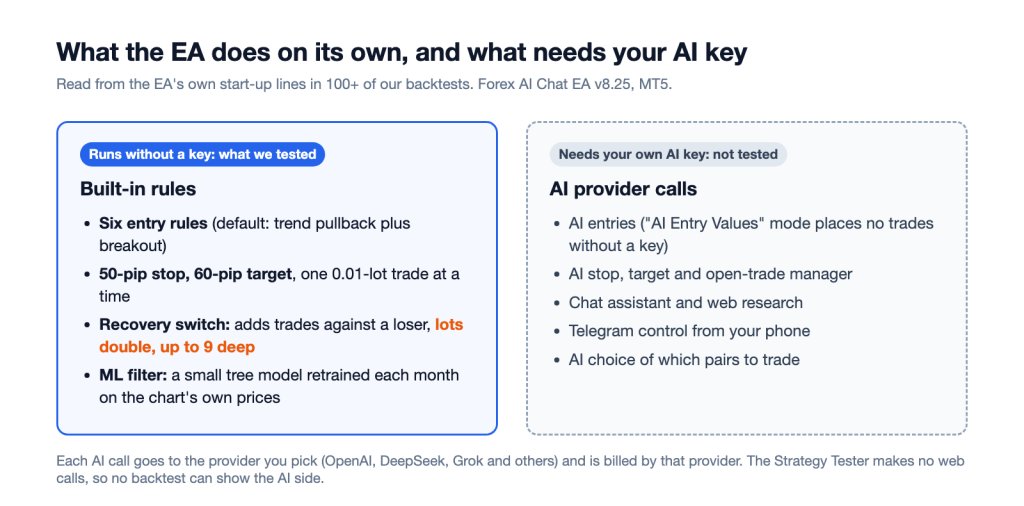
Forex AI Chat EA is a MetaTrader 5 expert advisor with two layers. One is a chat assistant and trading brain that runs on an outside AI model you pay for. The other is a set of built-in rules that trade on their own: six entry methods, a 50-pip stop, a 60-pip target and an optional Recovery mode that adds positions against a losing trade.
Core Strategy and Logic
The file is encrypted, so everything below comes from what the EA prints and does in our tests: more than 100 backtests on Tickmill data, January 2024 to November 2026.
- Two layers, one switch – With an API key from a provider such as OpenAI or DeepSeek, the AI can pick entries, set stops and targets, manage open trades, answer questions and take commands through Telegram. Without a key the EA falls back to its built-in rules. The Strategy Tester makes no web calls at all, so every backtest of this EA, ours included, shows only the built-in side.
- Six built-in entry rules – Trend pullback, breakout with stop orders, mean reversion, limit orders around price, and the default “Regime Adaptive”, which switches between trend pullback and breakout. A sixth mode, “AI Entry Values”, places no trades without a key.
- Fixed exits – By default every trade gets a 50-pip stop loss and a 60-pip take profit, one position at a time. An ATR option sets them from the daily range instead.
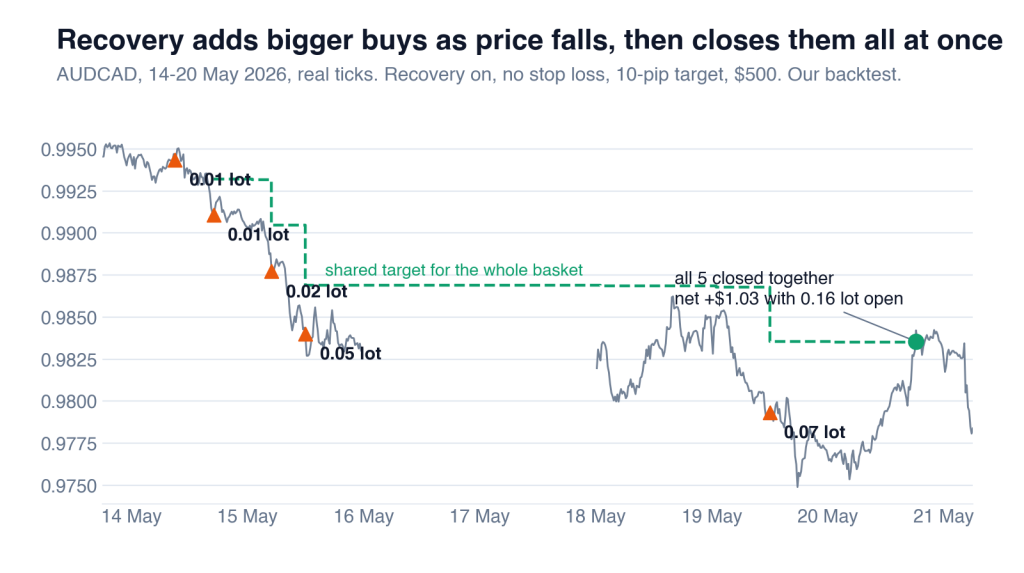
- Recovery mode – One input turns it on. When a trade goes against it, the EA adds another in the same direction, with gaps that widen as the basket grows and lots that double from the third position (x1, x2, x2, x2). All positions then share one exit target, set near the basket’s average price, so one winner closes together with the older losers. That is a martingale-style grid: we saw baskets up to nine positions deep, with single trades up to 0.36 lot on a 0.01 start.
- A local ML filter – Off by default. Switched on, it retrains a small tree model on the chart’s own prices at the start of every month, and the EA took about half as many trades. It runs offline and needs no key.
- One pair per chart in the tester – A list of pairs and an “AI chooses the pairs” mode exist for live charts. The tester trades only the chart symbol, so we tested each pair on its own.
Unlike the “AI” in Mavrik Scalper EA, which turned out to be a 15-minute timetable, this EA really does call an AI model once you give it a key. What the model decides can’t be tested, though, and point 6 of our EA scam checklist applies: judge the trades, not the label.
Please test in a demo account first for at least a week. Also, please familiarize yourself and understand how this Forex AI Chat EA works, then only use it in a real account.
Forex AI EA for MT5 Settings
There is a panel for the AI, capital and Recovery options, and an inputs list. The panel’s saved settings don’t load in the Strategy Tester, and the trade lot comes from the panel: the lot inputs changed nothing in our tests. These are the inputs that change how it trades:
| Input | Default | Notes |
|---|---|---|
| Inp_entrytype | Regime Adaptive | The six entry rules. “AI Entry Values” needs a key |
| sltype | 0 (Recovery off) | 1 turns on Recovery |
| spl / takeprofit | 50 / 60 pips | Stop and target. 0 = no stop. In Recovery the target becomes the basket’s shared exit |
| InpHardSLSource / InpHardTPSource | Fixed | ATR sets stop and target from the daily range instead |
| InpEnableMLEntryFilter | false | The local tree-model filter |
| pairlist | AUDCAD, NZDCAD, AUDUSD, NZDUSD | Pairs it trades from one live chart |
| Economic calendar filter | High impact, 120 min before / 60 after | Needs live calendar data, so it does nothing in a backtest |
Three set files come with the download, each loaded and checked in the tester:
- AI Chat EA Default.set – The shipped defaults: Regime Adaptive entries, 50-pip stop, 60-pip target, Recovery off.
- AI Chat EA Single Entry ML.set – The same with the ML filter on. The cautious choice: in 2026 it cut the default’s loss on every pair, but still lost.
- AI Chat EA CAD Recovery 200 Stop.set – Recovery on, ML filter on, a 10-pip basket target, a 200-pip stop on each position, AUDCAD and NZDCAD only. The setting that tested best (section 5 below).
Recommendations for the Forex AI Chat EA
- Deposit – Every result below is a 0.01 starting lot on $500, the size of its live accounts. With Recovery on, the worst open loss on the two CAD pairs was about $120 per 0.01 start, so $1,000 per 0.01 keeps that near 12%. On the other pairs a single basket took the whole $500. The lot size optimizer helps when you size up.
- Pairs – With Recovery, AUDCAD and NZDCAD only. Leave the USD pairs on single entry or off.
- Timeframe – H1. The chart timeframe changes its trades, and H1 is what we tested.
- Leverage – 1:100 or more covers the margin. More leverage doesn’t save a Recovery basket, it only lets the ladder grow deeper before the broker’s stop out.
- Account type – Recovery needs a hedging account: it can’t run on a netting account.
- AI key – Optional. Without one you get the rules tested here. With one, every AI call is billed by your provider, so watch that cost against a small account’s profit.
- VPS – The Forex AI Chat EA should run on a VPS around the clock, since Recovery baskets can stay open for weeks and the Telegram link only works while MT5 is running.
- Broker – A low-spread ECN account. Baskets held for weeks pay swap every night. Compare forex brokers here.
Performance Review: Is This AI EA for MT5 Profitable?
1. The live accounts
Two public live accounts run this EA under its original name, Aikon, at the same broker and size. Both are monitored from their first trade, with no deposits or withdrawals since. On 22 November the first showed +$33.08 (profit factor 1.52) over 58 trades and the second +$27.02 (profit factor 1.92) over 44 trades. Each trades AUDCAD, NZDCAD, EURUSD, NZDUSD, GBPUSD and AUDUSD from one account.
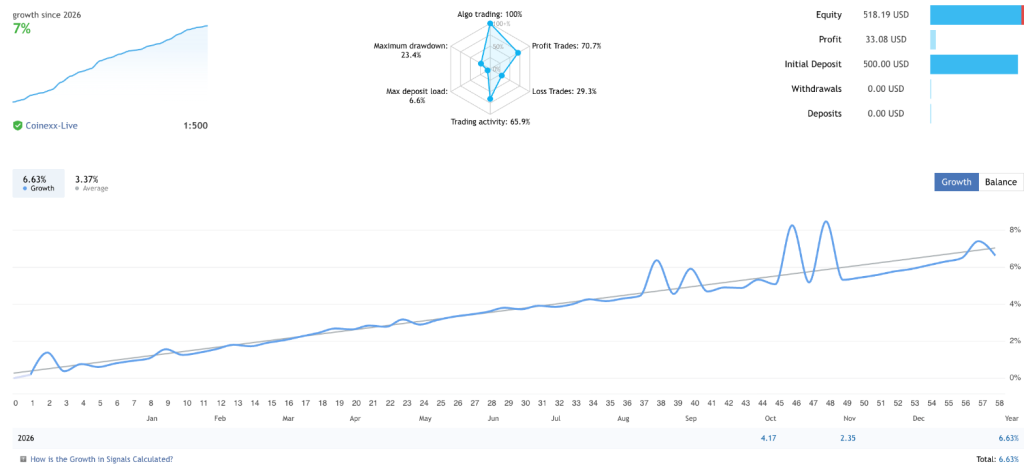
The record behind them is thin. Two more accounts started the same day were switched off between 13 and 20 November. On 13 November they showed +6% and +9%. Ten older accounts that ran the EA from August are deleted or disabled. Of 14 accounts tied to it, these two are what’s left to check.
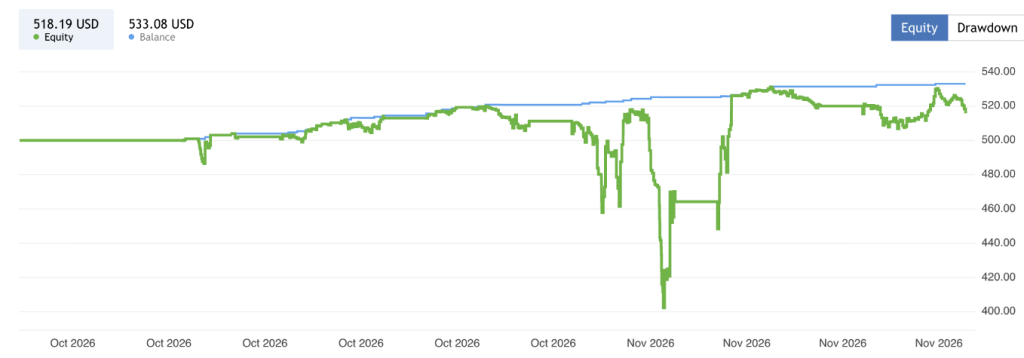
The smooth balance hides open losses. Balance drawdown on the first account is 2.86%, but equity fell 23.40% below its peak: on 6 November its open trades were $122.88 under water. That week the margin in use reached nearly 20 times what one 0.01-lot position needs, so trades were stacked while it was deepest in loss.
The lots, not the pips, made the money. On AUDCAD the account was net negative in pips (-2K on the page) and still made $8, and on the second account NZDCAD showed -920 pips for +$6. That only happens when winning closes carry bigger lots than losing ones, which is what a Recovery basket does.
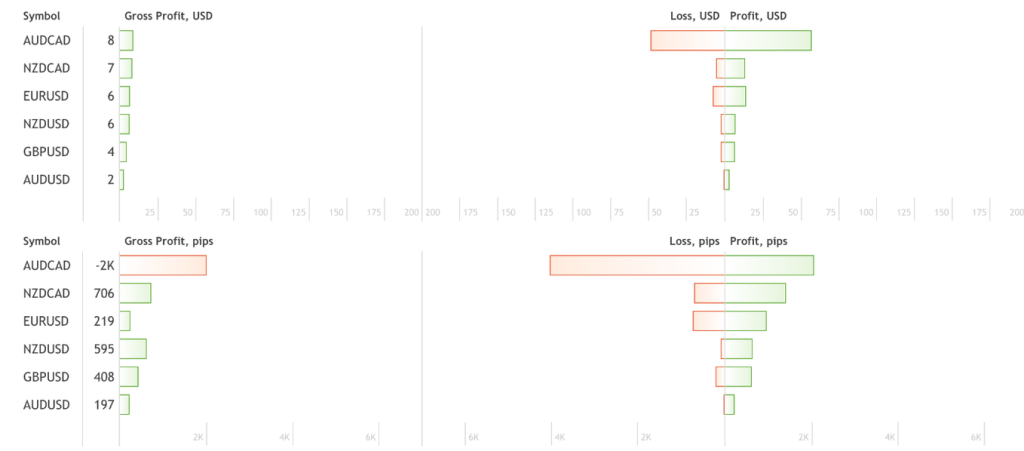
Both accounts started after the version we post had been replaced by a newer one, and neither shows which AI model or settings it uses.
2. What the file does without a key
The default settings, each pair on its own (Tickmill, H1, 1-minute OHLC):
| Pair | 2026 (Jan-Nov) | Apr 2024 – Dec 2025 |
|---|---|---|
| AUDCAD | -$94.02 (PF 0.48) | -$100.20 (0.66) |
| NZDCAD | -$72.15 (0.51) | -$97.62 (0.68) |
| GBPUSD | -$81.43 (0.70) | +$58.79 (1.13) |
| EURUSD | -$37.73 (0.80) | +$27.48 (1.07) |
| AUDUSD | -$27.20 (0.84) | -$46.77 (0.87) |
| NZDUSD | -$16.66 (0.89) | +$38.75 (1.14) |
The built-in rules have no edge. All six pairs lost in 2026 and three of six over the longer run. On real ticks AUDCAD was worse still: -$133.18 with a 0.36 profit factor, because some stops filled past their level. The ML filter about halved the trades and cut the losses by more than half, but every pair still finished 2026 below zero (-$0.63 to -$42.03). Two other entry rules, mean reversion and limit orders, roughly broke even on AUDCAD (profit factor 1.06), the only pair we tried them on.
3. Recovery: steady wins, then a wipe-out
The live accounts look like Recovery with a small target and no stop, so we ran that on each pair: Recovery on, no stop loss, a 10-pip basket target.
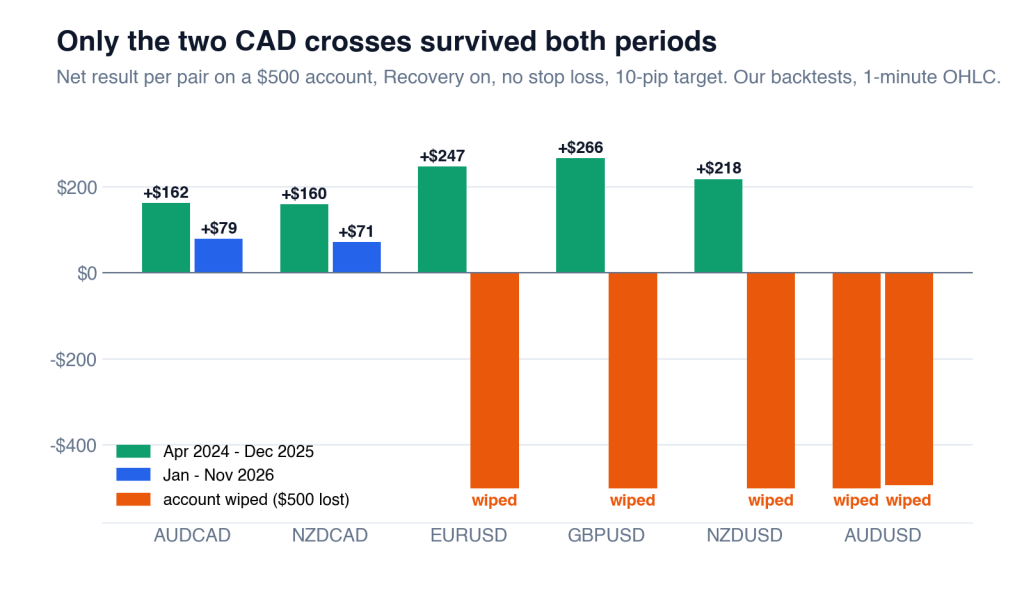
In 2026 four of six accounts were wiped out. GBPUSD and NZDUSD were stopped out in the same January week, EURUSD on 29 September, and AUDUSD had $7.72 left on 20 November with a seven-position basket still open. Over 2024-25 AUDUSD was stopped out on 29 October 2024, and GBPUSD and NZDUSD made money only after equity drops of 76% and 71%. Only AUDCAD and NZDCAD came through both periods, with equity drawdowns of 18% to 24%.
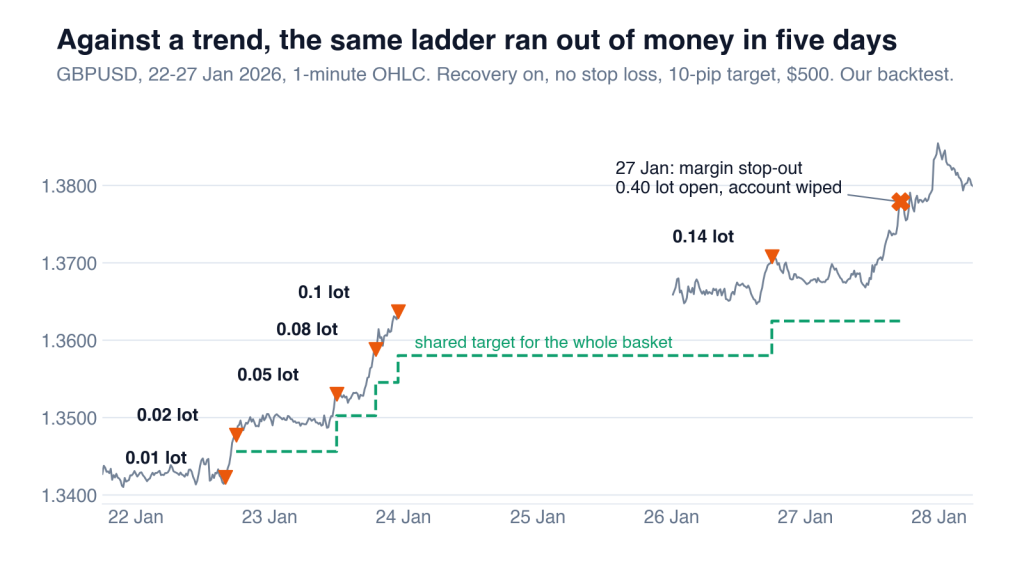
With the default 50-pip stop on every position, the ladder stays at three or four trades, but five of the six pairs then lost in 2026. The stop limits the damage and removes the profit with it.
4. Our backtest against the live accounts
Over the live accounts’ window, 13 October to 20 November, we ran the same Recovery setting on real ticks for each of the six pairs. Five of them made +$80.36 together with equity drawdowns of 1% to 13%, close in shape to the live accounts. AUDUSD lost $492.10: a six-position buy basket opened from 12 November and was still deep under water on the 20th. The live accounts made only a few AUDUSD trades, so whatever picks their entries kept them out of the basket our built-in rules opened. On one combined $500 account, that single basket would have taken about $410 of it.
5. The setting that tested best
Recovery on, the ML filter on, a 10-pip basket target and a 200-pip stop on each position, AUDCAD and NZDCAD only (the third set file):
| $500, 0.01 start | 2026 (Jan-Nov) | Apr 2024 – Dec 2025 |
|---|---|---|
| AUDCAD | +$40.48, equity DD 10.67% | +$63.98, equity DD 13.86% |
| NZDCAD | +$28.65, equity DD 3.62% | +$58.84, equity DD 23.58% |
It held on both pairs in both periods, but the 200-pip stop is not a safety net. On the CAD pairs it was rarely reached and cost almost nothing. On AUDUSD the same setting was still stopped out in November 2026: as price fell about 380 pips, the stops on the early buys closed one by one at -$20, -$20, -$60 and -$100 while the ladder kept adding, up to a single 0.36-lot buy on a $500 account. A stop on each trade doesn’t cap the basket. Picking two pairs after seeing the results is also hindsight. They are in the EA’s default pair list and are what its live accounts trade most, but that is no promise for 2027.
Forex AI Chat EA

An MT5 forex robot that connects to AI models such as ChatGPT and DeepSeek through your own API key. Without a key its built-in rules lost on six pairs in 2026; its Recovery mode makes small steady profits on AUDCAD and NZDCAD and wiped out four other test accounts.
Pros
- Really calls an AI model once you add a key, with chat and Telegram control
- Built-in rules put a stop on every trade by default
- Recovery on AUDCAD and NZDCAD was positive in both test periods
- Optional ML filter runs offline and cut losses in our tests
Cons
- Built-in rules lost on all six pairs in 2026
- Recovery doubles lots against losers: four test accounts wiped in 2026
- The AI side can't be backtested, and every call costs money
- Only 2 of 14 live accounts tied to it are still public
Summary
The AI layer is real but needs your own key and can't be backtested. The built-in rules have no edge on their own. Recovery turns them into steady small wins on AUDCAD and NZDCAD, but the same ladder emptied four of our six $500 test accounts in 2026. Its live record is two six-week accounts.

 Built by ForexCrackedWe tested 1,200+ indicators. Then we built our own.Six years of reviewing EAs and indicators went into FXC Fusion: two engines, the seven-panel cockpit, MT4 and MT5, from the team behind this site.
How it compares to other “AI” and recovery robots we have tested
| Forex AI Chat EA | Gold Trend Lock EA | Mavrik Scalper EA | Gold Breakwater EA | |
|---|---|---|---|---|
| Market | Forex pairs | XAUUSD | XAUUSD | XAUUSD |
| What drives entries | An outside AI with your key; built-in rules without one | Hourly entries with the 12-hour trend | A 15-minute timetable, one direction a day | Six strategies, one basket at a time |
| Stop on every trade | Yes by default; Recovery can run without | Yes, $40 | Yes, $38 | No |
| Adds against losers | Recovery: up to 9 deep, lots doubling | No | No | Recovery grid, lots growing |
| Profit factor in our test | 0.36 default (AUDCAD real ticks); 1.43 Recovery | 2.55 | 1.93 | 3.91 |
The tests cover different markets and windows, so read them as a rough guide. This is the only one of the four whose AI is an outside model, and the only one whose fixed rules lost money in our test.
Frequently Asked Questions (FAQ)
Conclusion
Forex AI Chat EA is a real AI client for MT5, and the chat and Telegram control are what set it apart. However, what it trades without a key has no edge, and what makes it profitable is a doubling ladder that held up on only two pairs. If you try this AI EA for MT5, run the Forex AI Chat EA free download on demo first, keep Recovery to AUDCAD and NZDCAD with $1,000 per 0.01, and treat any AI layer on top as untested.


Discussion no comments yet
Is this still working?
Nothing here yet
No one has asked anything about Forex AI Chat EA yet. First question gets answered.