
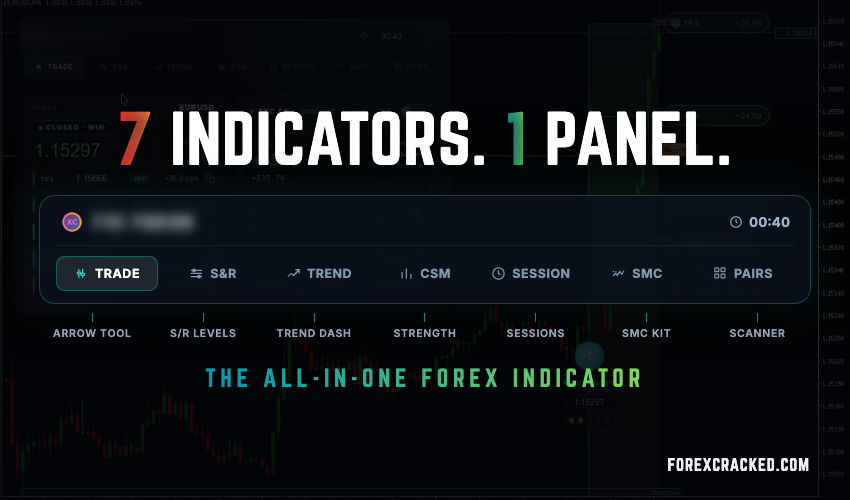
Count the indicators running on your chart right now. If you trade the way most of our readers do, there is a support and resistance tool, a trend dashboard, a currency strength meter, a session clock, something drawing order blocks and fair value gaps, a scanner watching the rest of your pairs, and a small timer counting the candle down in the corner.
That is seven separate downloads. Seven settings windows, seven sets of alerts, seven tools lagging and redrawing at their own pace, all reading the same price feed and all fighting for the same screen space. After six years and more than 1,200 indicators and expert advisors tested on this site, we can tell you that this clutter is the normal end state of a retail chart. Nobody plans it. It accumulates.
FXC Fusion, the indicator we built ourselves, folds that stack into a single panel on one chart, an all-in-one forex indicator in the most literal sense. The claim of this article is consolidation, not magic: one licence, one chart and one update stream in place of seven tools. We are not going to assert a round number at you. We are going to count.
The count, panel by panel
Fusion’s cockpit has seven tabs. Each one is a working replacement for a standalone indicator you have probably run, or are running now. Two more replacements sit outside the tabs, and we separate them honestly because one of them is an optional add-on.
So the count is seven panels in the base indicator, and nine if a bar timer and an execution EA are part of your current stack. That is the honest arithmetic, and you can check every row against the live cockpit.
Seven is also the conservative way to count. The SMC row alone is usually installed as three or four separate tools, one for order blocks, one for fair value gaps, one for market structure, so on a real chart the number this replaces is often into double digits. We keep the headline at seven because seven tabs is what you can verify in a single screenshot.
None of those rows is a preview feature. The S&R engine grades every zone from Weak through Untested, Verified and Proven by how many times price respected it, and marks the levels that flipped role. The trend matrix reads nine timeframes into one verdict, so “BEARISH, 6 of 9 down” is a single glance instead of nine chart switches. The strength meter resolves your broker’s symbol suffixes on its own, so it works on any account without a mapping exercise.
The two signal panels do the rest. Trade carries the live setup through its whole lifecycle, from waiting to active to targets hit, with live pip deltas on every level. Pairs runs the same engine across your watchlist, so the setup you were not watching still reaches you.
Take none of the signals. Keep the workstation.
Here is the part of the consolidation case that surprises people: five of the seven panels have nothing to do with the Fusion signal. S&R, Trend, CSM, Session and SMC are a read on the market that works however you trade, with your setups, your rules and your entries. Only Trade and Pairs exist for the signal itself.
That split matters because it changes what you are buying. If you never take a single Fusion signal, you still traded all day next to graded levels, a nine-timeframe bias, ranked currency strength, a session and liquidity clock, and a measured smart money read. The signal is one opinion on the chart. The workstation is the chart.
Since v1.15 the cockpit also renders on every chart timeframe. The signal engine stays on its M5 or M1 calculation, but you can sit on an H1 or D1 chart and keep the full panel. The candle countdown sits in the panel header on every tab, which is exactly why the separate bar timer comes off the chart.
The newest panel: smart money, with numbers on it
The SMC panel is the newest of the seven, and it is the clearest example of what consolidation should mean. Let us be precise about what it is and is not.
The detection is the standard public method, the same order block, fair value gap, equal high and low, and BOS and CHoCH structure logic you will find in the popular free SMC tools we have reviewed. We did not reinvent that math, and we are not going to pretend otherwise.
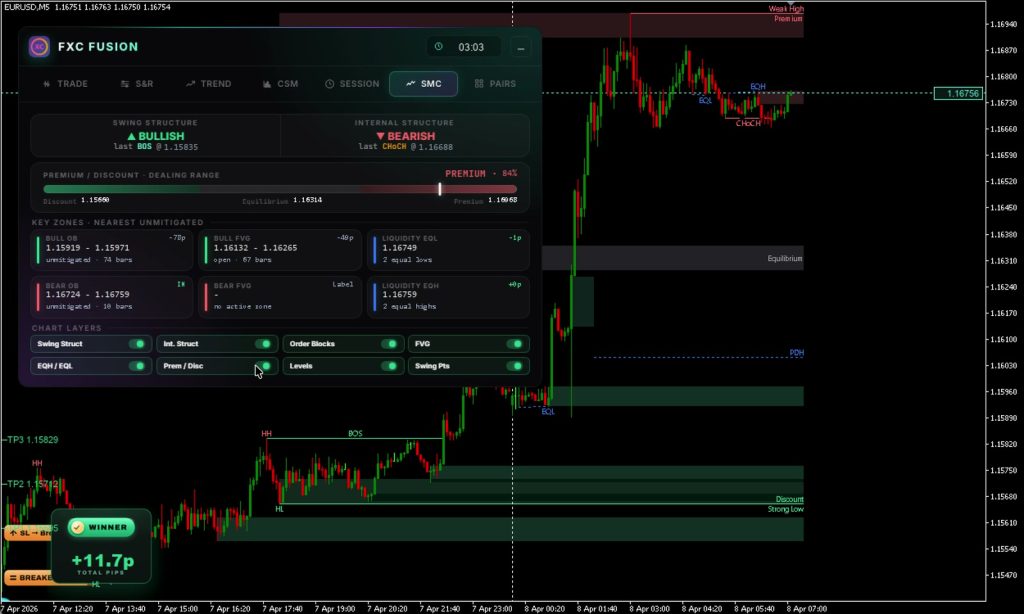
What the panel adds is measurement. Most SMC tools draw the zones and stop there. Fusion puts numbers on them: every order block and gap carries its price span, its age in bars, whether it is still unmitigated, how far it sits from price in pips, and an IN flag the moment price is trading inside it. Structure is read twice, swing and internal, each with its own bias and its last break event at a price. A premium and discount meter shows where price sits in the dealing range as a live percentage, and previous day, week and month levels ride along. Eight chart layers toggle on and off from the panel, and everything computes on closed bars, so nothing redraws behind you.
One thing the SMC panel deliberately does not do: it does not confirm or filter the Fusion signal. The breakout engine grades its setups on trend, momentum and volatility; the SMC engine tells you what structure sits around the trade. You read them together, but the code keeps them apart, because a panel that quietly feeds the signal is a panel you can no longer trust as an independent read.
One licence, nine releases in four weeks
A stack of seven indicators is also seven developers you are hoping keep updating, seven licences to track, and seven tools that will never coordinate a release. This is the other half of consolidation, and we can show it rather than promise it.
Since launch on June 21, Fusion has shipped nine releases in its first four weeks, roughly one every three days. The SMC engine and its panel arrived as a free update in v1.10. v1.15, live now, took SMC out of beta and made the cockpit render on every chart timeframe. Every update, including entire new panels, is free for every licence. One payment, lifetime licence, no subscription. The full record is public on the release history.
The roadmap on the same page shows where the count goes next: a trade assistant for traders who bring their own setups, structure-break alerts from the SMC engine, our own economic calendar wired into the cockpit, and market sentiment on the chart. The last slot on that board is left open on purpose. It gets filled by whatever the people running Fusion on live charts ask for, which is how every release so far has been shaped. Every item on it lands the way the SMC panel did, as a free update, so the count in the table above only gets longer.
Drop 2 opens Monday, July 20
Fusion is not sold on tap. It goes out in limited monthly drops, and Drop 1, the Founding 50, sold out. Drop 2 opens with 50 licences at $347, a lifetime licence with a 14-day money-back guarantee, and the ladder is public: Drop 3 opens at $447. The cap is deliberate, for the same reason as always: fewer copies in circulation keeps the levels the engine trades cleaner, and keeps the buyer group small enough to actually support.
Early access opens on Monday, July 20 at 05:00 UTC for the waitlist, and the public gets the buy button 24 hours later. Most of a drop tends to go inside that head-start window, so if you want in at $347, the waitlist is the practical way to do it. Joining is free, and the head start is the only thing it promises.
One small note on payment: checkout takes card and PayPal, and if you pay with crypto the price drops a flat 12%, $305 instead of $347 in Drop 2, because the card fees we skip go back to you. The Pay with crypto option sits next to the regular checkout on the Fusion page.
Common questions
- Meet FXC Fusion, what it is and who built it.
- The Problem With Forex Arrow Indicators, why one graded trade a day beats arrow spam.
- A Day With FXC Fusion, what a real trading day looks like.
- The All-in-One Forex Indicator, what one cockpit replaces (you are reading this one).


Discussion no comments yet
Nothing here yet
No one has asked anything about This One Tool Replaces 7 Indicators: The All-in-One Forex In yet. First question gets answered.